문구점 비즈니스 관리 및 통제 템플릿
Managing a stationery store involves juggling hundreds of individual items, varying price points, and frequent stock turnovers. This Stationery Business Administration System is a comprehensive Excel-based solution designed to bring order to the complexities of retail management. The template is structured into several interconnected modules: a Product Master List, an Inventory Control sheet, a Daily Sales Tracker, and a Supplier Management database. Each section is designed with user-friendly dropdowns and automated formulas to ensure that even those with minimal accounting experience can maintain professional records without the need for expensive software.
문구점을 운영하는 것은 수백 개의 개별 품목, 다양한 가격대, 그리고 빈번한 재고 회전을 관리하는 것을 의미합니다. 이 문구 비즈니스 관리 시스템은 소매 관리의 복잡성을 정리하기 위해 설계된 포괄적인 엑셀 기반 솔루션입니다. 템플릿은 제품 마스터 리스트, 재고 관리 시트, 일일 판매 추적기, 공급업체 관리 데이터베이스 등 여러 상호 연결된 모듈로 구성됩니다. 각 섹션은 사용자 친화적인 드롭다운과 자동 수식을 사용하도록 설계되어 회계 경험이 최소인 사람도 고가의 소프트웨어 없이 전문적인 기록을 유지할 수 있습니다.
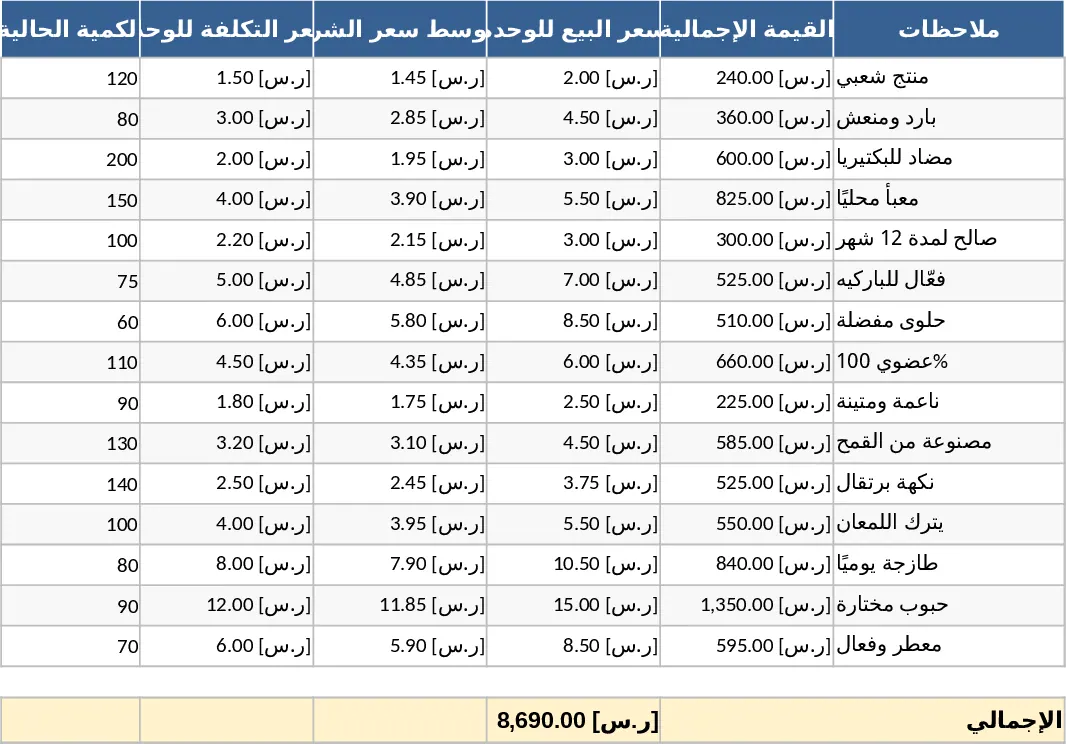
The core value of this template lies in its ability to provide a real-time snapshot of your business health. In the Product Master List, you can categorize items—such as writing instruments, paper products, or art supplies—and set specific reorder points. When your stock levels dip below these thresholds, the system automatically flags them, ensuring you never miss a sale due to missing inventory. This is particularly useful during high-demand periods like the back-to-school season or end-of-year office restocking when inventory moves faster than usual. By having a clear view of what is on your shelves, you can optimize your storage space and reduce capital tied up in slow-moving products.
이 템플릿의 핵심 가치는 비즈니스 현황을 실시간으로 파악할 수 있게 하는 데 있습니다. 제품 마스터 리스트에서는 필기구, 종이 제품, 미술용품 등으로 항목을 분류하고 특정 재주문 기준점을 설정할 수 있습니다. 재고 수준이 이 기준 이하로 떨어지면 시스템이 자동으로 표시해 주어 재고 부족으로 인한 판매 손실을 방지합니다. 이는 개학 시즌이나 연말 사무실 재고 보충과 같이 수요가 급증하는 시기에 특히 유용합니다. 선반에 어떤 제품이 있는지 명확히 파악함으로써 저장 공간을 최적화하고 회전이 느린 제품에 묶여 있는 자본을 줄일 수 있습니다.
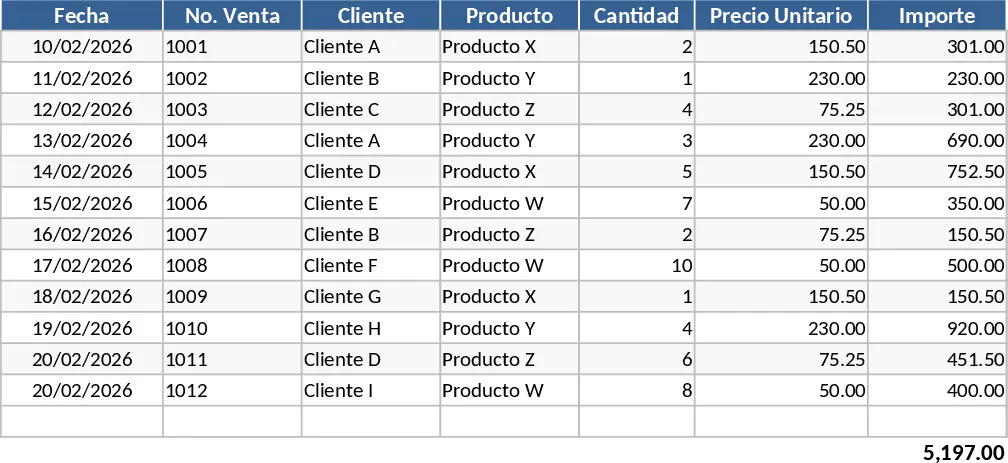
For daily operations, the Sales Tracker serves as your digital point-of-sale log. By entering the items sold, the template automatically calculates totals, taxes, and profit margins while simultaneously updating your inventory levels. This eliminates the need for manual end-of-day reconciliations and reduces the risk of human error in your bookkeeping. Furthermore, the Supplier Management section allows you to keep track of your procurement costs and contact details for various vendors, making the reordering process seamless and organized. You can compare prices between different suppliers over time to ensure you are always getting the best deal for your business.
일일 운영을 위해 판매 추적기는 디지털 POS 로그 역할을 합니다. 판매된 품목을 입력하면 템플릿이 자동으로 총액, 세금 및 이익률을 계산하고 동시에 재고 수준을 업데이트합니다. 이를 통해 수동적인 일일 마감 조정이 필요 없으며 회계 오류 위험을 줄일 수 있습니다. 또한 공급업체 관리 섹션을 통해 구매 비용과 다양한 공급업체의 연락처 정보를 추적할 수 있어 재주문 과정을 원활하고 체계적으로 만들 수 있습니다. 시간에 따라 여러 공급업체의 가격을 비교함으로써 항상 최적의 거래를 확보할 수 있습니다.
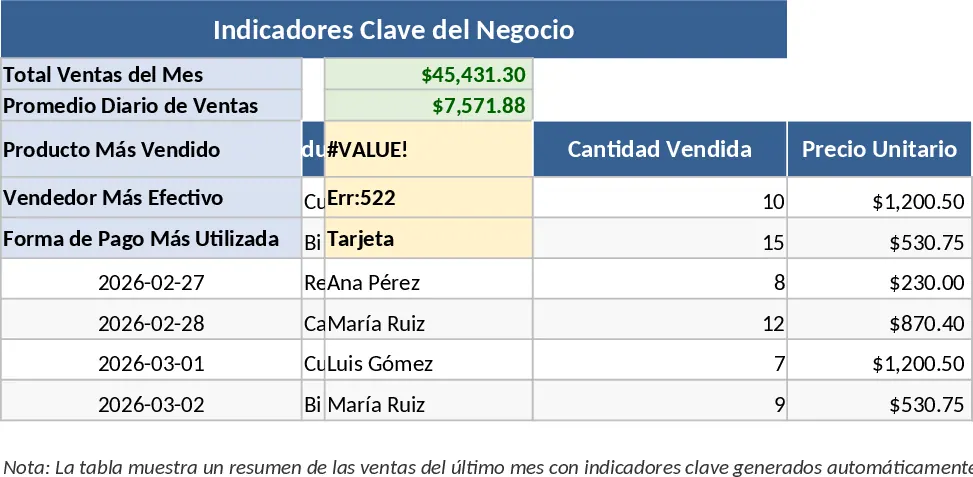
This tool is ideal for small business owners, shop managers, and independent retailers who need a robust system to digitize their manual processes. It helps you understand your best-selling products, monitor your daily cash flow, and identify areas where you can reduce costs or improve margins. By centralizing your data, you gain the insights needed to make informed purchasing decisions and grow your stationery business sustainably. The summary outputs provide clear visual charts that make it easy to present your business performance to partners or financial advisors.
이 도구는 수작업 프로세스를 디지털화할 강력한 시스템이 필요한 소규모 사업자, 매장 관리자 및 독립 소매업자에게 적합합니다. 베스트셀러 제품을 파악하고 일일 현금 흐름을 모니터링하며 비용 절감 또는 마진 향상이 가능한 영역을 식별하는 데 도움을 줍니다. 데이터를 중앙 집중화함으로써 정보에 기반한 구매 결정을 내리고 문구 사업을 지속 가능하게 성장시킬 수 있는 인사이트를 얻을 수 있습니다. 요약 결과는 명확한 시각적 차트를 제공하여 파트너나 재무 컨설턴트에게 사업 성과를 쉽게 전달합니다.
How to use:
Initial Setup: Navigate to the Inventory sheet and input your current products, including their SKU, category, initial stock quantity, and cost versus retail price. Set your reorder alerts here to trigger notifications when stock is low.
초기 설정: 재고 시트로 이동하여 현재 제품을 SKU, 카테고리, 초기 재고 수량, 원가와 소매가 등을 포함해 입력합니다. 여기에서 재주문 알림을 설정하여 재고가 부족할 때 알림이 발생하도록 합니다.
Daily Recording: Every time a sale is made, enter the transaction details in the Sales Log; the template will handle the math and update your stock levels automatically across the entire workbook.
일일 기록: 판매가 발생할 때마다 판매 로그에 거래 상세 정보를 입력하면 템플릿이 계산을 수행하고 전체 워크북의 재고 수준을 자동으로 업데이트합니다.
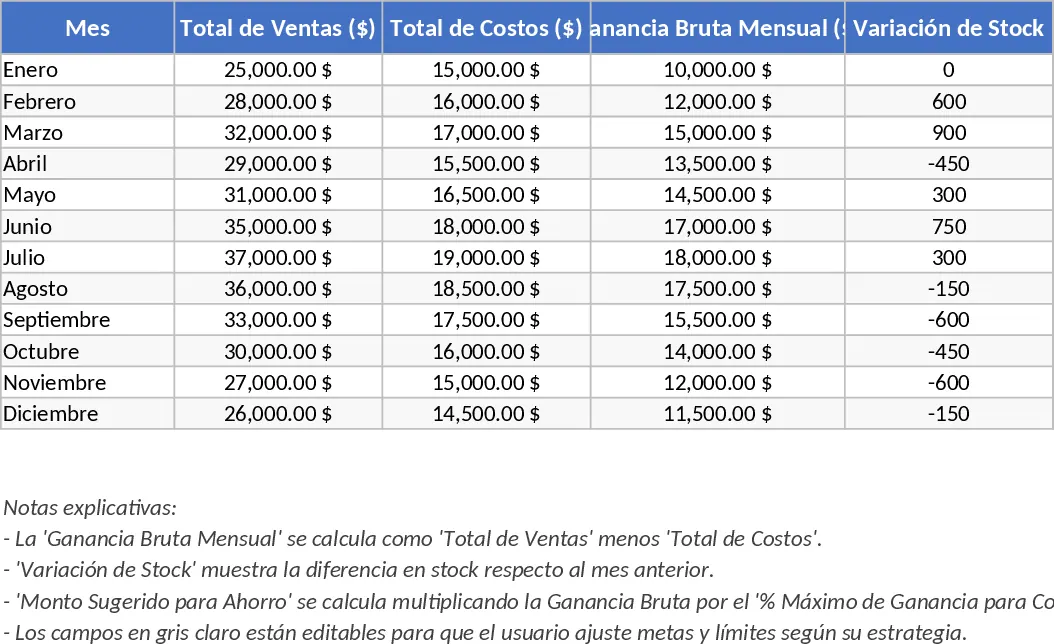
Performance Review: Visit the Dashboard tab to view visual summaries of your monthly revenue, top-performing categories, and a list of items that require immediate restocking based on your predefined limits.
성과 검토: 대시보드 탭을 열어 월별 매출, 상위 카테고리, 사전에 정의한 한계에 따라 즉시 재입고가 필요한 품목 목록 등의 시각적 요약을 확인합니다.
Supplier Updates: Keep your vendor list updated in the Supplier sheet to quickly reference contact information and historical purchase prices when it is time to replenish your shelves.
공급업체 업데이트: 공급업체 시트에서 벤더 목록을 최신 상태로 유지하여 선반을 보충할 때 연락처 정보와 과거 구매 가격을 신속히 확인할 수 있습니다.
Expected benefits: This template significantly reduces the time spent on manual stocktaking and helps minimize financial discrepancies through automated sales logging and real-time inventory updates.
예상 효과: 이 템플릿은 수동 재고 조사에 소요되는 시간을 크게 줄이고 자동 판매 기록 및 실시간 재고 업데이트를 통해 재무 불일치를 최소화합니다.