간편 월간 수입·지출 관리 템플릿
Managing money should not feel like a second job. Many financial tools are cluttered with complex charts, investment jargon, and dozens of tabs that end up being abandoned after a week. This Simple Personal Financial Control template is designed specifically for those who want a straightforward, no-nonsense way to stay on top of their bank account. By focusing on the core essentials—what comes in and what goes out—this tool provides immediate clarity on your financial health without the steep learning curve.
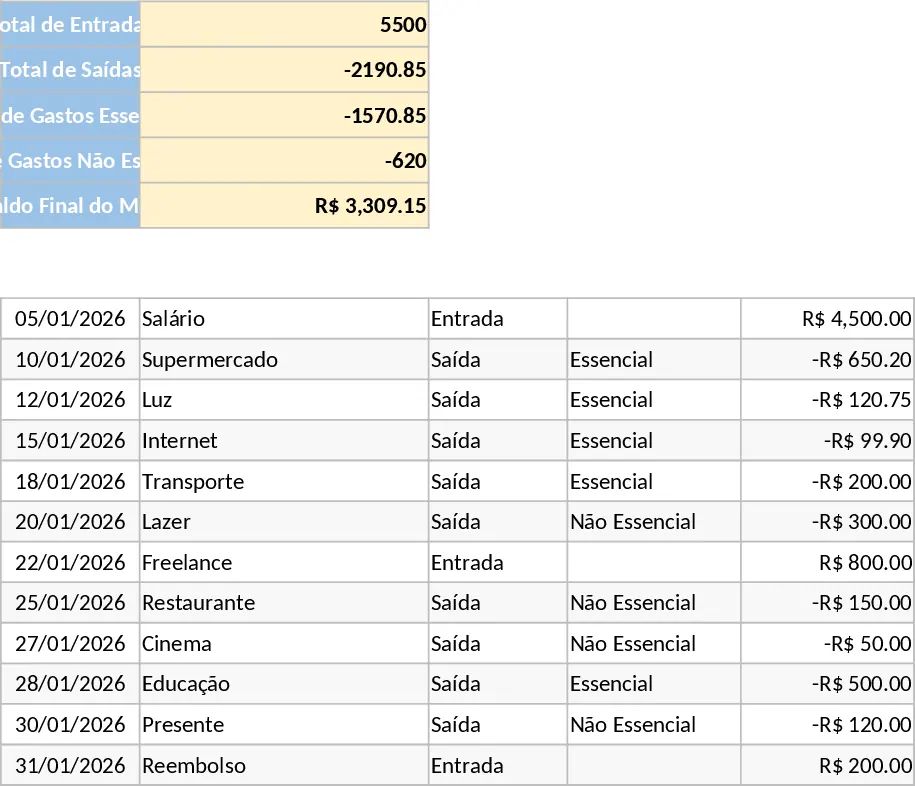
The template consists of a single, streamlined sheet titled Monthly Control. This layout ensures you never have to hunt for information across different tabs. The main data entry area features columns for the date, a brief description of the transaction, and two intuitive dropdown menus. The first dropdown allows you to mark a transaction as an Inflow or Outflow, while the second helps you categorize spending as either Essential or Non-essential. This distinction is crucial for anyone trying to cut back on costs, as it clearly separates fixed needs like rent and groceries from discretionary spending like entertainment or impulse buys.
At the very top of the page, you will find an automatic summary dashboard. As you enter your data, this section updates instantly to show your Total Inflow, Total Outflow, and a breakdown of your spending by category. Most importantly, it calculates your Final Balance, giving you a real-time look at how much money you actually have left. This immediate feedback loop helps prevent overspending before it happens. Because the template uses simple formulas, it remains fast and responsive even as you add more entries throughout the month.
This template is perfect for students, young professionals, or anyone who finds traditional accounting software overwhelming. It is particularly useful for those who want to build a consistent habit of tracking their finances but need a tool that fits into a busy daily routine. Whether you are using it on a desktop or updating it on the go via a mobile app, the clean design ensures readability and ease of use. It solves the common problem of financial fog—that feeling of not knowing where your money went at the end of the month—by providing a permanent, easy-to-read record of every transaction.
How to use:
- Start by entering your transactions in the main table, filling in the date and a short description for each entry.
- Use the dropdown menus to select the Type (Inflow for money received, Outflow for money spent) and the Category (Essential for needs, Non-essential for wants).
- Enter the amount, ensuring you follow the simple rule of positive numbers for income and negative numbers for expenses.
- Monitor the summary box at the top to see your total spending and remaining balance for the month.
By using this template, you can expect to save time on manual calculations and significantly reduce the mental effort required to manage your budget. It transforms a chaotic list of transactions into a clear, actionable overview of your financial life, helping you make better spending decisions with confidence.