每日工資與福利追蹤 模板
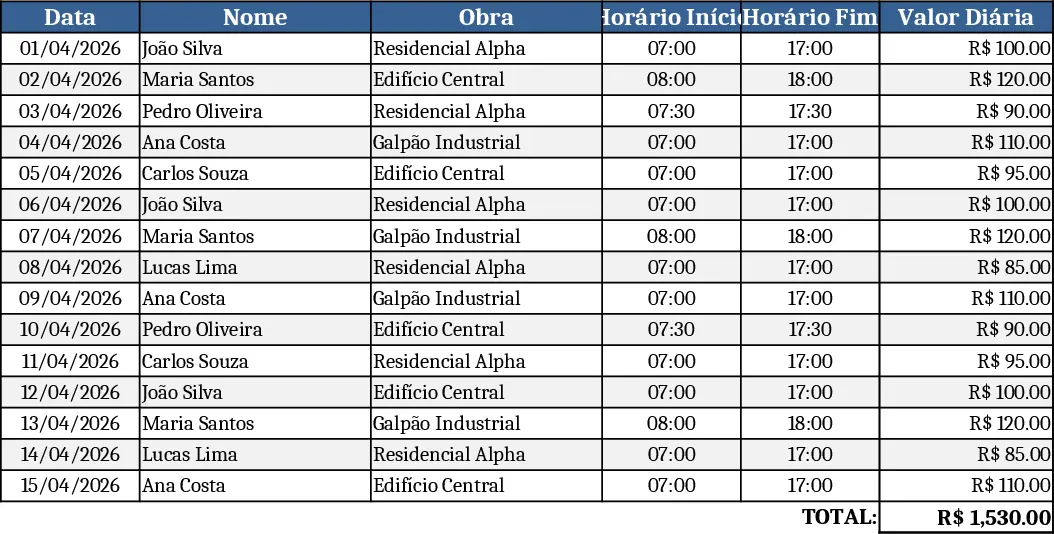
This template is built for companies that pay staff by the day and need a simple way to record who worked, where, and under what conditions. The workbook contains a main "Attendance" sheet where each row represents a single day for an employee. Columns include Employee Name (drop‑down list of Sadi, Kawan, Mayro, Rudinelso, Maycon, Israel), Date, Site (Edificio Znt, Edificio Tartara, Impermeia), Shift (Full Day or Half Day), Daily Rate, Meal (Yes/No), Voucher (Yes/No), and Payment Status (Paid/Unpaid). A summary sheet automatically aggregates total days, total amount due, meals provided, and vouchers issued per employee and per site, giving you a quick snapshot of labor costs and allowances.
The template solves the common headache of manually logging daily labor on paper or scattered spreadsheets. By centralising all data, you eliminate duplicate entries, reduce calculation errors, and gain instant visibility into project labor expenses. It is especially useful for site managers, HR coordinators, and small‑scale construction firms that need to reconcile daily wages with site activity before processing payroll. The built‑in totals let you see at a glance which sites are consuming the most labor budget and whether meal or voucher provisions are being used as expected.
To start, open the workbook and select the employee name from the drop‑down, pick the date, choose the site, and indicate whether the shift was full or half day. Enter the agreed daily rate, tick the boxes for meal and voucher if applicable, and mark the payment status once the wage is processed. The summary sheet will refresh automatically, showing updated totals and a concise report you can copy into emails or payroll systems. Expected benefits include faster daily logging, fewer manual calculations, and clearer insight into labor costs, saving you valuable time each week.