'%3e%3crect%20id='矩形_7888'%20data-name='矩形%207888'%20class='cls-1'%20width='20'%20height='20'%20rx='4'%20transform='translate(6260%20-4478)'/%3e%3cpath%20id='联合_155'%20data-name='联合%20155'%20class='cls-2'%20d='M6.074,12.147a6.207,6.207,0,0,1-.621-.031A6.087,6.087,0,0,1,.031,6.694a6.177,6.177,0,0,1,0-1.241A6.086,6.086,0,0,1,5.453.031,6.177,6.177,0,0,1,6.074,0H9.152V2.029H6.074a4.053,4.053,0,0,0-3.916,3.03H9.152V7.088H2.158a4.053,4.053,0,0,0,3.916,3.03H9.152v2.029Z'%20transform='translate(6264.693%20-4473.9)'/%3e%3c/g%3e%3c/svg%3e)
Key Takeaways
- The Spreadsheet Trap: Most generic budget templates are too rigid, breaking the moment you add a new expense category or a complex tax rule.
- Intelligent Budgeting: RowSpeak Template Generation builds the financial logic for you, creating automated calculations and spending alerts based on your plain-English description.
- Showcase Starters: Access professional, ready-to-deploy presets—from small business cash flow to personal monthly trackers—designed for immediate financial clarity.
- Decision-Ready Data: Move past simple data entry with integrated dashboards that visualize your "Actual vs. Budget" performance in real-time.
The "Manual Entry" Fatigue
We’ve all been there: you start with a goal to master your finances, but a week later, your "budget" is a disorganized mess of inconsistent formulas and missing receipts. You spend more time fighting the spreadsheet than actually saving money. Generic Excel budget templates often fail because they don't understand your specific business logic or personal spending habits.
When your budget becomes a chore rather than a tool for growth, it’s time for a change. You don’t need another static grid; you need an architectural system that automates the heavy lifting. RowSpeak turns your natural language descriptions into professional-grade financial systems in seconds.

Option 1: Describe It to Build It (Bespoke Budgeting)
The most powerful budget is one built around your unique financial rules. Instead of adjusting your life to fit a template, let the AI architect a system around your needs.
With RowSpeak, you define the logic in plain English:
- Define Your Logic: Tell the AI what you need (e.g., "Create a Small Business Budget with columns for Monthly Revenue, Fixed Costs, and Variable Expenses").
- AI Architecture: The system generates the complex math—automated totals, percentage-of-income breakdowns, and conditional formatting for overspending alerts.
- Execute: Download your professional
.xlsxfile, ready for high-stakes financial reporting.
Try this expert prompt to see the magic:
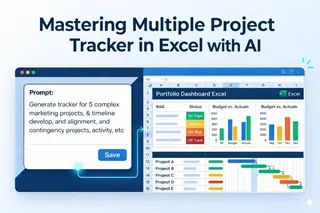
Create a 12-month Marketing Budget. Include a summary dashboard that visualizes 'Planned vs. Actual' spending and automatically highlights any category that exceeds the limit by 10%.
Option 2: The Professional Showcase (Ready-to-Deploy)
If you need a proven system right now, our Recommended Template Showcase provides a library of high-performance presets designed by experts:
- Personal Monthly Budget + Bill Tracker: Stay on top of personal expenses with automated due-date alerts.
- Small Business Cash Flow + Monthly Summary: Track your runway and profit margins with executive-ready charts.
- E-commerce Order Profit Calculator: Calculate net margins after shipping and ad spend automatically.
- Project Task Tracker + Overdue List: Perfect for managing project budgets alongside timelines. (Learn more about architecting project schedules with AI).
From Raw Data to Executive Insights
A professional budget should do more than just hold numbers—it should tell a story of your financial health. Every system generated or selected via RowSpeak is "Executive Ready," bridging the gap between a list of costs and a strategic tool.
Your templates come built-in with:
- Visual Status Indicators: Instant "Red/Green" alerts that update as you enter data.
- Interactive Filtering: Analyze spending by category or vendor with one click. (Discover how to visualize your data with custom trackers).
- Summary Dashboards: Professional-grade charts that give you an instant pulse on your operations.
Frequently Asked Questions (FAQ)
- Q: Can I add new categories or change tax rules later?
A: Absolutely. Every file is a standard, fully editable
.xlsxdocument. You can adjust it manually or re-prompt the AI for a new version. - Q: How does the AI handle complex math like depreciation?
A: When you include specific rules in your prompt, the AI builds the necessary nested logic (like
IForSUMPRODUCT) into the background so you never have to write them yourself. - Q: What if I have no idea how to structure my budget? A: That is why we created the Template Showcase. You can browse presets like the "Cash Flow Summary" to see exactly how a professional document should be structured before you click generate.
🚀 Ready to Master Your Money?
Access professional presets or architect your own custom budget system today.
Build My Custom Budget Now