'%3e%3crect%20id='矩形_7888'%20data-name='矩形%207888'%20class='cls-1'%20width='20'%20height='20'%20rx='4'%20transform='translate(6260%20-4478)'/%3e%3cpath%20id='联合_155'%20data-name='联合%20155'%20class='cls-2'%20d='M6.074,12.147a6.207,6.207,0,0,1-.621-.031A6.087,6.087,0,0,1,.031,6.694a6.177,6.177,0,0,1,0-1.241A6.086,6.086,0,0,1,5.453.031,6.177,6.177,0,0,1,6.074,0H9.152V2.029H6.074a4.053,4.053,0,0,0-3.916,3.03H9.152V7.088H2.158a4.053,4.053,0,0,0,3.916,3.03H9.152v2.029Z'%20transform='translate(6264.693%20-4473.9)'/%3e%3c/g%3e%3c/svg%3e)
Key Takeaways
- The Information Overload: Modern businesses are drowning in data but starving for insights, often spending more time managing spreadsheets than making decisions.
- The Democratization of BI: High-level Business Intelligence is no longer reserved for data scientists; AI now allows any professional to architect complex analytical models.
- Agility as a Competitive Edge: Transitioning to automated BI workflows enables real-time responses to market shifts, leaving manual-entry competitors behind.
- The Strategic Shift: By offloading data processing to AI, leaders can focus on "Actionable Insights" that drive revenue and operational excellence.
The "Data Paradox" in Modern Business
In 2026, every company is a data company. Whether you are tracking retail sales, monitoring supply chain logistics, or analyzing team performance, your Excel files hold the secrets to your next growth milestone. However, most professionals are stuck in the "Data Paradox": you have more information than ever, but you have less time than ever to actually understand it.
Traditional Business Intelligence (BI) often requires expensive software and specialized training. For the average manager, this means relying on static tables and "gut feelings" because building a dynamic dashboard manually is simply too time-consuming. But the landscape has shifted. AI-driven data analysis has turned the spreadsheet from a passive record into an active consultant.
What is AI Business Intelligence?
AI Business Intelligence is the evolution of how we interact with information. It’s not just about "sorting" numbers; it’s about using neural networks to interpret the narrative behind the metrics. Unlike traditional BI tools that require you to know exactly which dimensions to drag-and-drop, an AI-powered platform like RowSpeak understands the intent of your query.
Think of it as moving from a manual filing cabinet to a digital brain. Instead of browsing through a generate inventory excel template to find slow-moving stock, the AI proactively alerts you to supply chain risks. By utilizing data visualization tools that possess cognitive context, you move from "Data Processing" to "Data Architecture"—where the focus is on the final vision, not the manual construction.
Bridging the Gap: Why Spreadsheets Alone Aren't Enough
The spreadsheet is a brilliant tool for storage, but it was never designed for deep cognitive reasoning. When your business scales, your data becomes fragmented across marketing exports and internal trackers. This fragmentation leads to "analysis paralysis," where the effort to consolidate the data exceeds the value of the insight itself.
The "AI Way" bridges this gap by acting as a central intelligence layer. It connects the dots between different data silos in real-time, ensuring that your productivity levels remain high while your manual workload drops. This allows leaders to stop asking "what happened?" and start asking "what should we do next?"
How to Harness This Power in Minutes (The RowSpeak Way)
You don’t need an IT department to build a world-class BI environment. RowSpeak simplifies the most complex analytical tasks into a four-step conversational workflow that prioritizes speed and actionable results:
Step 1: Upload Your Data Sources
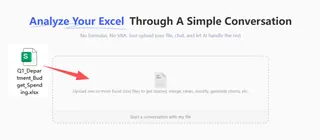
Business data is rarely clean. Whether you are dealing with messy CSVs, daily sales logs, or unstructured feedback, simply drag and drop your files into RowSpeak. The AI instantly scans the content, preparing it for high-level interrogation without the need for manual data cleaning.
Step 2: Enter Your Analytical Prompt
Instead of navigating complex menus, talk to your data. You don't need to be an expert to use AI to write excel formulas or logic anymore. Enter a natural language prompt such as: "Identify our top 3 growth drivers this quarter and visualize the correlation between ad spend and customer retention."

Step 3: Generate & Preview Insights
In seconds, the AI processes your request and provides a real-time preview. This isn't just a table; it’s a comprehensive look at your operation. You will see a concise executive summary, a perfectly formatted data set, and professional-grade charts that are ready for your next strategy meeting.
Step 4: Refine and Export
BI is an iterative process. You can continue to ask follow-up questions to "drill down" into specific regions or timeframes until the results meet your exact needs. Once satisfied, you can instantly generate a KPI dashboard or export your optimized data for immediate distribution to your team.
Why AI-Driven BI is the Only Way Forward
The move from manual entry to AI-first Business Intelligence is about more than just speed; it’s about strategic depth. By making RowSpeak part of your daily routine, you achieve:
- Elimination of Bias: Let the data tell the story, free from human error or "cherry-picked" metrics.
- Proactive Strategy: Spot market trends and operational inefficiencies before they impact your bottom line.
- Unified Vision: Ensure every department—from Sales to Management—is working from a single, AI-verified source of truth.
The future of business belongs to those who can turn data into action the fastest. Whether you are managing a global enterprise or a personal budget tracker, AI Business Intelligence is your gateway to a smarter, more profitable roadmap.
🚀 Don't Just Manage Data. Master It.
Start architecting a data-driven strategy that wins.
Generate My BI Dashboard Free