'%3e%3crect%20id='矩形_7888'%20data-name='矩形%207888'%20class='cls-1'%20width='20'%20height='20'%20rx='4'%20transform='translate(6260%20-4478)'/%3e%3cpath%20id='联合_155'%20data-name='联合%20155'%20class='cls-2'%20d='M6.074,12.147a6.207,6.207,0,0,1-.621-.031A6.087,6.087,0,0,1,.031,6.694a6.177,6.177,0,0,1,0-1.241A6.086,6.086,0,0,1,5.453.031,6.177,6.177,0,0,1,6.074,0H9.152V2.029H6.074a4.053,4.053,0,0,0-3.916,3.03H9.152V7.088H2.158a4.053,4.053,0,0,0,3.916,3.03H9.152v2.029Z'%20transform='translate(6264.693%20-4473.9)'/%3e%3c/g%3e%3c/svg%3e)
Key Takeaways
- The Generic Trap: Most "free download" templates are either too basic for real work or so cluttered with protected cells that you can't customize them.
- Instant Architecture: RowSpeak Template Generation eliminates the hunt by building the exact structure you need from a simple text description.
- Pro-Grade Showcase: Access a curated library of high-performance presets—from CRMs to project trackers—that are ready to deploy in one click.
- Executive-Ready Results: Every template is designed for more than just data entry; they include automated dashboards and visual insights that pre-made downloads lack.
The "Endless Search" Cycle
We’ve all been there: you need a specific tool for a new project, so you head to Google and type in "Excel template free download." You spend an hour clicking through ad-heavy sites, downloading five different files, only to find that none of them actually fit your workflow. One is missing crucial columns, another has broken macros, and the third is locked behind a password.
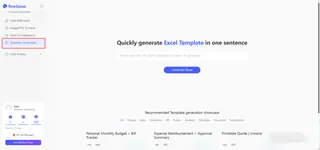
The truth is, your business logic is unique, and a generic, one-size-fits-all download will always be a compromise. Instead of settling for what's available, it’s time to start using tools that build what you actually need. RowSpeak replaces the "search and settle" cycle with a "describe and deploy" system.
Option 1: The "Showcase" (Better Than a Basic Download)
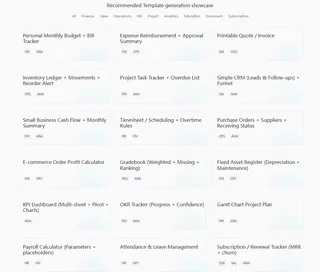
If you’re looking for a quick start, our Recommended Template Showcase offers more than just a simple file. These are expertly architected systems that act as a professional foundation for your operations:
- Sales Lead Tracker: Move beyond a simple list with automated status tracking and funnel visualization. (See how to visualize your sales funnel).
- Project Task Tracker: Stay ahead of deadlines with priority alerts and automated overdue lists.
- Printable Quote / Invoice: Professional, clean layouts designed for immediate client-facing use.
- Gantt Chart Project Plan: A visual timeline that rivals expensive project management software. (Learn more about architecting Gantt Charts with AI).
Option 2: Generate Your Own (The Ultimate Customization)
The best "template" is the one that didn't exist until you described it. With RowSpeak’s AI Architect, you can stop searching for a match and start defining your own rules.
Instead of a static download, you get a dynamic system built in three steps:
- Prompt: Describe your needs (e.g., "Create an Inventory Tracker with low-stock alerts and a supplier contact list").
- Architect: The AI builds the formulas, data validation, and visual dashboards automatically.
- Execute: Download your custom
.xlsxfile, fully editable and ready for Excel or Google Sheets.
Try this simple prompt:
Create a Monthly Budget Tracker with a visual dashboard that compares my actual spending against my goals for ten different categories.
Why AI Beats a Standard Download
When you use RowSpeak instead of a traditional Excel template free download, you aren't just getting a file—you're getting a professional edge:
- Zero Formatting Work: The AI handles the borders, fonts, and alignment so your sheets look "Executive Ready" from day one.
- Built-in Logic: Complex functions like
VLOOKUP,SUMIFS, and conditional formatting are architected into the background. (Discover how to turn your schedules into visual systems). - Total Ownership: No "Protected Sheets" or hidden passwords. You own the file and can modify it as your business grows.
Frequently Asked Questions (FAQ)
- Q: Is it really free to get started? A: Yes. You can browse our Showcase and generate your first custom templates to see the quality of the AI architecture for yourself.
- Q: Do these templates work on Mac and Mobile?
A: Absolutely. Every generation is a standard
.xlsxfile, fully compatible with Microsoft Excel (Windows/Mac), Google Sheets, and mobile spreadsheet apps. - Q: What if the template is too complex for me? A: That’s the beauty of AI—if it’s too complex, just tell it to "Simplify the layout" or "Remove the advanced charts," and it will rebuild it to your preference instantly.
🚀 Stop Searching. Start Building.
Get the professional Excel system you actually need in less than 60 seconds.
Access My Free Templates Now