'%3e%3crect%20id='矩形_7888'%20data-name='矩形%207888'%20class='cls-1'%20width='20'%20height='20'%20rx='4'%20transform='translate(6260%20-4478)'/%3e%3cpath%20id='联合_155'%20data-name='联合%20155'%20class='cls-2'%20d='M6.074,12.147a6.207,6.207,0,0,1-.621-.031A6.087,6.087,0,0,1,.031,6.694a6.177,6.177,0,0,1,0-1.241A6.086,6.086,0,0,1,5.453.031,6.177,6.177,0,0,1,6.074,0H9.152V2.029H6.074a4.053,4.053,0,0,0-3.916,3.03H9.152V7.088H2.158a4.053,4.053,0,0,0,3.916,3.03H9.152v2.029Z'%20transform='translate(6264.693%20-4473.9)'/%3e%3c/g%3e%3c/svg%3e)
Key Takeaways
- The Efficiency Gap: Searching for the right spreadsheet structure is a major productivity drain, with "excel template free download" searches rising by 180% recently.
- Curated Resource: Access hundreds of professional, ready-to-use layouts at the RowSpeak Full Template Gallery.
- On-Demand Customization: If a standard file doesn't fit, use the Template Generation tool to build custom spreadsheet structures from a single sentence.
- Data-Ready Design: Every template is built to be fully compatible with RowSpeak’s AI analysis tools, turning a simple grid into an intelligent dashboard.
Why You Should Never Design a Spreadsheet from Blank
Let’s be honest: nobody likes staring at a blank grid of gray lines. Whether you are managing a Personal Monthly Budget or a complex Gantt Chart Project Plan, the structure of your data determines how useful it actually is.
Google Trends confirms that users are increasingly looking for ready-to-use solutions, with significant interest in checklist templates (+30%) and invoice templates (+60%). Using a pre-built layout doesn't just save time; it ensures you are following industry best practices for data organization.
The RowSpeak Library: Professional Templates for Every Need
Our team has curated a comprehensive list of high-performance templates that you can download and use immediately. You can explore the full collection at our Excel Template Hub.
Featured Templates in Our Collection:
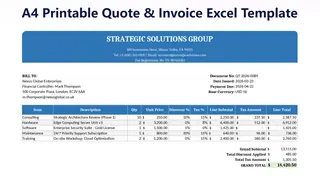
1. Professional Invoice & Billing Template
Perfect for freelancers and small businesses. This layout ensures your billing is accurate and professional.
 👉 Download This Invoice Template
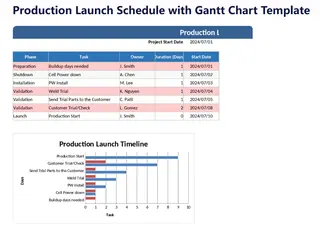
2. Advanced Project Plan & Gantt Chart
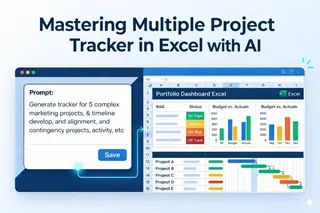
Visualizing timelines shouldn't be a chore. Track your tasks, owners, and deadlines in one visual dashboard.
 👉 Download This Project Plan Template
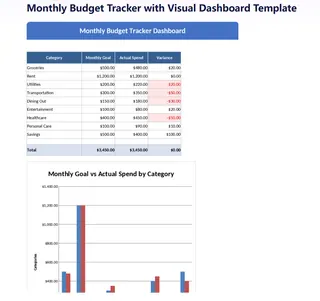
3. Monthly Budget & Expense Tracker
Master your finances with our most popular budget tracker. Designed for both personal and business spending.
 👉 Download This Budget Template
4. Smart Checklist & Task List
Simplify your daily operations with a high-efficiency task manager that keeps your team on track.
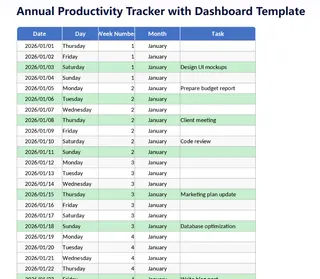 👉 Download This Checklist Template
Level Up: Generating Custom Templates with AI
Sometimes, a "standard" template doesn't quite fit your unique workflow. This is where RowSpeak’s Template Generation changes the game.
Instead of hunting for the "closest match" online, you can simply describe what you need in one sentence. Our AI acts as a digital architect, building a tailor-made spreadsheet that matches your exact requirements.
Power-User Prompts: Architect Your Perfect Grid
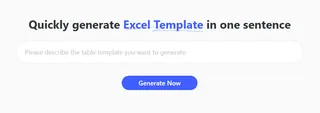
To get the most out of RowSpeak’s AI, specificity is key. Copy and paste these detailed prompts into the Template Generator to see the AI architect complex logic instantly:
- SaaS Subscription Health Tracker:
Create a professional SaaS Subscription Renewal Tracker. Include columns for Customer Name, Plan Type, Monthly Recurring Revenue (MRR), Subscription Start Date, Next Renewal Date, Churn Status, and a calculated column for Churn Rate percentage.
- Multi-Channel Marketing ROI:
Architect a 12-month Marketing Budget spreadsheet. Organize by rows for channels (Google Ads, Meta, SEO). Include columns for Planned Spend, Actual Spend, Variance, Total Conversions, and a final column for ROI calculation.
- Agile Project Sprint Backlog:
Generate an Agile Sprint Backlog template. Include columns for Task ID, User Story, Priority, Assigned Owner, Estimated Hours, Actual Hours, and Task Status (To Do, In Progress, Done).
- E-commerce Inventory Intelligence:
Build a High-Volume Inventory Ledger. Include columns for SKU, Product Name, Category, Unit Cost, Current Stock Level, Safety Stock Trigger, and a 'Reorder Required' column that flags low stock.
Frequently Asked Questions (FAQ)
1. Are these Excel templates really free to download?
Yes. Our core library is designed to provide high-quality, professional-grade spreadsheets for free to help users get started quickly without any hidden costs.
2. Beyond templates, what else can RowSpeak do with my data?
RowSpeak is a complete ecosystem for efficiency. Once you have your data in a template, you can use our Excel Data Analysis tools to find hidden patterns or use Data Visualization to create professional charts. We even help you generate complex formulas automatically.
3. Can RowSpeak help me visualize my project progress?
Absolutely. Many users download our templates to build an Excel Sales Dashboard or manage timelines. If you need more specialized views, our AI can help you create a Gantt Chart or a Pivot Table in seconds to track every detail.
4. What makes an AI-generated template better than a downloaded one?
While downloaded templates are great for general use, AI-generated templates are built specifically for your unique requirements. This customized approach ensures your structure is ready for advanced Excel Automation, saving you from manual Data Cleaning later.
🚀 Stop Searching. Start Building.
Access 100+ professional layouts or generate your own custom spreadsheet in seconds.
Generate My Template Free