'%3e%3crect%20id='矩形_7888'%20data-name='矩形%207888'%20class='cls-1'%20width='20'%20height='20'%20rx='4'%20transform='translate(6260%20-4478)'/%3e%3cpath%20id='联合_155'%20data-name='联合%20155'%20class='cls-2'%20d='M6.074,12.147a6.207,6.207,0,0,1-.621-.031A6.087,6.087,0,0,1,.031,6.694a6.177,6.177,0,0,1,0-1.241A6.086,6.086,0,0,1,5.453.031,6.177,6.177,0,0,1,6.074,0H9.152V2.029H6.074a4.053,4.053,0,0,0-3.916,3.03H9.152V7.088H2.158a4.053,4.053,0,0,0,3.916,3.03H9.152v2.029Z'%20transform='translate(6264.693%20-4473.9)'/%3e%3c/g%3e%3c/svg%3e)
Key Takeaways
- The Analytic Barrier: Traditional Excel analysis requires mastering hundreds of formulas (like
SUMIFSorVLOOKUP), which often leads to errors and wasted hours. - Conversational Logic: RowSpeak Chat With Excel allows you to clean, merge, and calculate data simply by asking questions in plain English.
- Advanced Visuals: From Linear Regression to Pie Charts, the AI doesn't just calculate numbers; it architecturally transforms them into visual stories.
- Efficiency Reimagined: Tasks that once took an afternoon—like cross-analyzing multiple tables or predicting trends—now happen in seconds.
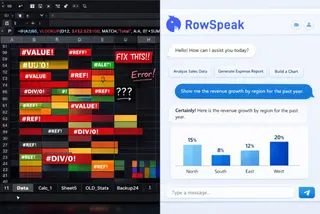
From Spreadsheet Struggle to AI Insight
We’ve all been there: staring at a massive dataset with thousands of rows, trying to remember the exact syntax for a nested IF statement. In the modern business world, data is growing faster than our ability to manually process it.
RowSpeak was designed for this exact moment. We believe you should spend your time interpreting data, not fighting it. With our new "Chat With Excel" interface, the formula bar becomes a thing of the past.
What Can You "Ask" Your Data?
The power of RowSpeak lies in its versatility. Our tutorial library shows that if you can think it, the AI can execute it. Here are three ways to transform your workflow today:
1. Instant Data Cleaning & Merging
Stop manually copy-pasting. Use Multiple Table Merge to combine datasets or Sheet Split to organize your data by specific categories (like student classes) instantly.
2. Deep Dive Calculations
Need the Average of the top 5 regions by GDP? Or a Cross Analysis to see which regions exceeded their 2022 growth? Just ask. The AI handles the logical calculations and returns the result without you ever touching a cell.
3. Predictive Modeling & Visuals
Move beyond the past and look into the future. With Linear Regression, RowSpeak can help you predict trends (like a country's GDP for 2024) and present it as a professional Line Chart or Bar Chart.
Master the Analysis: Expert Prompts to Try
To unlock the full potential of the RowSpeak AI Architect, use these high-performance analysis prompts:
- For Financial Reporting:
Summarize the total revenue for Class 3 (3) and merge it with the Sales table to fill in the missing price fields.
- For Market Trends:
Extract Chicago's data from 2018 to 2023 and generate a line chart showing the year-over-year growth.
- For Inventory Management:
Find the name and scores of all items with an ID above 100 and highlight those in the top 10% for value.
How to Start Your First AI Conversation
Getting insights has never been this simple:
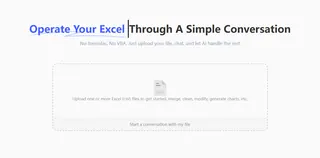
- Upload: Drag and drop your
.xlsxor.csvfiles into the secure portal.
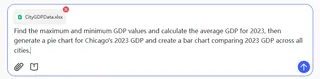
- Chat: Type your request—from "Find the maximum GDP value" to "Generate a pie chart for Chicago's 2023 data".
- Download: Get your updated file, clean data, or visual charts ready for your next presentation.
Frequently Asked Questions (FAQ)
- Q: Do I need to know any VBA or complex formulas? A: No. RowSpeak is designed to handle all formulas and coding in the background. You just use plain English.
- Q: Can it handle multiple files at once? A: Yes. You can upload one or more files to start a conversation, merge data, and perform cross-analysis.
- Q: What kind of charts can it generate? A: Everything from basic Pie Charts and Bar Charts to complex Line Charts based on filtered data subsets.
🚀 Stop Calculating. Start Conversing.
Your Excel data has a story to tell. Let RowSpeak help you hear it.
Analyze My Excel Free