'%3e%3crect%20id='矩形_7888'%20data-name='矩形%207888'%20class='cls-1'%20width='20'%20height='20'%20rx='4'%20transform='translate(6260%20-4478)'/%3e%3cpath%20id='联合_155'%20data-name='联合%20155'%20class='cls-2'%20d='M6.074,12.147a6.207,6.207,0,0,1-.621-.031A6.087,6.087,0,0,1,.031,6.694a6.177,6.177,0,0,1,0-1.241A6.086,6.086,0,0,1,5.453.031,6.177,6.177,0,0,1,6.074,0H9.152V2.029H6.074a4.053,4.053,0,0,0-3.916,3.03H9.152V7.088H2.158a4.053,4.053,0,0,0,3.916,3.03H9.152v2.029Z'%20transform='translate(6264.693%20-4473.9)'/%3e%3c/g%3e%3c/svg%3e)
Key Takeaways
- Escape the Subscription Trap: Stop paying for expensive CRM software that you only use 10% of; generate a lean, mean Excel CRM that fits your exact workflow.
- Intelligent Lead Management: AI-generated CRM templates include smart columns like "Follow-up Reminders" and "Closing Probability" formulas without manual setup.
- Description-to-Dashboard: Use RowSpeak Template Generation to turn a simple sentence describing your sales process into a full-featured tracking system in under a minute.
- Unified Business Logic: Seamlessly integrate your customer data with RowSpeak's AI tools to identify your highest-value clients and automate your sales reporting.
Background: Why Most Excel CRMs Fail
Small teams often struggle with two extremes: complex CRM software that is too expensive, or a "home-made" Excel sheet that quickly becomes a mess of broken rows and inconsistent data.
If you don't have a reliable way to track your leads yet, don't worry. You don't need to spend hours designing a system. Instead of downloading a rigid "one-size-fits-all" CRM excel template, let RowSpeak architect one based on how you sell.
The Problem with Manual CRM Setup
Building a sales tracker manually often leads to "Spreadsheet Fatigue":
- Metric Confusion: Struggling to decide between "Lead Stage," "Last Contact," or "Deal Value."
- Static Data: A sheet that just lists names but doesn't tell you who to call today.
- Broken Pipelines: Formulas for sales forecasting that stop working the moment you add a new row.
The AI Solution: Precision Sales Tracking
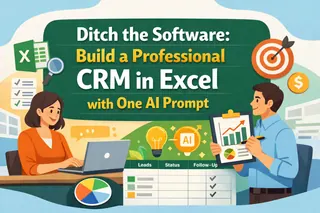
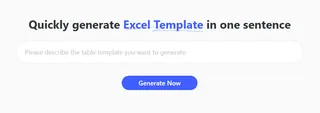
With RowSpeak's Template Generation, you describe your sales funnel, and the AI handles the architecture.
- Method A: Custom Sales Workflow (Custom Prompt)
Describe your specific industry or deal cycle.
- Example:
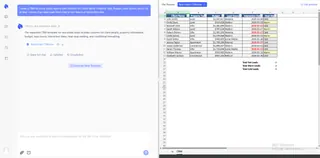
Create a CRM for a real estate agency with columns for Client Name, Property Type, Budget, Lead Source, and a 'Heat Map' column that ranks leads from Cold to Hot based on interaction date.
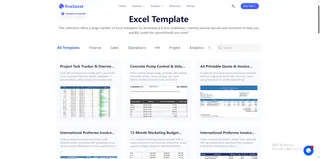
- Method B: Pro-Grade Showcases (Search & Download Free) Short on time? You don't have to build from scratch. Head over to our Excel template library and use the search bar to find the perfect fit. Simply type "CRM" or "Sales Pipeline" to browse dozens of professional, ready-to-use structures. Once you find a layout you like, you can download it for free and start tracking your revenue and follow-ups instantly.
3 Steps to Your Custom AI CRM
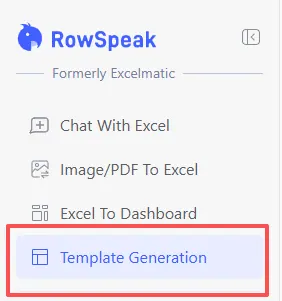
- Step 1: Open the Generator Log in and navigate to "Template Generation" in your RowSpeak dashboard.
- Step 2: Define Your Funnel Enter your tracking requirements or select a ready-made sales showcase.
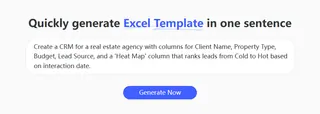
- Step 3: Deploy & Scale Click "Generate Now." In about 30-60 seconds, your professional CRM is ready for download.
Comparison: Searching vs. Generating
| Feature | Generic CRM Templates | RowSpeak AI Generation |
|---|---|---|
| Setup Time | Hours of formatting | Under 60 Seconds |
| Forecasting | Manual math | AI-Generated Formulas |
| Scalability | Hard to change | Updates with a New Prompt |
| Data Cleaning | Needs manual fix | Auto-Cleaning Integrated |
Frequently Asked Questions (FAQ)
Can I analyze my sales trends with AI? A: Yes. Once your CRM is populated, use our Chat with Excel feature to ask: "Which lead source has the highest conversion rate?"
How do I import existing customer lists? A: If you have printed lists or business cards, use our Image to Excel tool to digitize them directly into your new CRM.
Can I create other sales tools? A: RowSpeak is a full-scale business assistant. Beyond CRM, you can also use our platform for data analysis, data cleaning, and data visualization to turn your raw sales figures into actionable executive insights.
📈 Build a CRM That Actually Closes Deals
Stop searching for templates. Generate a customer relationship management system that fits your business perfectly.
💼 Generate Your Custom CRM Free