'%3e%3crect%20id='矩形_7888'%20data-name='矩形%207888'%20class='cls-1'%20width='20'%20height='20'%20rx='4'%20transform='translate(6260%20-4478)'/%3e%3cpath%20id='联合_155'%20data-name='联合%20155'%20class='cls-2'%20d='M6.074,12.147a6.207,6.207,0,0,1-.621-.031A6.087,6.087,0,0,1,.031,6.694a6.177,6.177,0,0,1,0-1.241A6.086,6.086,0,0,1,5.453.031,6.177,6.177,0,0,1,6.074,0H9.152V2.029H6.074a4.053,4.053,0,0,0-3.916,3.03H9.152V7.088H2.158a4.053,4.053,0,0,0,3.916,3.03H9.152v2.029Z'%20transform='translate(6264.693%20-4473.9)'/%3e%3c/g%3e%3c/svg%3e)
Key Takeaways
- The "Template Gap": Most free project management downloads are either too basic for complex timelines or too cluttered with features your team doesn't need.
- AI-Driven Milestones: RowSpeak’s Template Generation automatically builds the formulas for task duration, overdue alerts, and progress percentages based on your specific project phases.
- Instant Expert Library: If you need a proven starting point, browse our Excel template library to find professional Gantt charts and agile trackers ready for instant download.
- Total Workflow Control: Use the Chat with Excel feature to perform advanced data analysis on team bottlenecks or use AI-powered data cleaning to fix inconsistent task lists.
Background: The Project Planning Bottleneck
Every project manager has faced the same hurdle: you have a deadline approaching, but you're stuck spending hours formatting a project management excel template. You search for a "free download," find a file with rigid categories, and then spend half a day trying to bend its pre-set Gantt chart to fit your actual sprint schedule.
It’s time to move beyond the static spreadsheet. Whether you are managing a small marketing campaign, a construction build, or a software launch, your tracking system should adapt to your team—not the other way around.
The Problem: Why Manual Project Sheets Break
Managing projects manually in Excel is a recipe for "spreadsheet chaos":
- Broken Timelines: Manually updating a date often breaks the conditional formatting in your Gantt chart.
- Tracking Blindspots: Sheets that list tasks but fail to highlight critical paths or over-allocated team members.
- Formula Overload: Trying to calculate "working days" excluding holidays without advanced Excel knowledge often leads to errors.
The AI Solution: Your Project, Your Structure
With RowSpeak, you don't just find a template; you create a project ecosystem. Our platform gives you the flexibility to choose the path that matches your speed.
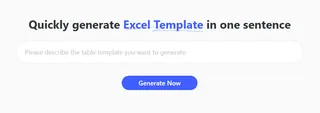
Path A: Custom AI Generation (The Precision Way)
Need a very specific workflow? Describe your project stages, team members, and desired alerts in plain English.
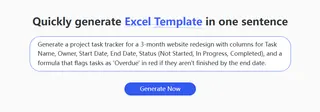
- Prompt Example: "Generate a project task tracker for a 3-month website redesign with columns for Task Name, Owner, Start Date, End Date, Status (Not Started, In Progress, Completed), and a formula that flags tasks as 'Overdue' in red if they aren't finished by the end date."
- The Result: The AI understands the data visualization and logic required to build a dynamic tracker that responds to your data.
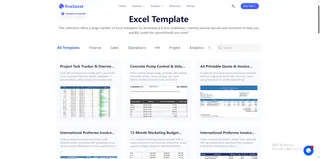
Path B: The Template Showcase (The Instant Way)
If you want a battle-tested professional layout, explore our Excel template library. Browse the Project category to find everything from high-level "Executive Project Summaries" to granular "Daily Task Checklists". Download them for free and start inputting your milestones immediately.
3 Steps to Your Professional Project Tracker
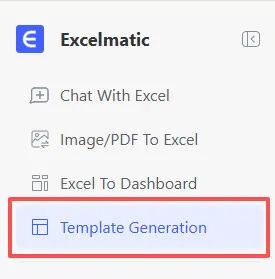
- Step 1: Open the Generator Log in to RowSpeak and navigate to the "Template Generation" tab in your dashboard.
- Step 2: Describe or Select Enter your specific project requirements in the prompt box or browse our library for a pre-made agile or waterfall layout.
- Step 3: Generate & Execute
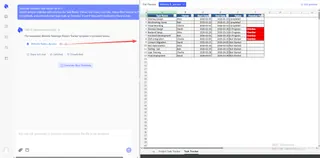
Click "Generate Now." In 30-60 seconds, your custom
.xlsxfile is ready for download, complete with all necessary formulas and formatting.
Mastering Your Project Lifecycle
Building the tracker is just the beginning. Use RowSpeak's AI capabilities to ensure your project stays on track from kickoff to completion:
- Identify Bottlenecks: Use data analysis to ask the AI: "Which team member has the most overdue tasks?" or "What is the average duration for the design phase?".
- Clean Team Inputs: Use data cleaning to standardize status names and dates across multiple team members' inputs automatically.
- Enhanced Automation: Add custom logic using our guide on how to use AI to write Excel formulas to create complex dependency alerts or budget variance warnings.
- Consolidated Reporting: If you manage multiple projects, use RowSpeak to merge multiple sheets into one master portfolio dashboard.
Comparison: Searching vs. AI Generation
| Feature | Generic Project Downloads | RowSpeak AI Generation |
|---|---|---|
| Setup Time | 1 - 2 hours of "tweaking" | Under 60 Seconds |
| Gantt Logic | Static and easily broken | Dynamic & Formula-Driven |
| Team Fit | You adapt to the template | The template adapts to YOU |
| Ongoing Support | Manual data entry only | Integrates with AI Chat & Cleaning |
Frequently Asked Questions (FAQ)
Can I generate a Gantt chart with this tool? A: Yes. Simply include "Gantt chart" or "horizontal bar chart for timeline" in your prompt, and the AI will set up the conditional formatting logic for you.
Are these templates truly free? A: Absolutely. Our template library offers a wide variety of project management layouts for free download.
How do I handle project data from different departments? A: Use RowSpeak for data cleaning to ensure that disparate task lists are formatted consistently before merging them into your master project tracker.
🚀 Build a Better Project, Faster.
Generate your custom project tracker or browse our free library in seconds.
📅 Generate My Project Tracker Free