'%3e%3crect%20id='矩形_7888'%20data-name='矩形%207888'%20class='cls-1'%20width='20'%20height='20'%20rx='4'%20transform='translate(6260%20-4478)'/%3e%3cpath%20id='联合_155'%20data-name='联合%20155'%20class='cls-2'%20d='M6.074,12.147a6.207,6.207,0,0,1-.621-.031A6.087,6.087,0,0,1,.031,6.694a6.177,6.177,0,0,1,0-1.241A6.086,6.086,0,0,1,5.453.031,6.177,6.177,0,0,1,6.074,0H9.152V2.029H6.074a4.053,4.053,0,0,0-3.916,3.03H9.152V7.088H2.158a4.053,4.053,0,0,0,3.916,3.03H9.152v2.029Z'%20transform='translate(6264.693%20-4473.9)'/%3e%3c/g%3e%3c/svg%3e)
Key Takeaways
- Visualize Progress Instantly: Stop guessing task completion; generate a dynamic Gantt chart that updates automatically as your team hits milestones.
- Smart Deadline Alerts: AI-generated trackers include conditional logic that highlights overdue tasks or upcoming deadlines without manual formatting.
- Total Workflow Control: Use RowSpeak Template Generation to build trackers that include specific columns for budget, team assignment, and risk level in seconds.
- Unified Project Insights: Combine your project data with RowSpeak's AI tools to identify bottlenecks and optimize your team's resource allocation.
Background: The Chaos of "Template Hunting"
Are you a project lead or freelancer juggling ten different spreadsheets? Most users waste hours trying to find a project management excel template that isn't too cluttered or too simple. You often end up with a static list that doesn't reflect your actual timeline or task dependencies.
If your current system feels like it's failing, don't worry. You don't have to settle for a rigid structure. Instead of hunting for the "perfect" file, let AI build a project engine that adapts to your specific project needs.
The Struggle: Manual Scheduling & Formatting
Manually maintaining a project tracker in Excel is often a full-time job in itself:
- Gantt Chart Pain: Trying to use shapes or manual cell colors to create a timeline that breaks the moment a date changes.
- Tracking Gaps: Forgetting to update task owners or missing the "Red Flag" status on critical items.
- No Automation: Manually calculating "Days Remaining" for hundreds of line items.
The AI Solution: Precision Project Oversight
With RowSpeak's Template Generation, you describe your project scope, and the AI handles the logic.
- Method A: Tailored Project Logic (Custom Prompt)
Describe your specific industry or project type.
- Example:
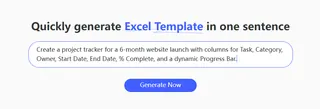
Create a project tracker for a 6-month website launch with columns for Task, Category, Owner, Start Date, End Date, % Complete, and a dynamic Progress Bar.
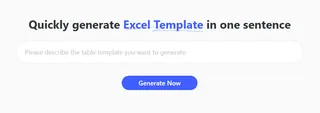
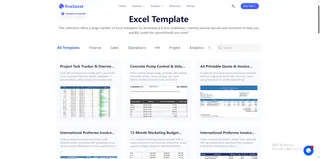
- Method B: Pro-Grade Showcases (Search & Download Free) Need a quick start? Head over to our Excel template library and use the search bar to find established layouts. Type "Project" or "Gantt" to browse professional, ready-to-use task trackers that you can download for free and deploy today.
3 Steps to Your AI Project System
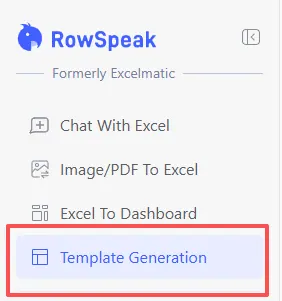
- Step 1: Open the Generator Log in and go to "Template Generation" in your RowSpeak dashboard.
- Step 2: Define Your Milestones Enter your project requirements or select a project-focused showcase.
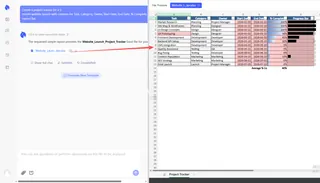
- Step 3: Generate & Execute Click "Generate Now." In about 30-60 seconds, your professional project management system is ready for action.
Comparison: Manual Setup vs. AI Generation
| Feature | Generic Project Templates | RowSpeak AI Generation |
|---|---|---|
| Gantt Chart Setup | Complex & Fragile | Automated & Dynamic |
| Deadline Logic | Manual Formatting | AI-Generated Alerts |
| Team Specifics | Hard to add custom fields | Built to Your Description |
| Data Health | Prone to #REF! errors |
Clean & Validated Output |
How do I fix broken formulas in my project tracker? A: If you encounter
#REF!or#VALUE!errors while moving tasks around, don't panic. You can use our AI Formula Generator to describe the logic you need—such as "Calculate days between Start Date and Today only if Status is not Complete"—and the AI will provide the exact fix.Can I turn a photo of a whiteboard schedule into an Excel Gantt chart? A: Yes. Project planning often starts on whiteboards or paper. Use our Image to Excel tool to capture those handwritten milestones and convert them into a structured digital grid instantly.
Can RowSpeak help me summarize project bottlenecks? A: Absolutely. By leveraging our data analysis capabilities, you can upload your tracker and ask the AI to identify which phase of your project is lagging or which resources are over-allocated.
What if I need to clean up messy task lists from different vendors? A: Projects often involve data from multiple sources. You can use RowSpeak for data cleaning to standardize date formats and remove duplicate entries, ensuring your master schedule remains accurate.
Can I present these project milestones to stakeholders? A: High-level reporting is key. Use our data visualization tools to transform your raw task list into professional executive dashboards and burndown charts that are ready for your next board meeting.
🚀 Turn Your Ideas into Actionable Timelines
Don't let your project slip. Generate a custom management system that keeps your team on track.
📅 Generate Your Project Template Free