'%3e%3crect%20id='矩形_7888'%20data-name='矩形%207888'%20class='cls-1'%20width='20'%20height='20'%20rx='4'%20transform='translate(6260%20-4478)'/%3e%3cpath%20id='联合_155'%20data-name='联合%20155'%20class='cls-2'%20d='M6.074,12.147a6.207,6.207,0,0,1-.621-.031A6.087,6.087,0,0,1,.031,6.694a6.177,6.177,0,0,1,0-1.241A6.086,6.086,0,0,1,5.453.031,6.177,6.177,0,0,1,6.074,0H9.152V2.029H6.074a4.053,4.053,0,0,0-3.916,3.03H9.152V7.088H2.158a4.053,4.053,0,0,0,3.916,3.03H9.152v2.029Z'%20transform='translate(6264.693%20-4473.9)'/%3e%3c/g%3e%3c/svg%3e)
Key Takeaways
- The Fragmentation Barrier: Business data often lives in "silos" like Google Sheets, making it difficult to create a unified, professional narrative for stakeholders.
- Seamless Integration: Modern AI tools eliminate the "copy-paste" cycle by connecting disparate data sources into a single, intelligent analytical environment.
- Speed to Insight: What used to take a weekend of manual formatting can now be achieved in minutes, allowing for real-time reporting during high-stakes meetings.
- Executive-Level Clarity: Automation ensures that raw numbers are translated into the high-level KPIs and data visualizations that executives demand.
The Mid-Level Manager’s Nightmare: The Manual Bridge
Every analyst has been there: you have a perfectly functional Google Sheet filled with raw sales figures, but your Board meeting is in two hours. To get that data "Boardroom ready," you face a grueling gauntlet of exporting CSVs, fixing broken formatting, and manually recreating charts in a slide deck.
This manual bridge between collaborative tools like Google Sheets and executive reporting is where productivity goes to die. In a world of instant information, relying on static, hand-copied reports isn't just slow—it's risky. One hidden error in a cell reference can lead to a multi-million dollar miscalculation in front of the board.
What is AI-Driven Cross-Platform Analysis?
AI Cross-Platform Analysis is the "smart glue" of the modern enterprise. It is a system that understands that your data isn't just a list of numbers; it’s a living part of your business strategy.
An AI-powered platform like RowSpeak doesn't just read your Google Sheets; it contextualizes them. It can pull data from a marketing sheet, cross-reference it with a KPI dashboard, and automatically highlight the most important trends for your leadership team. It moves the focus from moving the data to understanding the data.
By utilizing an AI layer, you ensure that whether your data starts in a cloud-based sheet or an inventory Excel template, the final output is consistent, professional, and accurate.
Bridging the Gap: Moving Beyond the "Export" Button
The problem with traditional cross-platform work is the loss of "intelligence" during the move. When you export a CSV, you lose the formulas, the history, and the context. You are left with a dead snapshot of the past.
The "AI Way" maintains the thread of intelligence. By connecting your cloud data directly to an AI engine, you enable a continuous flow of information. This means when your team updates a figure in the Google Sheet, your business analysis reflects that change instantly. This agility is the difference between a reactive company and a market leader.
How to Harness This Power in Minutes (The RowSpeak Way)
RowSpeak was built to simplify the transition from "working data" to "presentation data." Here is how you can automate your reporting pipeline in four simple steps:
Step 1: Upload and Connect
Skip the complex API setups. Simply drag and drop your Google Sheets exports or cloud-synced files into RowSpeak. Whether you have PDF invoices from one department and an Excel sheet from another, the AI integrates them into a unified view instantly.
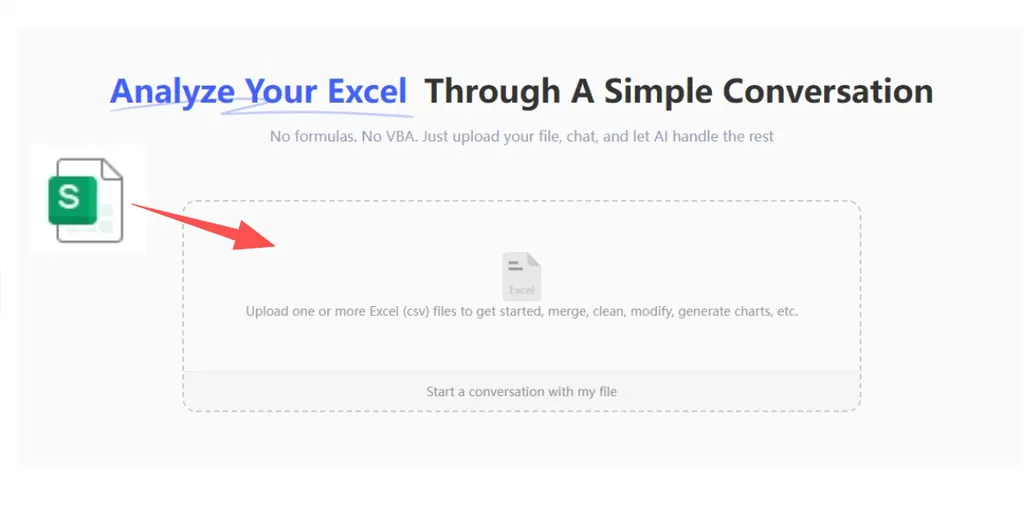
Step 2: Enter Your Executive Query
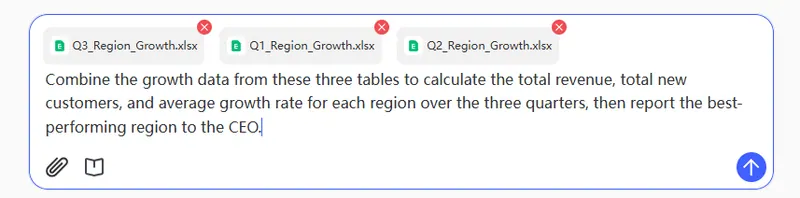
Once connected, you don't need to manually filter columns or write complex Excel formulas. Use the prompt bar to ask a high-level question:
Combine the growth data from these three tables to calculate the total revenue, total new customers, and average growth rate for each region over the three quarters, then report the best-performing region to the CEO.
Step 3: Generate & Preview the Narrative
Within seconds, the AI generates a real-time preview. This isn't just a restatement of the numbers—it's a narrative. You’ll receive an executive summary, a cleaned data table optimized for readability, and professional-grade charts that are formatted for a high-level audience.
Step 4: Refine and Export for the Board
If the board needs a deeper dive into a specific metric, simply ask a follow-up question to "drill down" into the data. Once the insights are perfect, export and download your final report. Whether it’s a cleaned Excel file or a visual summary, it’s ready for the boardroom the moment you hit save.
Why Cross-Platform Automation is Non-Negotiable
The transition from manual data cleaning to an AI-automated pipeline is about more than just convenience; it’s about institutional trust. When you use RowSpeak to architect your reports, you provide:
- Single Source of Truth: No more "which version of the sheet are we looking at?"
- Operational Velocity: Update your executive team in minutes, not days.
- Professional Authority: Present insights that are backed by AI-verified logic rather than manual entry.
The path from a messy Google Sheet to a strategic boardroom decision is now shorter than ever. Whether you are managing a personal budget tracker or a global sales pipeline, AI is the bridge to your next big win.
🚀 Ready for the Boardroom?
Turn your messy sheets into strategic assets today.
Automate My Reports Free