'%3e%3crect%20id='矩形_7888'%20data-name='矩形%207888'%20class='cls-1'%20width='20'%20height='20'%20rx='4'%20transform='translate(6260%20-4478)'/%3e%3cpath%20id='联合_155'%20data-name='联合%20155'%20class='cls-2'%20d='M6.074,12.147a6.207,6.207,0,0,1-.621-.031A6.087,6.087,0,0,1,.031,6.694a6.177,6.177,0,0,1,0-1.241A6.086,6.086,0,0,1,5.453.031,6.177,6.177,0,0,1,6.074,0H9.152V2.029H6.074a4.053,4.053,0,0,0-3.916,3.03H9.152V7.088H2.158a4.053,4.053,0,0,0,3.916,3.03H9.152v2.029Z'%20transform='translate(6264.693%20-4473.9)'/%3e%3c/g%3e%3c/svg%3e)
Key Takeaways
- The Billing Bottleneck: Generic invoice downloads and rigid templates often fail to capture specific tax rules or international trade terms, leading to payment delays and "administrative chaos".
- Intelligent Architecture: RowSpeak Template Generation replaces manual grid-building with AI architecture, creating linked systems that handle VAT, discounts, and currency conversions automatically.
- Bespoke vs. Ready-to-Use: Whether you need a highly specific export invoice or want to deploy a professional preset from our library, RowSpeak scales to your needs.
- Operational Clarity: High-performance invoices mean faster approvals, accurate financial records, and a clear executive dashboard for better cash flow management.
The "Manual Billing" Headache
Anyone who has managed international sales or complex orders knows the dread of the "Blank Spreadsheet." You start with a simple idea: How much does the client owe? Two hours later, you’re trapped in a nightmare of broken tax formulas, misaligned shipping terms (Incoterms), and "hidden" calculation errors that your template didn't account for. Most generic invoices are either too simple to be professional or so complex that one wrong entry breaks the entire layout.
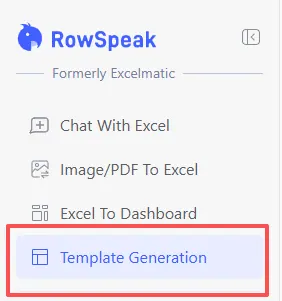
When you spend more time fixing the invoice than actually closing the deal, it’s a sign that your tools aren't working for you. RowSpeak Template Generation was built to change that—moving you from a "manual typist" to an Architect of Efficiency.
Your Workflow, Your Rules
The problem with standard billing software is that it forces you to adapt to its fields. RowSpeak flips that logic: the AI builds a system around the way you trade.
1. Custom Logic for Unique Demands
Every business has "quirks"—perhaps you need specific discount tiers for bulk orders, or your regional tax laws require a unique breakdown. A standard download can't handle that.
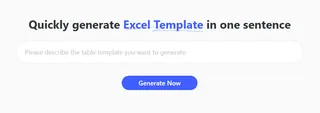
With RowSpeak, you describe your unique scenario in plain English. The AI then constructs the "plumbing"—the complex calculation logic and professional formatting—ensuring your invoice is both compliant and structurally sound from day one.
2. Instant Professional Presets
Sometimes, you don't need to reinvent the wheel; you just need a wheel that actually turns. For those moments, RowSpeak offers a curated selection of Recommended Templates.
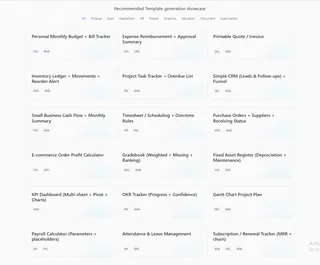
From Printable Quote / Invoice to Purchase Orders with Receiving Status, these aren't your standard basic grids; they are architecturally sound systems designed by experts. You don't have to imagine how these work—you can see them in action.
Master the Prompt: Expert Invoicing Frameworks
To get the most out of our AI Architect, use these high-performance prompts to generate your next system:
For International Trade
Create a Proforma Invoice for export. Include fields for Port of Loading, Incoterms 2020, and automated VAT calculation based on the destination country.
(➡️ Learn more about visualizing your sales data.)
For Service Providers
Build a Professional Quote with a 10% deposit logic. Include a breakdown for hourly labor vs. material costs and an "Executive Summary" section for the total project value.
(➡️ See our guide on AI-generated scheduling.)
For Subscription Businesses
Generate a Recurring Billing Invoice. I need to track monthly service fees and one-time setup costs. Include a dashboard that visualizes the total quote value vs. the discount applied.
How to Deploy Your Invoice Instantly
Efficiency is the goal. Here is how you go from a blank screen to an executive-ready system:
- Define: Enter a prompt describing your rules or select a preset like "Printable Quote / Invoice" from the showcase.

- Generate: Let the AI architect the formulas, tax logic, and link the data layers.
- Execute: Download your
.xlsxfile. It’s ready for Excel or can be instantly uploaded to Google Sheets for real-time team collaboration.

Frequently Asked Questions (FAQ)
- Q: Can I add my own branding or specific tax rules later? A: Absolutely. Each file is a standard Excel document. You can manually adjust the rules, or simply re-prompt the AI to generate a new version that includes your updated constraints.
- Q: How does this handle multi-currency or complex math?
A: When you describe your currency or discount rules in the prompt, the AI builds the necessary nested logic (like
VLOOKUPand tax formulas) into the background so you never have to write them yourself. - Q: What if I have no idea how to structure my invoice? A: That is exactly why we created the Template Showcase. You can browse the presets to see the output before you even click generate.
🚀 Stop Fighting Your Billing.
Start architecting a system that works as hard as you do.
Generate My Custom Invoice Free