'%3e%3crect%20id='矩形_7888'%20data-name='矩形%207888'%20class='cls-1'%20width='20'%20height='20'%20rx='4'%20transform='translate(6260%20-4478)'/%3e%3cpath%20id='联合_155'%20data-name='联合%20155'%20class='cls-2'%20d='M6.074,12.147a6.207,6.207,0,0,1-.621-.031A6.087,6.087,0,0,1,.031,6.694a6.177,6.177,0,0,1,0-1.241A6.086,6.086,0,0,1,5.453.031,6.177,6.177,0,0,1,6.074,0H9.152V2.029H6.074a4.053,4.053,0,0,0-3.916,3.03H9.152V7.088H2.158a4.053,4.053,0,0,0,3.916,3.03H9.152v2.029Z'%20transform='translate(6264.693%20-4473.9)'/%3e%3c/g%3e%3c/svg%3e)
Key Takeaways
- The Scalability Wall: Conventional multiple project tracking template excel files inevitably fail when dependencies complexify or budget sources multiply.
- The Generative Shift: Instead of adapting to a template, RowSpeak Template Generation creates a template that adapts to you, building logic and formulas from natural language prompts.
- Integrated Financials: Successful multi-project management requires linking task progress directly to budget consumption—a feature rarely found in free templates but easily generated by AI.
- Visual Intelligence: Move from reading data to synthesizing insights with automatically generated executive dashboards that highlight risks across your entire portfolio.
Introduction: The High Stakes of Multi-Project Management
In today’s business environment, rarely are we managing just one thing. A marketing manager balances five concurrent campaigns; a software lead oversees three distinct product releases; a consultant tracks ten client engagements. The tool of choice remains Excel, leading to the high-volume search for a multiple project tracking template excel.
But there’s a trap. Generic templates downloaded from the internet are static. They are built for a snapshot in time, not the dynamic reality of business. When a project slips, a budget is reallocated, or a new stakeholder joins, these manual templates fracture. You spend more time maintaining the spreadsheet than managing the projects.
This guide provides a new blueprint: moving beyond the ledger and utilizing generative AI to architect a flexible, scalable, and intelligent multi-project tracking system in Excel.
Section 1: Why Standard Excel Templates Are a Trap for Multi-Project Leaders
When you manage one project, a simple list works. When you manage five, you face systemic challenges that a downloaded "tracker" cannot solve.
1.1 The Rigidity Crisis
Free templates come with rigid structures. Maybe they track "Status" and "Owner," but what if your workflow requires "Approval Stage" and "Vendor Dependency"? Adding these columns often breaks pre-built VLOOKUPs or conditional formatting, rendering the template useless.
1.2 The Data Silo Problem
If you use a separate tab for each project (a common practice), getting a bird's-eye view (Portfolio View) becomes a nightmare of manual consolidation and complex, error-prone 3D formulas. If you put all projects in one massive list, it becomes unreadable.
1.3 The Budget-Progress Disconnect
Perhaps the biggest failing is financials. A standard multiple project tracking template excel might show a project is "50% Complete," but it won't automatically tell you if you’ve already spent 90% of the budget allocated for that 50%. This disconnect causes expensive surprises.
Section 2: Building Your Master Portfolio Architecture (The AI Way)
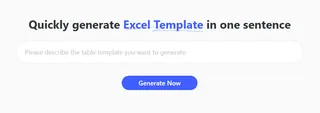
The solution isn’t to abandon Excel; it’s to abandon manual template setup. Generative AI, specifically RowSpeak Template Generation, changes the fundamental workflow.
Instead of searching for a template, you describe the template you need.
2.1 Understanding Project "DNA"
A robust multi-project system requires three levels of data, which you must prompt the AI to include:
- Metadata (The What): Project Name, ID, Program Area, Stakeholder.
- Performance Data (The How): Start/End Dates, % Complete, Current Status (RAG Status—Red/Amber/Green).
- Financial Data (The Cost): Allocated Budget, Actual Spend, Forecasted Spend, Variance.
2.2 Case Study: Generating a "Marketing Campaign Portfolio" Template
Let’s see how this works in practice. A Marketing Director needs to track seven concurrent product launches.
The RowSpeak Prompt:
Generate an Excel template to track 7 product launch campaigns. The main view should list all 7 campaigns. Each campaign needs columns for: Project Manager, Budget, Actual Spend, Launch Date, Status dropdown (Planning, Live, Post-Mortem), and a RAG status column that turns Red if the budget variance is negative. Also include a simple dashboard showing total budget vs. total spent.
The Result (In Seconds): RowSpeak generates a multi-tab Excel file. The main tab is a consolidated "Portfolio Dashboard." Formulaic logic is built-in: the RAG status column automatically applies conditional formatting based on the budget/actual calculation.
Section 3: Deep Dive into Key Automated Features
To convince your leadership (and Google) that your new system is superior, highlight the automated complexity that AI handles instantly.
3.1 Advanced Formula Generation (Without the headache)
One of the main reasons people search for a multiple project tracking template excel is because they don't know how to write complex formulas like IFS, XLOOKUP, or nested SUMIFS.
RowSpeak handles these complexities automatically. When you input a natural language prompt like, "Show remaining budget as a percentage, but only if the status is not 'Closed'," the AI performs the heavy lifting by architecting the required logic:
=IF(Status_Column<>"Closed", (Budget-Actual)/Budget, "")
This ensures data integrity without requiring you to be an Excel expert.
3.2 Automated Executive Dashboards
Data is useless without visualization. A professional multi-project tracker must have a dashboard tab. When RowSpeak generates the template, it uses the described structure to create pivot tables and charts.
A typical AI-generated dashboard includes:
- Total Portfolio Budget vs. Actual (Bar Chart)
- Number of Projects by RAG Status (Pie Chart for Risk Assessment)
- Timeline/Milestone View (Simplified Gantt)
Section 4: No Prompt? No Problem. The RowSpeak Preset Library
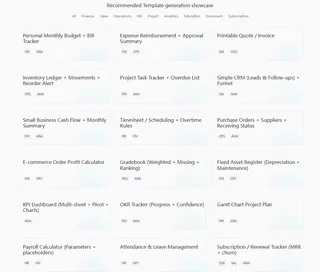
While the power of RowSpeak lies in its AI's ability to "think" for you, we know that sometimes you just need a professional foundation to start with. In the Template Generation interface, RowSpeak provides a curated library of industry-standard presets.
This is perfect for project managers who want a multiple project tracking template excel that follows global best practices but still allows for total customization.
4.1 Popular Presets for Project Leaders
As shown in our dashboard, you can bypass the prompt engine and dive straight into:
- Project Task Tracker + Overdue List: Ideal for high-velocity teams focused on deadlines and bottleneck identification.
- Gantt Chart Project Plan: For those who need to visualize dependencies and project phases horizontally.
- OKR Tracker (Progress + Confidence): A modern approach to linking high-level strategy with daily execution.
4.2 Download, Customize, and Scale
The beauty of these presets is that they are not "locked." Once you select a template, RowSpeak generates the Excel file for you. From there, you can:
- Direct Download: Get the raw .xlsx file with all formulas intact.
- Manual Tweak: Add your specific brand colors or internal codes.
- AI Refine: (Coming Soon) Ask the AI to take the existing preset and add a specific custom column, combining the best of both worlds.
Section 5: Presets vs. Architecting from Scratch
RowSpeak offers flexibility. You can start with professional presets or define your system from the ground up.
| Method | Best For | Pros | Cons |
|---|---|---|---|
| RowSpeak Presets | Immediate needs; Standard workflows. | Instant deployment; proven structures. | Less tailored to unique business niches. |
| Architecting with AI Prompting | Complex workflows; Unique data points; High-stakes portfolios. | Perfect fit for your process; highly scalable. | Requires clear definition of your needs. |
We recommend starting with a preset like the "Enterprise PPM Light" and then using the "Refine with AI" feature to add your custom columns.
Conclusion: The Move to Decision-Ready Data
The time you spend hunting for the "perfect" multiple project tracking template excel is time you could be spending on strategic growth. Whether you are a "Prompt Engineer" who wants a custom-built AI engine or a "Quick-Start Leader" who prefers our professional presets, RowSpeak is the only tool that bridges the gap between static data and decision-ready intelligence.
Don’t settle for broken formulas and rigid grids. Architect your future today.
🚀 Ready to Master Your Projects?
One-click presets or AI-generated custom systems. The choice is yours.
Build My Custom Template Now