'%3e%3crect%20id='矩形_7888'%20data-name='矩形%207888'%20class='cls-1'%20width='20'%20height='20'%20rx='4'%20transform='translate(6260%20-4478)'/%3e%3cpath%20id='联合_155'%20data-name='联合%20155'%20class='cls-2'%20d='M6.074,12.147a6.207,6.207,0,0,1-.621-.031A6.087,6.087,0,0,1,.031,6.694a6.177,6.177,0,0,1,0-1.241A6.086,6.086,0,0,1,5.453.031,6.177,6.177,0,0,1,6.074,0H9.152V2.029H6.074a4.053,4.053,0,0,0-3.916,3.03H9.152V7.088H2.158a4.053,4.053,0,0,0,3.916,3.03H9.152v2.029Z'%20transform='translate(6264.693%20-4473.9)'/%3e%3c/g%3e%3c/svg%3e)
Key Takeaways
- The Access Mirage: Unlocking a protected sheet often reveals a secondary challenge: unstructured, inconsistent, or "dirty" data that is unfit for immediate analysis.
- The Post-Unlock Checklist: Critical first steps include identifying hidden rows, fixing mismatched data types, and removing invisible characters that break formulas.
- Beyond Manual Correction: Traditional cleaning methods like Flash Fill or nested formulas can be time-consuming and prone to guessing errors.
- Strategic Transformation: AI-driven tools streamline the transition from raw, messy data to board-ready reports by identifying patterns across thousands of rows instantly.
The Reality Behind the Lock
For many analysts, finally getting the password to a protected workbook feels like a victory. However, once you unprotect the Excel sheet, the reality often sets in: the data is a mess. Protecting a sheet is frequently used to hide complex, unorganized calculations or inconsistent data entry.
Gaining access is only step one. To make the data useful, you must navigate through a gauntlet of "invisible" issues—hidden columns, trailing spaces, and numbers stored as text that cause your VLOOKUP formulas to fail.
Common Post-Access Data Nightmares
Once your data is unhidden, you will likely encounter these three productivity killers:
- Invisible Formatting Errors: Numbers that look like "123" but act like text, preventing any mathematical operations.
- Inconsistent Naming: Product IDs that lack standardized prefixes, requiring you to manually add a letter in front of a number to align them with other systems.
- The "Spill" Obstacle: Messy data ranges that overlap, leading to frustrating #SPILL! errors when you try to apply dynamic arrays.
While Excel's "Flash Fill" can sometimes guess the pattern you're trying to fix, it is not always reliable for complex business datasets.
The AI Advantage: From Messy to Masterful
Traditional data analysis often forces you to spend 80% of your time cleaning and only 20% interpreting. AI transforms this ratio.
Instead of writing a wall of TRIM, CLEAN, and PROPER functions, you can use an intelligent agent like RowSpeak. The system understands the intent of your data. It can recognize that a date entry error is simply a formatting issue and suggest the smartest choice for standardization—such as an interactive date picker—to prevent future errors.
How to Clean Your Unlocked Data (The RowSpeak Way)
RowSpeak automates the "Data Janitor" work so you can focus on the "Data Architect" strategy:
Step 1: Upload and Scan
Simply drag and drop your newly unprotected file into RowSpeak. The AI instantly scans the entire workbook, identifying hidden patterns and inconsistencies across all sheets.

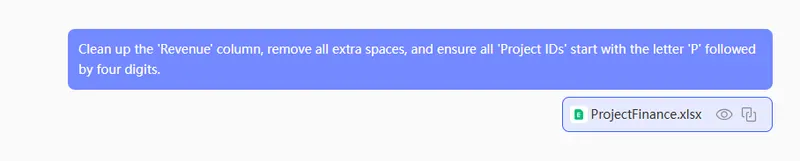
Step 2: Use Natural Language Instructions
Don't waste time memorizing syntax. Tell the AI what you want to achieve in plain English:
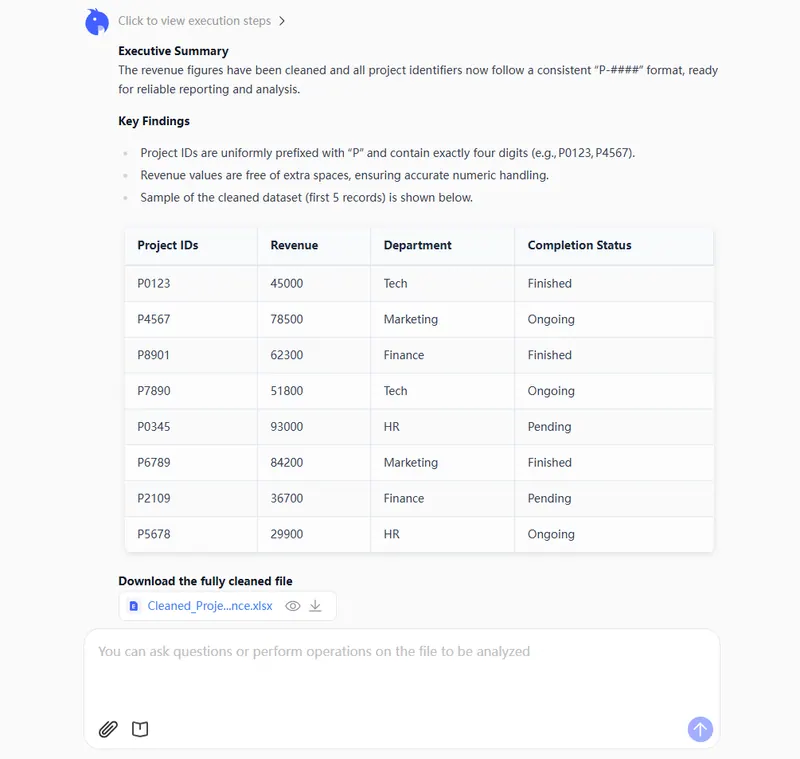
Clean up the 'Revenue' column, remove all extra spaces, and ensure all 'Project IDs' start with the letter 'P' followed by four digits.
Step 3: Preview the Transformation
RowSpeak provides a real-time preview of your cleaned data. It intelligently fixes errors like mismatched data types that usually cause #N/A errors in standard lookups.
Step 4: Export a Board-Ready Report
You can continue to refine and iterate on the results until they perfectly match your requirements. Once you are completely satisfied with the output, simply export and download your clean, professional dataset for immediate use.
Conclusion: Reclaiming Your Sunday Nights
Gaining access to data should be the beginning of an insight, not the start of a manual formatting marathon. By leveraging modern AI tools, you remove the technical friction that makes Excel feel like a chore.
- Accuracy: AI logic eliminates the manual typos common in repetitive cleaning.
- Efficiency: Turn a three-hour cleaning task into a 60-second automated workflow.
- Insight: Spend your energy on the "Why" behind the numbers, not the "How" of fixing them.
🚀 Ready to Clean Your Messiest Sheets?
Join the future of automated, intelligent data refinement.
Try RowSpeak Free Today