'%3e%3crect%20id='矩形_7888'%20data-name='矩形%207888'%20class='cls-1'%20width='20'%20height='20'%20rx='4'%20transform='translate(6260%20-4478)'/%3e%3cpath%20id='联合_155'%20data-name='联合%20155'%20class='cls-2'%20d='M6.074,12.147a6.207,6.207,0,0,1-.621-.031A6.087,6.087,0,0,1,.031,6.694a6.177,6.177,0,0,1,0-1.241A6.086,6.086,0,0,1,5.453.031,6.177,6.177,0,0,1,6.074,0H9.152V2.029H6.074a4.053,4.053,0,0,0-3.916,3.03H9.152V7.088H2.158a4.053,4.053,0,0,0,3.916,3.03H9.152v2.029Z'%20transform='translate(6264.693%20-4473.9)'/%3e%3c/g%3e%3c/svg%3e)
Key Takeaways
- The Productivity Gap: Manual data entry from PDF documents is the #1 time-sink for modern office workers, leading to costly errors and missed deadlines.
- Seamless Extraction: By using RowSpeak’s PDF to Excel Converter, you can transform static images and documents into perfectly formatted spreadsheets in seconds.
- Conversational Intelligence: One-Click Analysis: Unlike standard tools, RowSpeak lets you jump from conversion to AI analysis with a single click—no manual file re-uploading required.
- Professional Efficiency: This AI-driven workflow allows you to move from raw document to executive-ready report without writing a single line of code.
The Problem: When PDFs Become Data Prisons
We have all been there. You receive a proforma invoice, a shipping manifest, or a quarterly financial report in PDF format, and you need to analyze the numbers. You try to copy and paste, but the columns break. You try a basic converter, but the headers disappear.
Eventually, you resort to the "dark ages" of data management: manual typing.
This doesn't just waste time; it kills creativity. Your job is to analyze the data, not to act as a human bridge between a PDF and an Excel cell.
Stage 1: Liberating Your Data (The Conversion)
The first step to freedom is RowSpeak's high-precision extraction engine. Unlike standard OCR tools, our AI understands the structure of a table.
How to Convert with Precision:
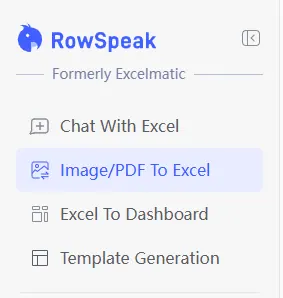
- Navigate to the Tool: Select Image/PDF To Excel from your RowSpeak dashboard.
- One-Click Upload: Drag and drop your JPG, PNG, or PDF file into the upload zone.
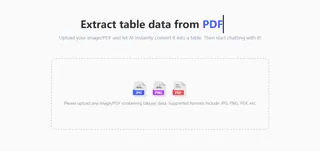
- Review & Refine: Our AI will scan the document and present a digital preview of your table instantly.
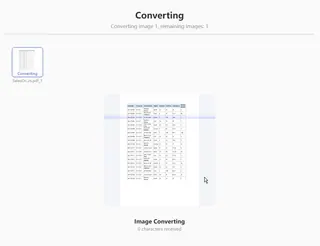
- Instant Download: While you can click Download All to save your file, the real magic happens at the top of the screen. Simply click the Chat With Excel button to start analyzing your results immediately.
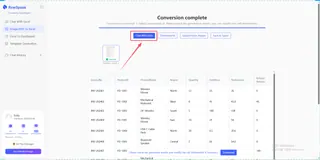
This process ensures that your "Product IDs," "Quantities," and "Unit Prices" stay in their respective columns, moving from a static file to a live database in a heartbeat.
Stage 2: Beyond the Grid (The AI Analysis)
Most tools stop at the conversion. RowSpeak is where the real work begins. Because you’ve clicked through to the Chat With Excel module directly from your conversion, the AI already has your data context ready.
You can now perform professional-grade analysis using simple "Human Language":
- Automated Auditing: Instead of hunting for errors, ask:
Are there any missing values or duplicate invoice numbers in this sheet?
- Instant Calculations: No more calculators. Just say:
Calculate the total tax amount across all orders and subtract the refunds.
- Executive Visualization: Turn those rows into insights:
Generate a bar chart showing the top 5 regions by total revenue.
Real-World Impact: Why This Workflow Wins
Imagine you are a logistics manager with 50 PDF invoices. In the old world, you would spend your entire Friday morning entry-typing.
In the RowSpeak world:
- You convert the PDFs into a single Excel workbook.
- You Chat With Excel and talk to the data:
Show me the average shipping cost per kilogram for the past month.
- You export the resulting chart and head to your meeting.
This is the difference between being a data entry clerk and being a data architect.
Frequently Asked Questions (FAQ)
1. How accurate is the AI in extracting tables from messy PDFs?
RowSpeak uses advanced OCR (Optical Character Recognition) combined with structural AI to recognize table borders, headers, and cell relationships. Even if your PDF is a scan or has complex nested tables, our engine is designed to maintain data integrity.
2. Beyond conversion, what can RowSpeak do with my extracted data?
That is the RowSpeak advantage. Once your PDF is converted, you don't just get a static file; you gain access to a full suite of intelligence. You can immediately jump into Excel Data Analysis to uncover trends, or use our Data Visualization tools to turn numbers into insights. If your data is unorganized, our AI helps with Data Cleaning. Furthermore, you can transform your results into a professional Excel Sales Dashboard or even generate complex Excel formulas via chat to automate your future workflows.
3. Can the AI handle multi-page PDF documents?
Yes. RowSpeak can process multi-page PDFs, allowing you to extract and merge data into a single, cohesive Excel workbook. This is perfect for long quarterly reports or batch-processing multiple invoices at once.
🚀 Your Data Deserves Better.
Turn your static PDF files into intelligent, conversational spreadsheets today.
Convert My PDF for Free