'%3e%3crect%20id='矩形_7888'%20data-name='矩形%207888'%20class='cls-1'%20width='20'%20height='20'%20rx='4'%20transform='translate(6260%20-4478)'/%3e%3cpath%20id='联合_155'%20data-name='联合%20155'%20class='cls-2'%20d='M6.074,12.147a6.207,6.207,0,0,1-.621-.031A6.087,6.087,0,0,1,.031,6.694a6.177,6.177,0,0,1,0-1.241A6.086,6.086,0,0,1,5.453.031,6.177,6.177,0,0,1,6.074,0H9.152V2.029H6.074a4.053,4.053,0,0,0-3.916,3.03H9.152V7.088H2.158a4.053,4.053,0,0,0,3.916,3.03H9.152v2.029Z'%20transform='translate(6264.693%20-4473.9)'/%3e%3c/g%3e%3c/svg%3e)
Key Takeaways
- The "One-Size-Fits-None" Problem: Most generic dashboard downloads are either too complex to set up or missing the specific KPIs your business actually needs to track.
- Intelligent Data Architecture: RowSpeak’s Template Generation builds the underlying logic and formulas for you, ensuring your charts update the moment your data changes.
- Instant Expert Blueprints: If you prefer starting with a proven layout, browse our Excel template library to find and download dozens of professional, ready-to-use dashboards for free.
- Integrated Productivity: You can use the Chat with Excel feature to perform advanced data analysis and automated data cleaning, ensuring your professional reporting ecosystem stays accurate and insightful.
Background: The "Dashboard Dread" Cycle
We’ve all been there: you have a mountain of data and a looming deadline. You search for an excel dashboard templates free download, find a "professional" file, and spend the next three hours trying to force your data into its rigid columns. By the time you fix the broken links and mismatched formulas, you're too exhausted to actually analyze the results.
It is time to stop being a slave to the spreadsheet. Whether you are tracking sales performance, marketing ROI, or operational efficiency, your dashboard should work for you—not the other way around.
The Barrier: Why Manual Dashboards Fail
Creating a high-impact dashboard manually is a technical minefield that most busy professionals don't have time to navigate:
- Formula Fragility: One wrong row deletion and your entire "Summary" tab fills with
#REF!errors. - Visual Overload: Too many "pretty" charts that don't actually answer the question: "Are we hitting our goals?"
- Static Logic: A downloaded template doesn't know your business has a 15% seasonal tax or a multi-tiered commission structure.
The AI Solution: Your Dashboard, Your Rules
With RowSpeak, you don't just download a file; you architect a solution. Our platform allows you to choose the path that fits your current needs.
Path A: Natural Language Generation (Fully Custom)
If your reporting needs are specific—like tracking high-value real estate leads or multi-currency e-commerce sales—simply describe your vision.
- Prompt Example: "Generate a marketing dashboard with columns for Campaign Name, Spend, Leads, and a calculated 'Cost Per Lead' column with a bar chart showing performance by month."
- Why it works: The AI understands the data visualization logic needed to turn raw numbers into professional charts instantly.

Path B: The Template Library (Instant Inspiration)
Don't have a specific prompt in mind? No problem. We maintain a massive Excel template library filled with professional, battle-tested layouts. Browse dozens of categories—from finance to operations—and pick a ready-to-use blueprint for free. It’s the perfect starting point when you need a professional look without the manual labor.
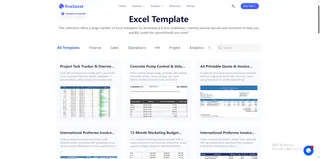
3 Steps to Your Executive Dashboard
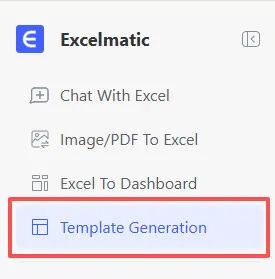
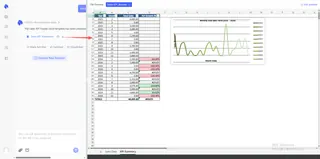
- Step 1: Open the Interface Log in to RowSpeak and navigate to the "Template Generation" tab.
- Step 2: Describe or Browse Enter your specific requirements in the prompt box (e.g., "Build a sales KPI tracker with a year-over-year growth formula") or explore our searchable library for a pre-made fit.
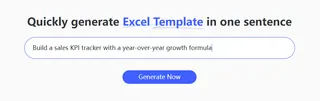
- Step 3: Generate & Deploy
Click "Generate Now." In 30-60 seconds, your professional
.xlsxfile is ready. Just drop in your data and watch the charts come to life.
Mastering Your Professional Workflow
Generating the template is just the first step toward peak productivity. Once your dashboard is running, you can leverage RowSpeak's AI capabilities to handle the heavy lifting of your daily data management:
- Clean Your Data: Before importing messy records into your new dashboard, see how RowSpeak handles data cleaning to fix inconsistent date formats and duplicate entries automatically.
- Deep Analysis: Want to know the "why" behind the numbers? Learn how our data analysis capabilities allow you to chat with your spreadsheet to find hidden trends in seconds.
- Advanced Automation: Use our AI to write complex Excel formulas if you need to add specialized business logic to your generated dashboard later.
- Departmental Synergy: Connect your dashboard insights with our specialized trackers for inventory management or invoice tracking for a complete business overview.
Comparison: Old Search vs. New Generation
| Feature | Generic Template Downloads | RowSpeak AI Generation |
|---|---|---|
| Setup Time | 1 - 2 hours of "fixing" | Under 60 Seconds |
| KPI Accuracy | Fixed and often irrelevant | Tailored to your description |
| Visual Quality | Basic and dated | Executive-ready & Dynamic |
| Flexibility | Rigid and easily broken | Evolves with a new prompt |
Frequently Asked Questions (FAQ)
Are the templates truly free to download? A: Yes! Our template library is open for users to browse and download dozens of high-quality layouts across all major business categories.
Can I customize a template after it's generated? A: Absolutely. Every file is a standard
.xlsxformat, meaning you have full control to add your own branding, extra tabs, or custom formatting.How does RowSpeak help with data accuracy? A: Beyond building the sheet, RowSpeak's AI can be used for data cleaning to ensure the numbers you feed into your dashboard are standardized and error-free.
🚀 Stop Searching. Start Visualizing.
Get your custom Excel dashboard or browse our free library in seconds.
📈 Generate My Dashboard Free