'%3e%3crect%20id='矩形_7888'%20data-name='矩形%207888'%20class='cls-1'%20width='20'%20height='20'%20rx='4'%20transform='translate(6260%20-4478)'/%3e%3cpath%20id='联合_155'%20data-name='联合%20155'%20class='cls-2'%20d='M6.074,12.147a6.207,6.207,0,0,1-.621-.031A6.087,6.087,0,0,1,.031,6.694a6.177,6.177,0,0,1,0-1.241A6.086,6.086,0,0,1,5.453.031,6.177,6.177,0,0,1,6.074,0H9.152V2.029H6.074a4.053,4.053,0,0,0-3.916,3.03H9.152V7.088H2.158a4.053,4.053,0,0,0,3.916,3.03H9.152v2.029Z'%20transform='translate(6264.693%20-4473.9)'/%3e%3c/g%3e%3c/svg%3e)
Key Takeaways
- The Inefficiency Crisis: Finance teams often spend up to 80% of their workflow on manual data preparation, which significantly delays strategic decision-making.
- The Error of Manual Entry: Traditional "cell-by-cell" reconciliation is the primary source of inaccuracies in quarterly forecasts and tax compliance.
- Shift to Real-Time Reporting: Transitioning from static spreadsheets to automated data processing allows for instant visibility into cash flow and budget variances.
- Strategic Evolution: Automation is no longer just a luxury; it is a necessity for finance professionals looking to move from "record-keepers" to "strategic business partners."
The "Excel Trap" in Modern Financial Reporting
In the fast-paced world of finance, data is both your greatest asset and your biggest headache. Whether you are a CFO overseeing a multinational or a freelance accountant managing client books, the challenge remains the same: How do you turn thousands of rows of messy Excel data into accurate, actionable insights without spending all night on manual entry?
Traditionally, quarterly reporting and budget tracking meant wrestling with complex VLOOKUPs, Pivot Tables, and the constant fear of a single broken formula. But in 2026, the game has changed. AI-driven data analysis is no longer a luxury—it’s a competitive advantage.
What is AI Financial Data Analysis?
For decades, "financial analysis" was synonymous with a human auditor manually squinting at rows of figures to spot discrepancies. AI Financial Data Analysis fundamentally shifts this paradigm by integrating machine learning and neural networks directly into the accounting workflow to handle the cognitive load of data processing.
Instead of a user manually calculating variances or hunting for a missing transaction, an AI-powered platform like RowSpeak acts as an intelligent bridge. It doesn't just "store" your numbers; it "understands" the context behind them. It can recognize that a $5,000 entry in the "Travel" column of a departmental budget might be an anomaly based on historical Q3 spending, flagging potential errors before they ever reach the final board report.
This technology allows you to move beyond mere descriptive bookkeeping ("what happened") and into the realm of predictive intelligence ("what will happen next"), where the software handles the structural heavy lifting so you can focus on high-level fiscal strategy.
Bridging the Gap: Why Traditional Methods Fall Short
The problem isn't Excel itself; it’s the human limitation in managing massive, fragmented datasets. When your financial data is scattered across bank exports, PDF invoices, and internal department trackers, the risk of "data silos" becomes critical. Information gets lost, formulas break, and by the time you've consolidated everything manually, the window for strategic action has often closed.
This is where the "AI Way" proves its value—not by replacing the accountant, but by augmenting their ability to see the full financial picture in real-time, ensuring that your reports are a reflection of the present, not a memory of the past.
How to Harness This Power in Minutes (The RowSpeak Way)
You don’t need to spend months on a digital transformation project or master complex coding to revolutionize your department. RowSpeak is architected as an "invisible assistant" that fits into your existing routine, turning hours of labor into seconds of insight through these four streamlined steps:
Step 1: Upload Your Financial Sources
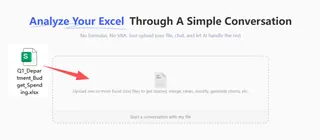
The first step is to bring your fragmented data into a unified environment. Simply drag and drop your files—whether they are messy CSV exports, bank statements, or even a legacy inventory Excel template—directly into RowSpeak. The AI handles the heavy lifting of digitizing and organizing the raw content for you.
Step 2: Enter Your Analytical Prompt
Once your files are uploaded, you communicate with your data using plain English. There’s no need to write complex Excel formulas manually. Simply enter a prompt like:
Analyze our spending patterns for Q1 and highlight any department that exceeded their budget by more than 10%.

Step 3: Generate & Preview Insights
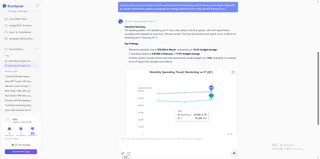
Within seconds, the AI processes your request. You will see a real-time preview of the results, which might include a concise executive summary of your files, a newly formatted and cleaned data table, or professional data visualizations and charts ready for your next presentation.

Step 4: Refine and Export
Precision is key in finance, so RowSpeak allows for deep iteration. You can continue to ask follow-up questions or adjust the parameters—such as changing the chart type or filtering specific date ranges—until the result is perfect. Once satisfied, simply export and download your professional-grade report, KPI dashboard, or cleaned Excel file for immediate use.
Why Automation is the Future of Finance
The transition from manual data cleaning to an AI-first approach represents the next evolution of the financial professional. By offloading the "dirty work" to RowSpeak, you regain the most valuable asset in business: Strategic Time.
- Precision over Guesswork: Eliminate the human error margin that typically plagues manual entries.
- Proactive Risk Management: Identify cash flow bottlenecks and spend anomalies before they become crises.
- Elevated Career Trajectory: Spend your energy on high-value tasks like capital allocation and investment strategy rather than cell formatting.
The future belongs to the "Architect" of financial data, not the "Processor." Whether you are refining a corporate balance sheet or a personal budget tracker, the AI-driven path is the only way to maintain a competitive edge.
🚀 Stop Fighting Your Financial Data.
Start architecting a financial roadmap that drives real growth.
Automate My Financial Reports Free