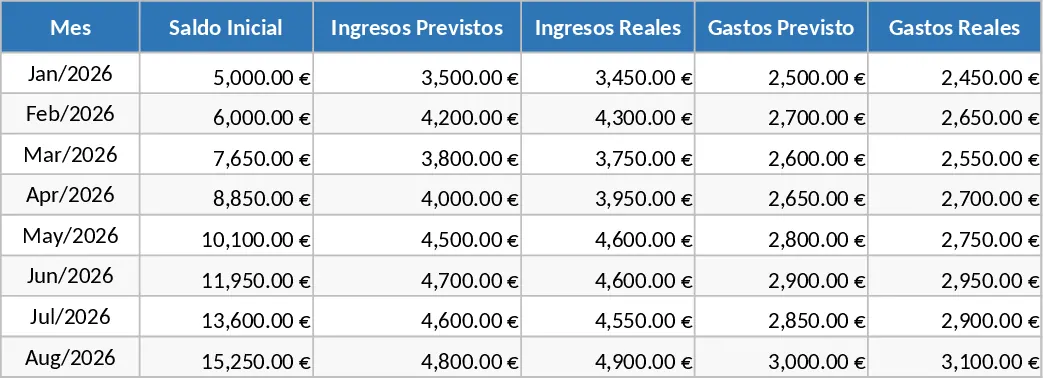
Budget Forecast vs Actual Variance Tracker Template
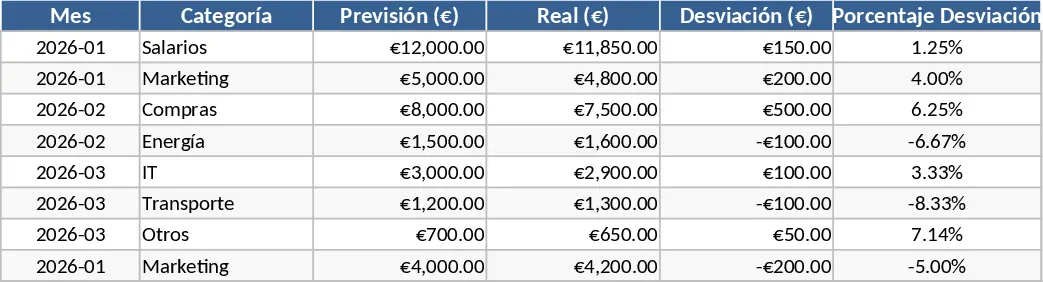
Effective financial management begins with a clear understanding of where your money is intended to go versus where it actually ends up. This Budget and Variance Control template serves as a robust framework for anyone looking to master their finances, whether for personal use or business operations. The template is organized into intuitive sections, starting with a comprehensive Budget Configuration sheet. Here, you can define your specific income streams and expense categories, such as rent, utilities, marketing, or payroll, and assign a planned value to each. This sets the baseline for your entire financial period, providing a target to aim for.
The core functionality of the template lies in its ability to perform real-time variance analysis. As you populate the Actuals sheet with your day-to-day transactions, the system automatically bridges the gap between your initial forecast and your current spending. Key fields include the Date, Category, Description, and Amount, often accompanied by dropdown menus to ensure data consistency. The summary output is where the magic happens: a dynamic dashboard that calculates the absolute deviation and the percentage variance. This visual representation makes it immediately obvious which categories are performing well and which ones require urgent attention or budget reallocation.
This tool is indispensable for small business owners, freelancers, and department heads who need to maintain strict fiscal discipline. In a daily workflow, it eliminates the guesswork associated with bank balances by showing the logic behind the numbers. If your marketing spend is 20% over budget, you can drill down into the transactions to identify the cause. It solves the common problem of invisible spending, where small, unmonitored costs accumulate into significant financial leaks. By centralizing this data, you gain a high-level perspective that is often lost when looking at individual bank statements or receipts.
To get started with this template, follow these steps:
- Start by filling out the Budget Setup sheet. Enter your anticipated income and set realistic spending limits for each of your expense categories for the upcoming period.
- Throughout the month, record every expense and revenue item in the Transaction Log. Be sure to select the correct category from the dropdown menu so the data flows correctly into the summary.
- Regularly check the Dashboard or Summary sheet. Look for the deviation columns; positive numbers in expenses usually indicate savings, while negative numbers signal that you have exceeded your planned budget.
- Use these insights to adjust your spending for the remainder of the period or to refine your budget targets for the following month.
By adopting this structured approach to budgeting, you can expect a significant reduction in the time spent on manual bookkeeping and financial reporting. The automated nature of the template ensures accuracy, reducing the risk of human error in complex calculations. Ultimately, this template provides the peace of mind that comes with total financial transparency, helping you save effort while building a more sustainable financial future.
Similar Templates Recommendation
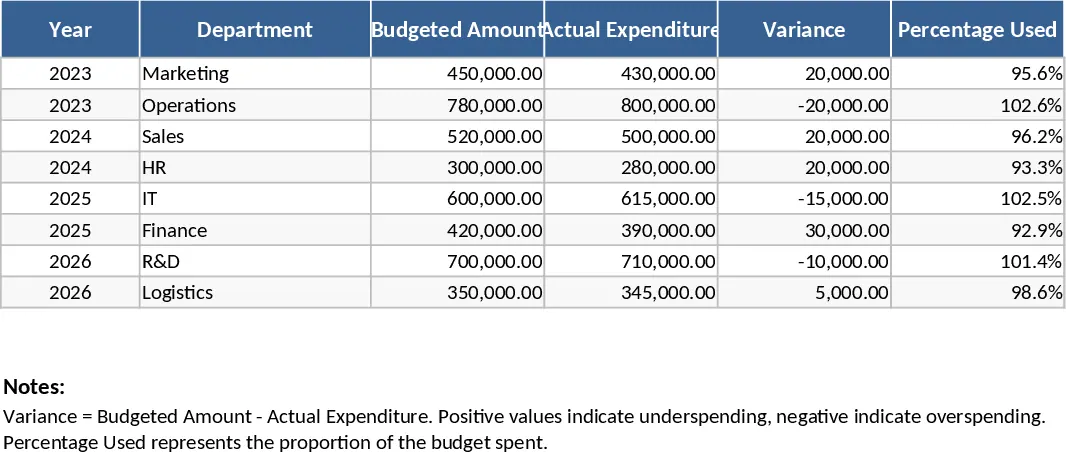
Budget Expenditure Tracking Template
Track your planned budget against actual spending with detailed category breakdowns and visual variance analysis to maintain financial control.
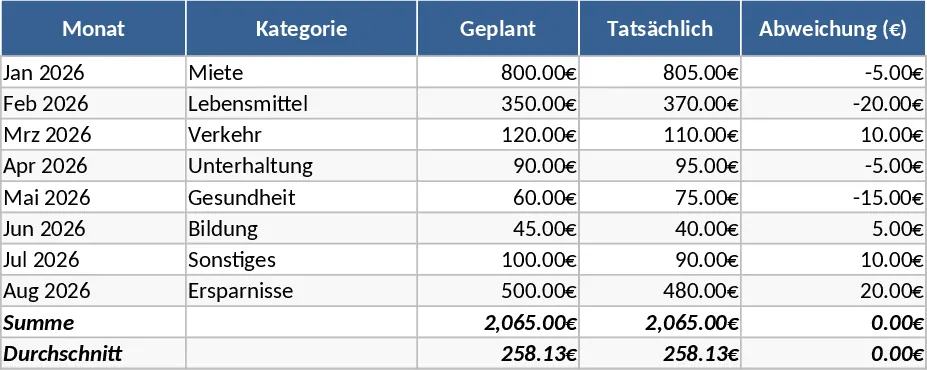
Monthly Household Expense Tracker Template
Track your monthly household spending across various categories to manage your budget and identify potential savings effectively.
Monthly Budget Forecast vs Actual and Carryover Balance Template
Track monthly income and expenses with forecast vs. actual comparisons and automatic balance carry-over for continuous financial monitoring.