Comprehensive Payroll and Net Salary Calculator Template
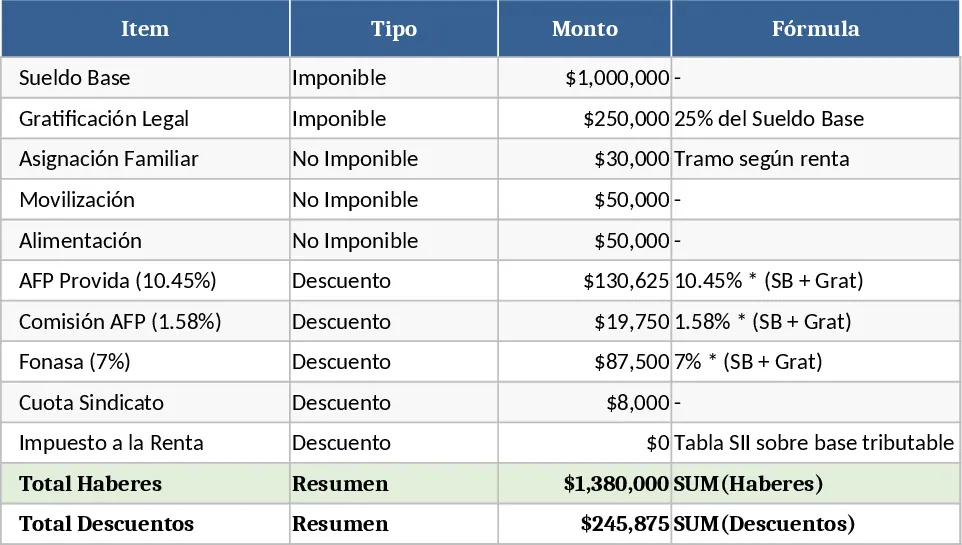
This Excel template is built for Chilean payroll processing and lets you turn a raw salary statement into a clear, itemised net‑pay result. The workbook contains three sheets: Input Data, where you enter the base salary, family allowance, mobility and food allowances, plus any other taxable earnings; Deductions, where you select the health insurer (Fonasa) and pension fund (AFP) from dropdown lists, and add union fees or other statutory cuts; and Summary, which automatically calculates the legal gratification, total taxable earnings, income tax, AFP commission, and finally the net salary to be paid. Key fields are highlighted in blue, formulas are locked, and the summary sheet presents a concise table and a small chart showing the proportion of each component.
The template solves the common headache of manually applying Chile’s complex payroll rules. By feeding the basic remuneration figures, the sheet instantly applies the legal 25% gratification, computes the taxable base, applies the progressive income‑tax brackets, and subtracts health, pension and union contributions. This eliminates calculation errors, speeds up month‑end processing, and ensures compliance with local labor regulations. It is especially handy for small‑to‑medium enterprises, HR officers, accountants, or freelancers who need a reliable, repeatable way to generate payslips without investing in expensive payroll software.
Who benefits most? HR managers handling a handful of employees, office administrators preparing monthly payroll, and business owners who want to verify that each worker’s net pay is correct. The template is also useful for payroll trainees learning the Chilean deduction structure, as every step is transparent and can be audited. It tracks every component of compensation – from gross earnings and statutory bonuses to health, pension, union fees, and tax – giving you a full picture of labor costs and employee take‑home pay.
How to use
- Open the Input Data sheet and fill the highlighted cells with the employee’s base salary, family allowance per dependent, mobility and food allowances, and any other taxable income.
- Switch to the Deductions sheet, choose the appropriate Fonasa regime and AFP provider from the dropdowns, and enter any fixed union fees.
- The Summary sheet updates automatically; review the calculated legal gratification, total taxable earnings, income‑tax amount, AFP commission, and the final net salary.
- Export or copy the summary table to create a payslip or report for the employee.
Expected benefits: reduces manual calculation time, lowers the risk of compliance errors, and provides a clear, professional view of each employee’s compensation package.