Monthly Employee Salary Tracker Template

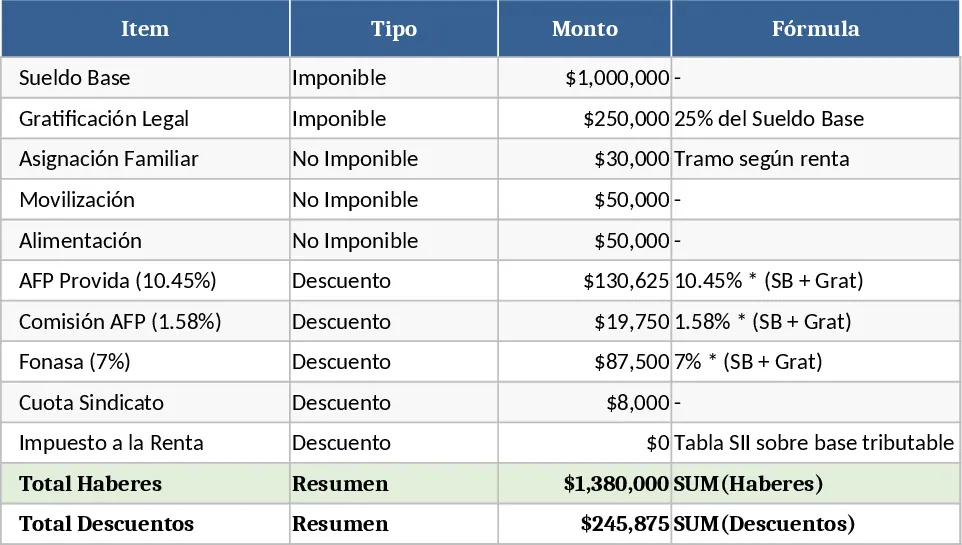
This template is built for HR teams and payroll administrators who need a reliable way to produce monthly salary statements for every employee. It consists of several linked sheets: Employee List (name, ID, department, bank details), Salary Structure (base pay, overtime rate, bonuses), Deductions (social security, health insurance, other withholdings), Tax Rates (progressive tax brackets or flat rates), and a Payroll Summary that pulls everything together. Drop‑down menus let you select the payroll month and automatically filter the data, while formulas calculate gross pay, statutory deductions, tax, and net salary for each staff member. At the bottom of the summary sheet you’ll see department‑level totals, average net pay, and a printable payroll register ready for export.
The template solves the common headache of manual payroll spreadsheets that are prone to calculation errors and inconsistent formatting. By centralising all employee compensation data and applying standard deduction and tax rules, it guarantees consistent results month after month. It also speeds up the end‑of‑month closing process, freeing up time for strategic HR activities such as talent development or workforce planning. Because everything is linked, updating a single salary rate or tax percentage instantly refreshes the entire payroll, ensuring compliance with the latest regulations.
Ideal for small‑to‑medium enterprises, HR managers, finance‑payroll partners, and anyone who prepares a monthly payroll without a dedicated software system. Whether you’re processing a fixed‑salary workforce, hourly staff, or a mix of both, the template adapts to capture regular wages, overtime, bonuses, and variable deductions.
How to use
- Open the Employee List sheet and fill in each employee’s personal and banking information.
- In the Salary Structure sheet, enter the base salary, any overtime rates, and scheduled bonuses for the current month.
- Set the applicable deduction percentages and tax brackets in the Deductions and Tax Rates sheets.
- Go to the Payroll Summary sheet, select the month from the drop‑down, and the template will automatically compute gross, deductions, tax, and net pay for every employee. Export or print the summary as needed.
Expected benefits: reduces manual calculation time, minimizes errors, and provides a clear, audit‑ready payroll report each month.