Compensation Portfolio Exit Strategy Template
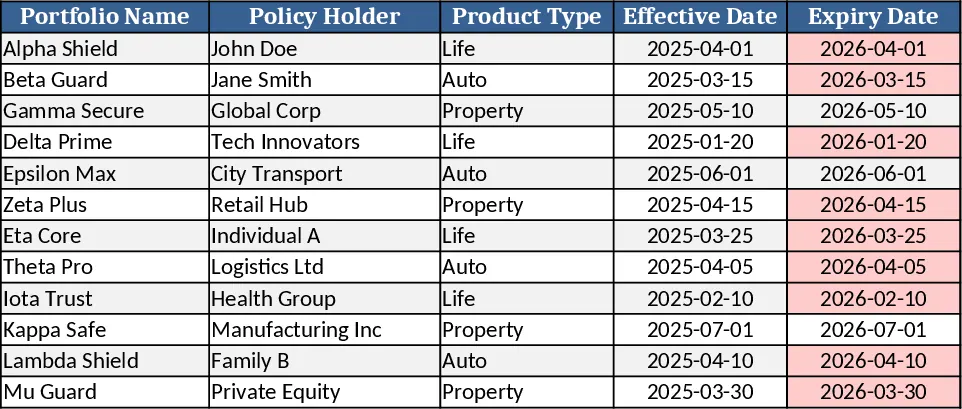
This Excel template is built for insurance carriers, brokers, and finance teams that need a clear roadmap to exit a workers' compensation portfolio. It consists of four linked sheets: Input Data where you list each policy, premium, loss amount, and current reserve; Assumptions with dropdowns for discount rates, exit timing windows, and market multiples; Calculations that automatically compute projected cash flows, net present value, and reserve release schedules; and a Dashboard that visualizes key metrics such as cumulative cash outflow, IRR, and break‑even dates. The layout lets you see both granular policy details and high‑level portfolio performance at a glance.
The template solves the common pain points of manually consolidating policy data, estimating the financial impact of a portfolio sale, and communicating the exit plan to stakeholders. By centralizing all variables and automating the math, it reduces errors and speeds up scenario analysis. You can instantly compare "sell now" versus "hold and release reserves" options, evaluate how different discount rates affect valuation, and identify the optimal exit window that maximizes return while meeting regulatory reserve requirements.
It is especially useful for actuarial analysts, CFOs, and risk managers who must justify portfolio disposition decisions to senior leadership or potential buyers. Whether you are preparing a bid for a reinsurer, planning a strategic divestiture, or simply monitoring reserve adequacy, the template provides the data‑driven insight needed to make confident decisions.
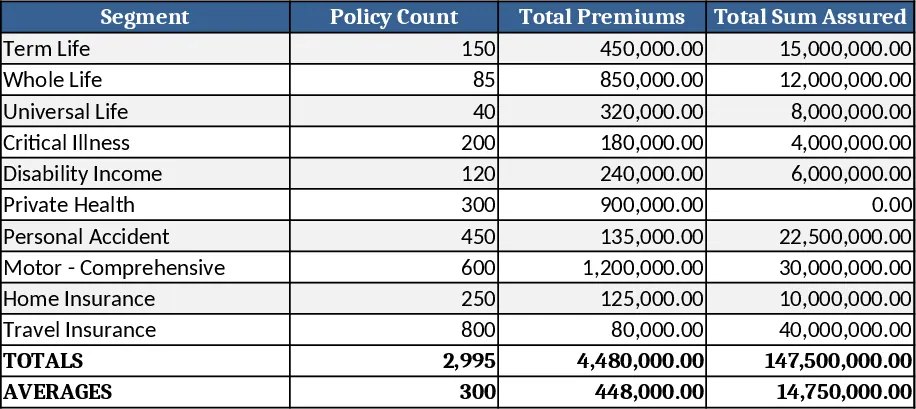
The workbook tracks premium income, incurred losses, reserve balances, cash‑flow timing, and valuation multiples. It also flags policies that fall outside predefined risk thresholds, helping you prioritize which contracts to retain or sell. Summary tables on the Dashboard give you quick access to total portfolio value, projected cash‑flow waterfall, and sensitivity analysis results, all of which can be exported for presentations or further modeling.
How to use
- Populate the Input Data sheet with each policy’s identifier, written premium, incurred loss, and current reserve. Use the provided dropdowns to select the policy status (active, closed, pending).
- In the Assumptions sheet, set your discount rate, choose an exit horizon (e.g., 12‑24 months), and pick a market multiple for valuation. The template will recalculate automatically.
- Review the Calculations sheet to see projected cash flows, NPV, and reserve release schedules for each scenario.
- Use the Dashboard to compare scenarios, adjust assumptions, and generate charts that illustrate the optimal exit timing.
Expected benefits include a noticeable reduction in manual spreadsheet work, faster scenario testing, and clearer communication of exit strategy outcomes, helping you move from data gathering to decision making more efficiently.