Let's face it—managing data in Google Sheets can feel like trying to drink from a firehose. You've got rows upon rows of numbers, but turning them into actionable insights? That's where most of us hit a wall.
As a growth manager at RowSpeak, I've seen firsthand how AI transforms spreadsheet struggles into "aha!" moments. While ChatGPT integration with Google Sheets is gaining traction, there's a smarter way: purpose-built AI tools like RowSpeak that deliver faster, more accurate analysis right where you work.
Why Settle for Manual Analysis When AI Can Do the Heavy Lifting?
Google Sheets is fantastic for organizing data, but its true potential gets unlocked when you pair it with AI. Imagine:
- Instant trend spotting without scrolling through endless columns
- Automated reports that write themselves
- Predictive insights that used to require expensive consultants
The best part? You don't need to be a data scientist to make this work. Modern AI tools have made advanced analysis accessible to everyone.
RowSpeak vs. ChatGPT: The Spreadsheet AI Showdown
While ChatGPT can technically analyze spreadsheet data, it's like using a Swiss Army knife when you need a precision tool. Here's why RowSpeak is the better choice:
- Native Integration: No clunky add-ons or API setups—RowSpeak works directly with your Google Sheets data
- Visual Intelligence: Automatically suggests the most effective charts and graphs for your specific data
- Context-Aware Analysis: Understands business metrics and financial data out of the box
- One-Click Automation: From data cleaning to predictive modeling, complex tasks become single-click operations
Pro tip: Try RowSpeak's free trial and you'll never go back to manual analysis.
Your AI-Powered Analysis Workflow (The Easy Way)
Step 1: Clean Up Your Data
AI works best with clean data. RowSpeak can:
- Identify and fix inconsistent formatting
- Flag missing values
- Standardize date formats
- Remove duplicates
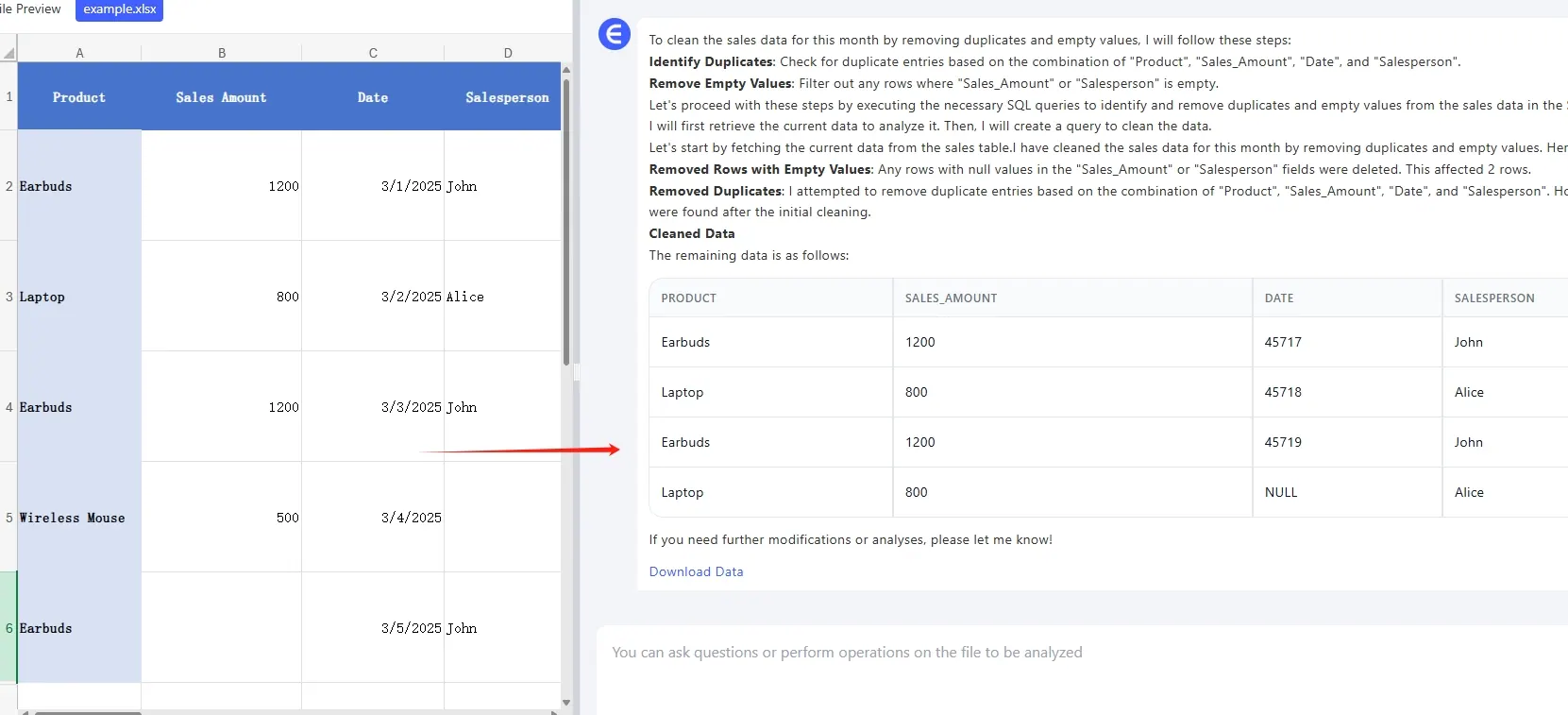
All with a single click—no formulas required.
Step 2: Discover Hidden Insights
Instead of guessing what questions to ask, let RowSpeak surface the most important trends:
- Automatic anomaly detection
- Seasonality patterns
- Correlation heatmaps
- Predictive forecasts
Step 3: Create Stunning Visuals
Transform your numbers into boardroom-ready visuals:
- Smart chart recommendations
- Brand-compliant styling
- Interactive dashboards
- Exportable reports
Real-World Examples: AI Analysis in Action
E-commerce Store Owner:
- Automatically segments customers by purchase behavior
- Predicts holiday season demand
- Identifies products at risk of stockouts
Marketing Team:
- Analyzes campaign performance across channels
- Recommends optimal ad spend allocation
- Forecasts ROI for new initiatives
Financial Analyst:
- Detects unusual expense patterns
- Projects cash flow scenarios
- Generates investor-ready reports
Beyond Basic Analysis: Advanced AI Features
RowSpeak takes spreadsheet analysis further with:
- Natural Language Query: "Show me Q3 sales by region compared to last year"
- Automated Alerts: Get notified when key metrics hit thresholds
- Collaboration Tools: Share live dashboards with stakeholders
- Template Library: Jumpstart analysis with industry-specific frameworks
The Future of Spreadsheets Is AI-Powered
The days of manual data wrestling are over. With tools like RowSpeak, anyone can:
- Reduce analysis time by 80%
- Make data-driven decisions with confidence
- Present insights that actually get acted upon
Ready to transform how you work with data? Try RowSpeak free for 14 days—no credit card needed. Your future self (and your spreadsheets) will thank you.