Non‑Functional Requirements Tracker Template
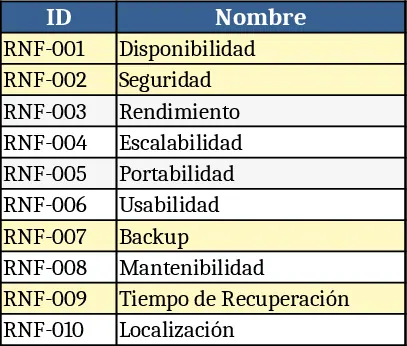
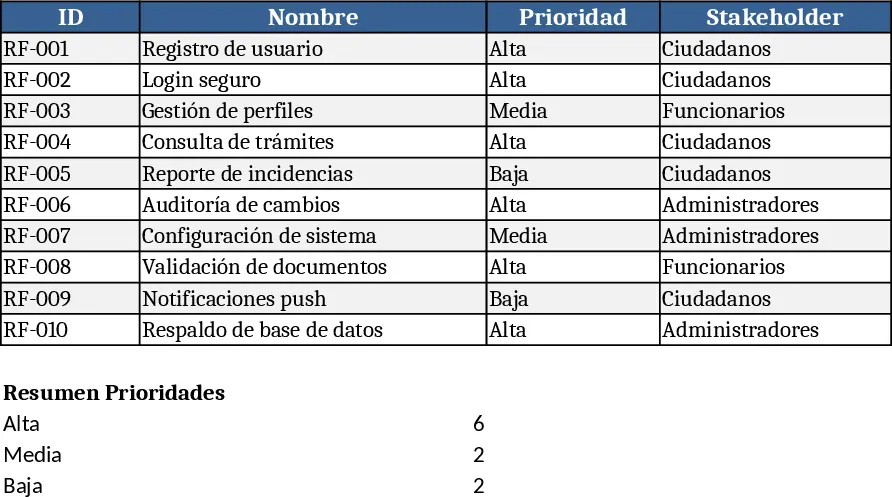
This template provides a ready‑made table for documenting the non‑functional requirements (NFRs) of any software system. The main sheet lists each requirement with columns for ID, Name, Description, Priority, and Stakeholder. Users can add rows for additional NFRs, use data validation dropdowns to standardize priority levels (High, Medium, Low) and stakeholder types, and include notes or links to supporting documents. A summary section automatically counts requirements by priority and highlights any gaps, giving a quick visual of where the system’s quality attributes stand.
The template solves the common problem of scattered or informal NFR capture, which often leads to missed security controls, performance bottlenecks, or accessibility issues later in development. By centralizing this information, project teams can ensure that critical quality criteria are visible to architects, developers, testers, and compliance officers from day one. The structured format also makes it easier to audit the system against legal standards such as data‑protection laws, because every requirement is linked to its responsible stakeholder and priority.
Ideal for system architects, product owners, compliance managers, and development teams working on public‑facing applications, internal portals, or any solution where reliability, security, and user experience matter. Whether you are drafting a new system, upgrading an existing platform, or preparing for an external audit, the template helps you keep a single source of truth for all non‑functional expectations.
How to use:
- Open the workbook and go to the "Requirements" sheet. Fill in a new row for each NFR, selecting the appropriate priority from the dropdown and assigning the stakeholder who owns the requirement.
- In the Description column, write a concise statement of the quality goal (e.g., "Encrypt all personal data at rest using AES‑256").
- Switch to the "Summary" sheet to see automatically generated counts and any high‑priority items that lack a stakeholder assignment.
- Export the table to PDF or share the workbook with your team for review and sign‑off.
Expected benefits include faster requirement alignment across teams, reduced risk of overlooking critical quality attributes, and smoother audit preparation, all while saving time on manual tracking.