System Requirements Traceability Matrix Template
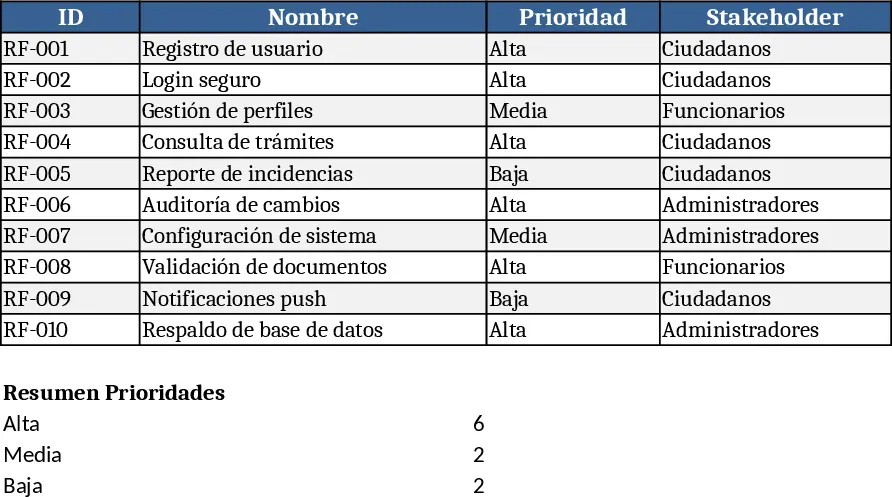
This template provides a structured workbook for capturing every functional and non‑functional requirement of a software project. The main sheet, Requirements List, contains columns for ID, Name, Type (Functional/Non‑Functional), Priority, Stakeholder, Description, and Status. A secondary sheet, Metrics Dashboard, automatically aggregates counts by priority, type, and stakeholder, and visualises compliance gaps with simple bar charts. Dropdown menus enforce consistent entry for Type, Priority, and Stakeholder, while conditional formatting highlights high‑priority items in red for quick attention.
Use it to centralise requirement documentation, avoid duplicated entries, and keep traceability straight from initial request to final delivery. It solves the common pain of scattered spreadsheets, missed compliance checks, and unclear ownership, giving project managers a single source of truth. The template is especially helpful for business analysts, product owners, and IT governance teams who need to ensure that every request – from citizen‑facing services to internal admin tools – is recorded, prioritised, and linked to the right stakeholder group.
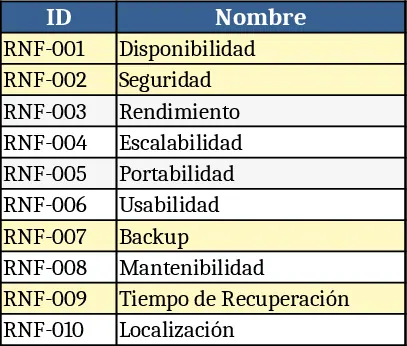
The workbook helps you track what the system must do (e.g., request filing, role management, report generation) and the quality constraints it must meet (e.g., data encryption, 24/7 availability, WCAG 2.1 AA compliance). By keeping functional and non‑functional items side by side, you can see at a glance whether performance, security, or accessibility requirements are being addressed alongside core features, making risk assessment and planning more transparent.
How to use
- Open the Requirements List sheet and add a new row for each requirement. Choose the appropriate Type, set the Priority (High, Medium, Low), and select the Stakeholder from the predefined list.
- Fill in the Description field with a concise statement of the need, then mark the Status as Draft, Approved, or Implemented.
- Switch to the Metrics Dashboard to see real‑time totals and charts; the dashboard updates automatically as you edit the list.
- Export the sheet as PDF or share it with your team; the built‑in filters let anyone focus on high‑priority items or a specific stakeholder group.
Expected benefits: you’ll spend less time hunting for missing requirements, reduce the risk of non‑compliance, and gain clearer visibility into project scope, which can streamline meetings and accelerate decision‑making.