DIY Professional Workbook Builder Template
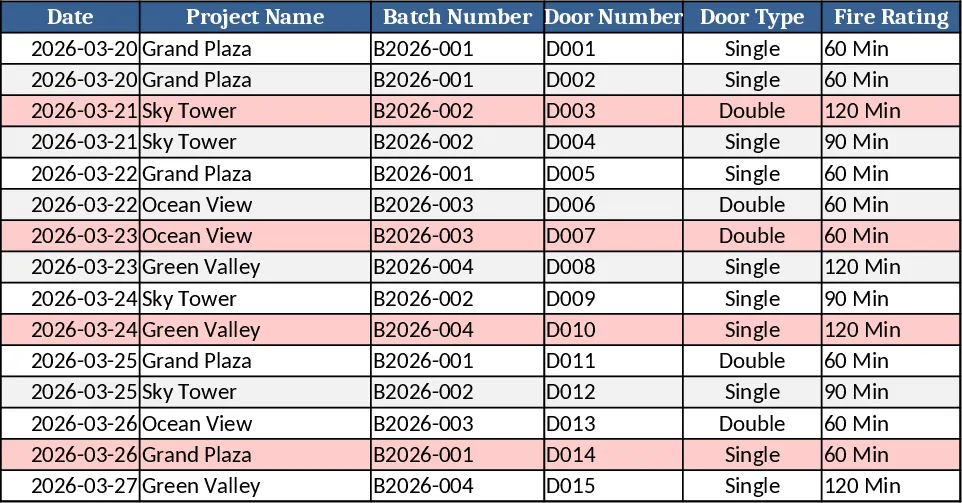
This workbook is built for a fire‑rated doors factory that needs a single, professional Excel solution to capture every quality and safety event. It opens with a QC DATA sheet where inspectors enter each inspection record in a structured table. Columns include Date, Project Name, Batch Number, Door Number, Door Type (single/double dropdown), Fire Rating, Inspector Name, Inspection Result (PASS/FAIL), Defect Type (Dimension, Painting, Hardware, Label, Others), Remarks, Label Serial Number, and Frame Number. All headers are frozen and formatted as an Excel table, so new rows inherit data validation, conditional formatting, and formulas automatically.
The QC ANALYSIS sheet pulls the raw data with COUNTIFS, SUMIFS and pivot‑style tables to calculate total inspections, passes, fails, pass/fail percentages, and to break down defects by type, project, batch, and by day or month. These tables feed directly into the DASHBOARD, which displays KPI cards for total inspections, pass rate and fail rate, a bar chart comparing passes vs. fails, a pie chart of defect types, and a line chart showing inspection trends over time. The layout uses a clean color palette and dynamic ranges so charts update as soon as new rows are added.
Beyond quality, the workbook includes a SAFETY MANAGEMENT section that tracks fire extinguishers and first‑aid kits. Each asset table records location, type, last and next inspection dates, quantity, minimum required, expiry dates and status. Conditional formatting highlights expired items in red and low‑stock items in orange, while simple formulas generate automatic alerts on the dashboard.
The LABEL TRACKING sheet monitors label serial numbers and installation status, with duplicate detection to prevent reuse. The ADVANCED INSIGHTS sheet surfaces the top three defect categories, the project with the highest failure rate, and the batch with the most issues, using dynamic text formulas for quick executive summaries. Finally, an INCIDENT TRACKING sheet captures safety incidents, their causes, severity, and corrective actions, giving safety managers a clear view of trends.
Who benefits? Quality inspectors, production supervisors, safety officers, and plant managers who need real‑time visibility into inspection results, defect patterns, and safety compliance. The workbook solves the problem of scattered spreadsheets and manual reporting by consolidating all data, automating calculations, and delivering visual insights at a glance.
How to use
- Open the file and start entering inspection records on the QC DATA sheet; dropdowns ensure consistent entries.
- Review the automatically refreshed tables on QC ANALYSIS and the visual KPIs on the DASHBOARD to see current pass rates and defect distribution.
- Update safety asset information on the SAFETY MANAGEMENT sheet; alerts will turn red or orange as dates approach or stock falls below thresholds.
- Use the ADVANCED INSIGHTS and INCIDENT TRACKING sheets to identify problem areas and plan corrective actions.
Expected benefits: reduces manual data consolidation, speeds up reporting, and gives instant, data‑driven insight into quality and safety performance, freeing staff to focus on corrective actions rather than spreadsheet gymnastics.