Workshop Inventory & Workforce Management Template
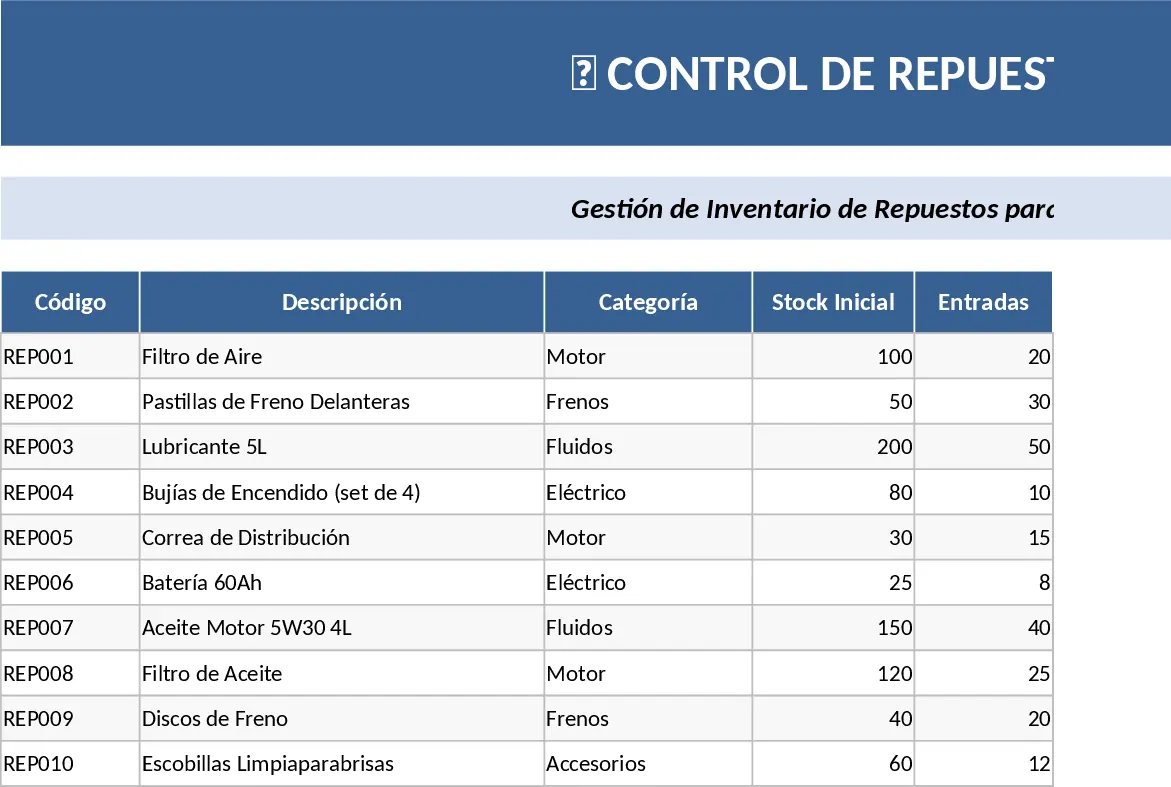
This Excel workbook is organized into clear sub‑sheets that mirror the main areas of a workshop: Repuestos (Spare Parts), Uniformes y Equipo de Seguridad, Productos de Limpieza, and Trabajadores. Each sheet uses colour‑coded tables and dropdown lists so you can quickly select items, sizes, and access rights. The Workers sheet is split by department – Mecánicos, Chapa y Pintura, Limpieza de Vehículos – and records shirt, polo, pantalón, calzado sizes, security‑key assignments, tool‑cart allocations, safety‑gear (guantes, gafas) and electronic devices (tablet). At the top of every sheet a banner identifies the section, giving a polished, corporate look.
The template solves the common headache of scattered paperwork and manual stock‑takes. By centralizing parts, uniform, cleaning product, and employee equipment data, the workshop manager can instantly see what is on hand, what is assigned, and where gaps exist. The built‑in summary dashboard pulls key metrics – total parts value, uniform stock levels, pending tool assignments, and safety‑gear compliance – into a single visual page, enabling fast decisions and preventing costly shortages or over‑stock.
Designed for workshop supervisors, inventory clerks, and HR coordinators who need a single source of truth for all physical assets. Whether you run a small garage or a large service centre, the workbook adapts to the size of your team and the variety of items you manage. It helps you keep track of every bolt, every uniform size, every key, and every tablet, ensuring that each employee has the right equipment while maintaining clear accountability.
How to use
- Open the Repuestos sheet and enter each spare part with its code, description, quantity, and unit cost; use the dropdown to classify the part type.
- In the Trabajadores sheet select the employee’s department, fill in their size measurements, and choose the keys, tool‑cart, safety gear, and electronic devices they receive from the provided lists.
- Update the Uniformes y Equipo de Seguridad and Productos de Limpieza sheets whenever new stock arrives or items are consumed, adjusting quantities accordingly.
- Switch to the Dashboard sheet to view real‑time totals, low‑stock alerts, and assignment summaries that refresh automatically.
Expected benefits include a noticeable reduction in time spent on manual inventory checks, fewer errors in equipment allocation, and a clearer overview that supports proactive ordering and compliance reporting.