Mortgage Amortization Schedule with Variable Rates and Term‑Reducing Partial Payments Template
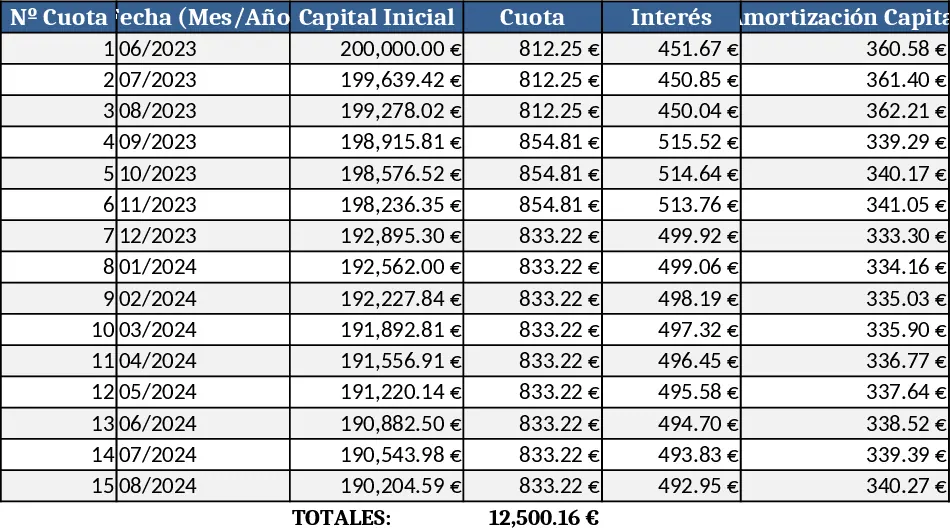
This Excel template builds a complete amortization schedule for a fixed‑rate mortgage while allowing you to make extra principal payments that only shorten the loan term, not the monthly instalment. The workbook is divided into three sheets: Input, Schedule, and Summary.
In the Input sheet you enter the loan amount (e.g., €165,000), total number of installments (288), the start month and year (June 2023), and the two interest periods – 2.71 % for the first three payments and 3.11 % for the remaining ones. A dedicated field lets you record any partial principal contribution for each period; the template automatically recalculates the remaining balance, reduces the number of future payments, and keeps the regular monthly payment unchanged. All dates are shown as month‑year (e.g., Jun‑2023) for easy reading.
The Schedule sheet lists every instalment in rows, showing: payment date, interest rate applied, interest amount, principal amortisation, extra partial payment, remaining balance, and a flag indicating when the loan is fully repaid. Because the extra payment column is linked to the input table, you can experiment with different contribution amounts and instantly see how the loan term shortens. The Summary sheet aggregates key metrics such as total interest paid under each rate, total extra payments, final payoff date, and a simple chart visualising balance decline over time.
Who benefits? Home‑buyers, mortgage brokers, financial advisors, or anyone managing a personal loan who wants to understand the impact of early repayments without renegotiating the monthly cash flow. It is especially useful when interest rates change part‑way through the loan, or when you plan periodic lump‑sum contributions (e.g., bonuses or tax refunds) and need to see how they affect the overall term.
The template helps you track every payment, calculate exact interest per period, and instantly model “what‑if” scenarios for partial amortisations. By keeping the regular instalment constant, you avoid budgeting surprises while still accelerating debt retirement. The built‑in date column removes manual calendar work, and the summary chart gives a visual cue of progress.
How to use
- Fill the Input sheet with your loan amount, start date, total installments, and the two interest rates (first three months at 2.71 %, then 3.11 %).
- Enter any extra principal you plan to pay in the "Partial Payment" column for the corresponding month. Leave cells blank or zero if no extra payment is made.
- The Schedule sheet updates automatically; review the "Remaining Balance" column to see how many months are left after each extra payment.
- Check the Summary sheet for total interest saved, new payoff date, and the balance‑decline chart.
Expected benefits: reduces manual calculations, speeds up scenario planning, and gives a clear picture of how partial payments shrink the loan term while keeping monthly cash outflow stable.
Similar Templates Recommendation
Intuitive Dynamic Loan Collection Template
An intuitive, dynamic Excel template to track and manage loan repayments, calculate balances, and generate payment schedules without any accounting expertise.
Fixed Payment Loan Amortization Schedule with Admin & Random Fees Template
Create a detailed loan amortization schedule with fixed monthly payments, interest, admin fees, and random charges while preserving the loan term.