2026 Accounting Roadmap & Budget Control Template
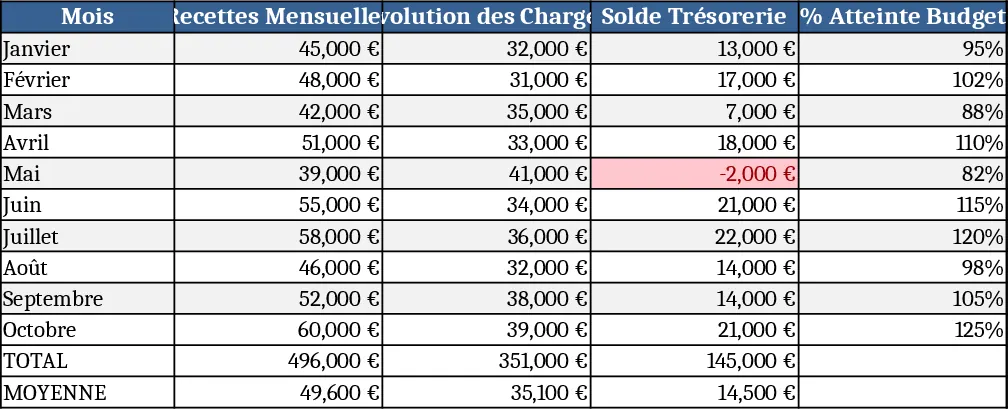
The 2026 Accounting Roadmap template is built as a multi‑sheet workbook that brings together every financial control you need for a project‑driven company. The Projects sheet lists all active initiatives with a dropdown to select the responsible manager and the approved budget ceiling. The Budget Limits sheet records the maximum amount per project and flags any entry that exceeds the limit. All spendings are entered in the Expense Log, where you choose the project, expense category, amount, and attach a justification file; a validation column lets you mark each line as pending, approved or paid. A ready‑made Purchase Order Form captures the object, project, forecasted amount, supplier and required signatures, and automatically pulls the approved budget to prevent overruns. Fixed recurring charges such as rent, utilities and subscriptions are gathered in the Fixed Costs sheet, while the Dashboard sheet consolidates cash‑flow forecasts, variance analysis, and a monthly expense summary into easy‑to‑read charts and tables. Finally, the Control Log records quarterly review dates, audit notes and archive references, ensuring a clear audit trail.
This template solves the common pain points of scattered spreadsheets, ad‑hoc approvals and lack of visibility into project‑level finances. By enforcing a single source of truth for budgets and expenses, it reduces impulsive spending, speeds up validation cycles and gives finance leaders a real‑time picture of cash needs. The built‑in dashboards turn raw data into actionable insights, helping you spot cost overruns early, renegotiate supplier terms, and keep projects within the 95 % budget compliance target set for 2026.
The primary users are accounting professionals, finance managers and project leaders who need to allocate funds, monitor spend and report to senior management. It is also valuable for department heads who must submit purchase requests and for external auditors who require a structured archive of supporting documents. In any scenario where multiple projects compete for limited resources, the template provides the discipline and transparency needed to make informed decisions.
With this workbook you can track per‑project budget ceilings, actual expenditures, remaining balances, purchase‑order status, fixed‑cost commitments and short‑term cash‑flow projections. The automatic variance calculations and conditional formatting highlight any breach of policy, while the monthly analysis tab produces a ready‑to‑share report for board meetings.
How to use
- Fill the Projects sheet with every active project and assign the approved budget ceiling.
- Record each cost in the Expense Log, attach the receipt, and set the approval status; the sheet will instantly update the remaining budget.
- Complete a purchase order in the Purchase Order Form; the template checks the project’s budget and flags any excess before you submit.
- Review the Dashboard each month to see cash‑flow forecasts, variance charts and a summary of fixed‑cost spend; export the view for stakeholder presentations.
Expected benefits: streamlined approval workflow, clearer budget visibility and reduced manual effort in monthly reporting, freeing up time for strategic analysis.