

Self‑Study Pig Research Tracker Template
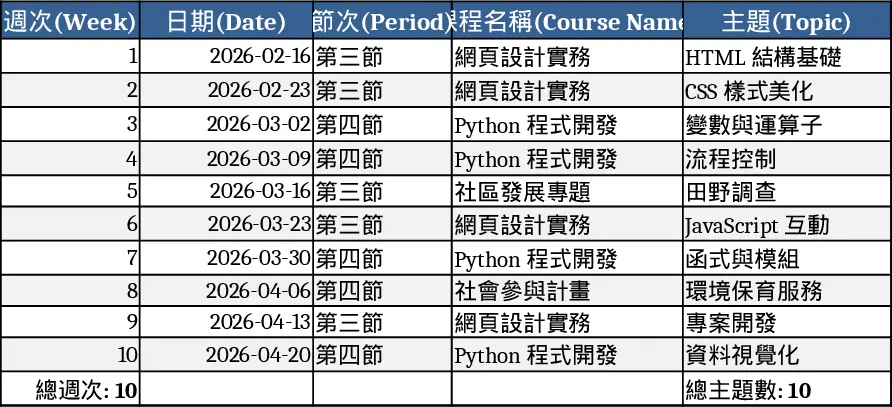
The Pig Self‑Study Tracker is a multi‑sheet Excel workbook designed to keep students and teachers organized throughout an independent‑learning project on pig biology. The first sheet, Schedule, lists each class day with columns for Date, Period, Activity (Research, Note‑taking, Presentation, etc.), Specific Task, Location and free‑form Notes. A drop‑down menu limits Activity entries to predefined options, ensuring consistent data. The second sheet, Topic Notes, is divided into sections for each major theme – organ anatomy, life cycle, husbandry, cultural references and more. Within each section you record Source, Key Points, Summary, Completion Status and any attached file links. The third sheet, Summary, pulls data from the other two sheets with simple formulas and pivot‑tables, showing total study sessions, topics completed, upcoming deadlines and a small bar chart that visualizes progress over weeks.
This layout solves the common problem of scattered notebooks, forgotten deadlines and duplicated effort during a semester‑long self‑study. By entering a single line for each class period, students instantly see how many sessions they have allocated to research, note‑taking or presentation creation, and the Summary sheet tells them at a glance which pig‑related topics are still pending. The automatic calculations remove the need for manual tallies, while the built‑in chart gives a visual cue that motivates continued work. Teachers can also use the workbook to monitor each learner’s pace, spot gaps early and provide timely feedback, turning an otherwise informal activity into a measurable component of the curriculum.
The template is ideal for high‑school biology classes, agricultural clubs, or any educational setting where pupils explore animal science independently. It helps students who prefer structured self‑learning, teachers who want to assign and track independent projects, and even parents who wish to follow their child’s progress at home. Whether the goal is to produce a final slide deck on pig anatomy, compile a research bibliography, or simply keep a tidy record of weekly discoveries, the tracker keeps every piece of information in one place, making revision and presentation preparation far less stressful.
How to use
- Open the workbook and go to the Schedule sheet; select the date, period and choose an Activity from the drop‑down, then type the specific task (e.g., “Research organ structure”).
- Switch to Topic Notes, pick the relevant topic from its drop‑down, paste the source link, write key points and mark the status as “In progress” or “Done”.
- Check the Summary sheet; it will automatically update totals, highlight overdue items and display a progress chart.
- When you’re ready, use the filtered notes to copy into PowerPoint or Word for a final presentation, or export the sheet as PDF for submission.
You’ll spend less time hunting for scattered notes and more time focusing on learning, while the visual progress tracker keeps motivation high.
Similar Templates Recommendation
Secondary School Results and Ranking Template
Track up to 200 secondary students' marks, auto‑calculate grades, averages, divisions and rankings in a clear, formatted sheet.

Couple Budget and Cash Flow Tracker Template
Track monthly income, expenses, and cash flow for a working couple, visualize budgets and savings goals in one spreadsheet.

Date Range and Internal Log Template
Create an Excel file with two columns for dates and internal notes, with colored rows for different date ranges.
