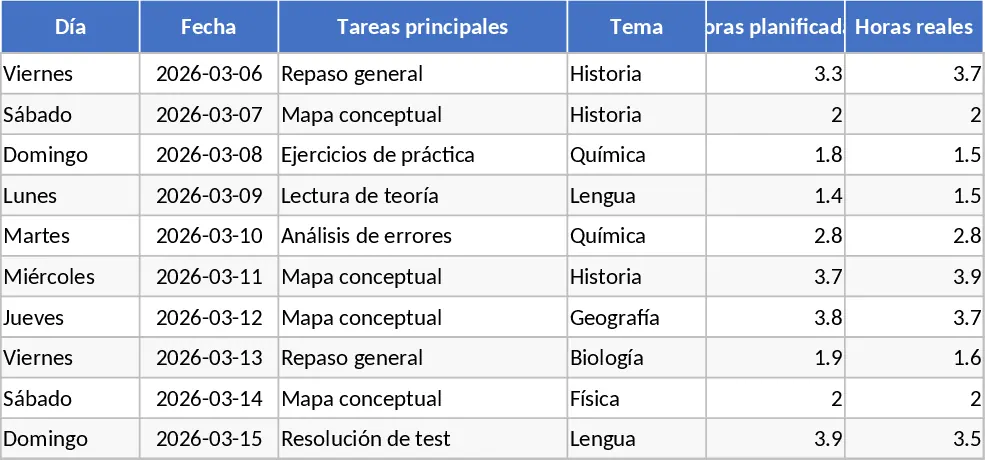
Exam Study Planner with Weekly Tracking Template
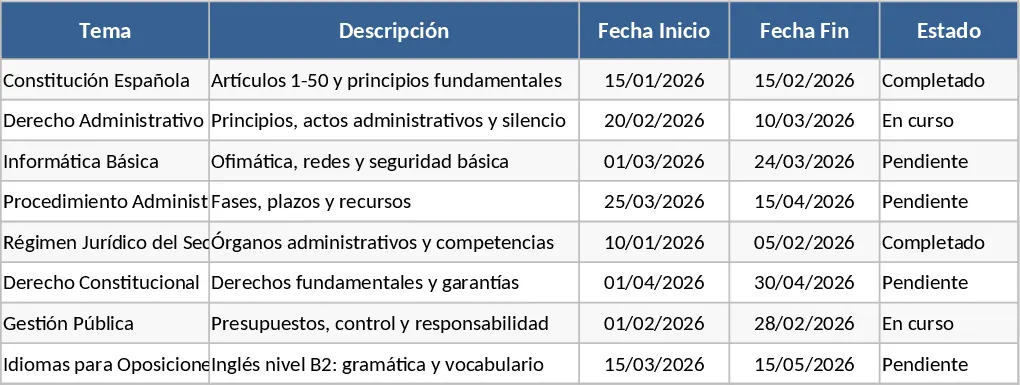
This Excel template is built for anyone preparing for a public‑service exam (oposiciones) and needs a clear, weekly‑by‑weekly roadmap. It consists of four interconnected sheets: Dashboard, Weekly Plan, Task List, and Progress Tracker. The Task List lets you enter every subject, sub‑topic, and the estimated study hours for each item. In the Weekly Plan you assign those topics to specific weeks, set target hours, and choose a status from a dropdown (Planned, In‑Progress, Completed). The Progress Tracker is where you log the actual hours you study each day, mark completion status, and add brief notes. All sheets feed the Dashboard, which automatically calculates total hours planned vs. spent, weekly completion percentages, and visual charts that highlight upcoming deadlines and any lagging areas.
The template solves the common chaos of juggling many subjects, keeping track of what has been covered, and ensuring you stay on pace for the exam date. By visualising weekly targets and real‑time progress, you can quickly spot overloads or gaps and adjust your plan before they become problems. It also reduces the mental load of remembering what to study next, letting you focus on learning instead of administrative tracking.
Ideal for candidates studying for any oposición, whether you are a solo learner, part of a study group, or a tutor managing multiple students. It works equally well for those who prefer a structured calendar view and for those who need to monitor detailed hour‑by‑hour effort. The template helps you track study time, topic coverage, weekly goals, and overall readiness, turning vague intentions into measurable actions.
How to use
- Open the Task List sheet and fill in each subject, the specific topics you need to master, and the estimated hours required for each.
- Switch to the Weekly Plan sheet, drag topics into the week columns, set the target hours for that week, and select the appropriate status from the dropdown.
- Each day, go to the Progress Tracker and record the actual hours you studied, update the status, and add any notes about difficulties or breakthroughs.
- Watch the Dashboard refresh automatically, showing you completion rates, total hours logged, and a quick visual of upcoming weeks.
Expected benefits: you’ll spend less time figuring out what to study each day, gain a clear picture of your overall progress, and reduce the risk of missing critical topics, all while keeping your study routine organized and efficient.
Similar Templates Recommendation
Academic Study Plan with Dashboard Template
Organize your learning journey by tracking subjects, study hours, and exam dates to stay on top of your academic goals.
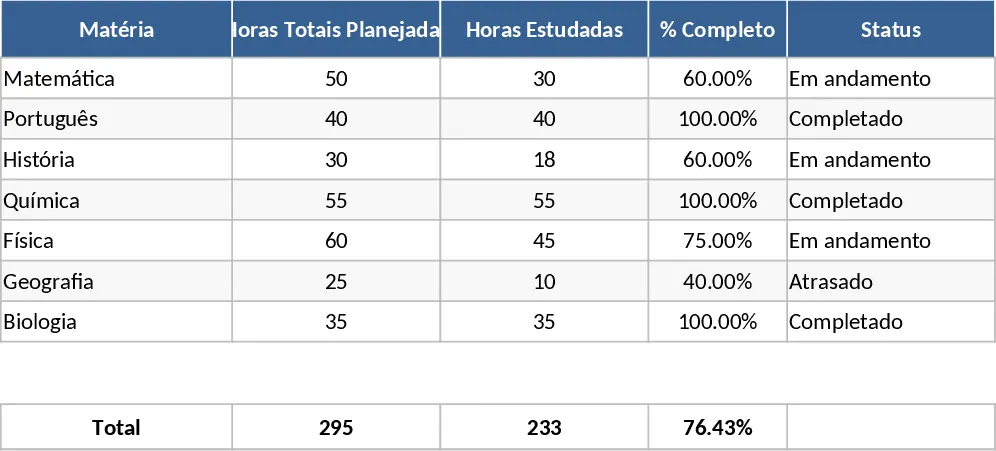
Comprehensive Exam Preparation and Study Tracker Template
Organize your study schedule, track syllabus progress, and analyze mock exam performance with an automated dashboard for exam candidates.