

Simple Two-Column Table Template
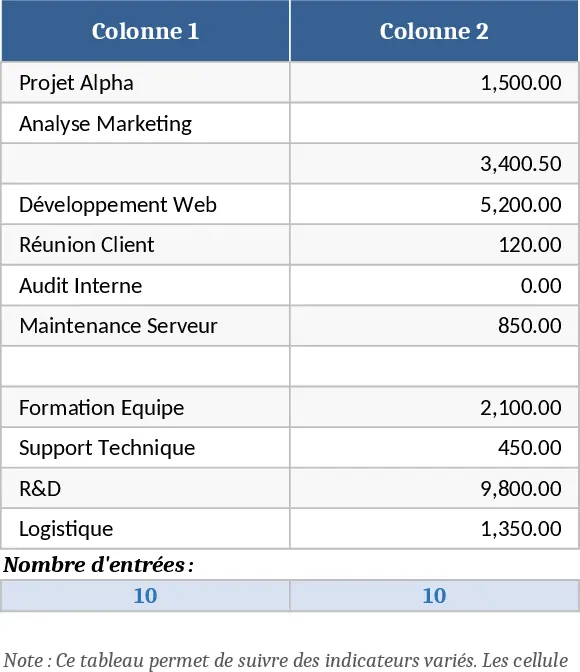
This template gives you a ready‑made two‑column table that you can instantly fill with any list of items and mark each entry with a checkbox. The sheet is laid out with Column A for the description or name of each item and Column B containing a pre‑formatted checkbox that you can tick or leave blank. The design is clean, printable, and works in any language, making it ideal for quick checklists, inventory logs, survey results, or simple status trackers.
Because the table is already set up with data‑validation checkboxes, you don’t need to spend time building the structure from scratch. Just start typing your entries in the left column, and click the boxes in the right column as you complete each item. The template also includes a small summary area at the top that automatically counts how many boxes are checked versus total items, giving you an instant progress snapshot.
This tool is perfect for anyone who needs a fast, organized way to capture and monitor a list of items – from teachers preparing classroom activity sheets, to project coordinators tracking deliverables, to HR staff managing onboarding steps, or even individuals planning personal to‑dos. The straightforward layout removes the guesswork of formatting and lets you focus on the content that matters.
How to use
- Open the workbook and go to the "Checklist" sheet. In column A, type each item, task, or data point you want to track.
- In column B, click the checkbox next to each entry to mark it as completed; the box will turn checked automatically.
- Watch the summary at the top update the count of completed items in real time.
- When finished, print the sheet or export it as PDF for sharing or archiving.
Expected benefits: you’ll save the time normally spent designing a table and adding checkboxes, enjoy a consistent look for all your lists, and get an instant visual cue of progress without manual calculations.
Similar Templates Recommendation
Secondary School Results and Ranking Template
Track up to 200 secondary students' marks, auto‑calculate grades, averages, divisions and rankings in a clear, formatted sheet.

Couple Budget and Cash Flow Tracker Template
Track monthly income, expenses, and cash flow for a working couple, visualize budgets and savings goals in one spreadsheet.

Date Range and Internal Log Template
Create an Excel file with two columns for dates and internal notes, with colored rows for different date ranges.
