Semester Budget and Expense Tracker Template
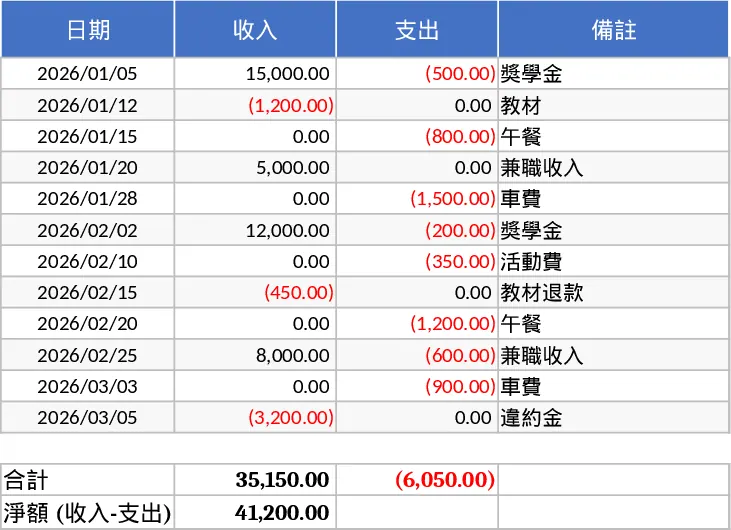
This comprehensive financial tracker is designed to help you maintain a clear and organized record of your personal finances across different academic terms. The template features a structured layout where you can log every transaction, including the date, specific income or expense amounts, and detailed remarks. A dedicated section for the previous semester's total ensures that your financial history remains continuous, allowing you to see exactly how much capital you are carrying forward into the new term.
Whether you are a student managing a limited budget or an individual looking for a simple way to track cash flow, this tool provides the clarity needed to make informed spending decisions. By categorizing your transactions and keeping notes on specific purchases, you can identify spending patterns and find opportunities to save. The template automatically calculates your current balance by factoring in your starting funds and all subsequent entries, giving you a real-time view of your financial health.
To use this template effectively, follow these steps:
- Enter your total closing balance from the previous semester in the designated carryover cell to set your starting point.
- Begin logging your daily activities by filling in the date, entering the amount under income or expense, and adding a brief description in the remarks column.
- Review the automated summary at the top of the sheet to see your total earnings, total spending, and the final net balance for the current period.
Using this template reduces the manual effort required to calculate complex balances and helps prevent overspending. It provides a reliable digital ledger that saves time during busy exam seasons or end-of-month reviews, ensuring you always know exactly where your money is going.
Similar Templates Recommendation
Monthly Budget with Weekly Spending and Savings Breakdown Template
Manage your monthly finances by breaking down three income streams and eleven expense categories into manageable weekly spending and saving targets.
Monthly Personal Finance and Expense Tracking Dashboard Template
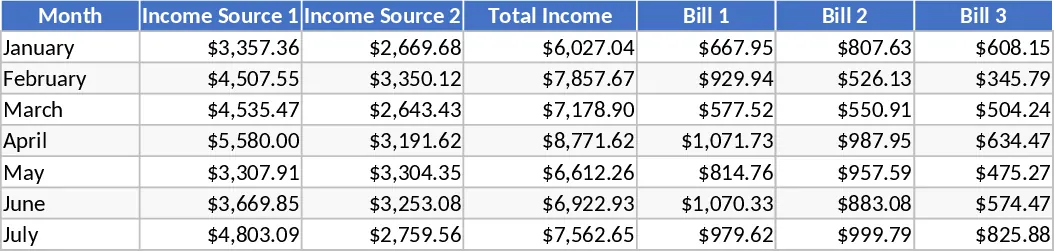
Manage monthly income and expenses with color-coded categories and a visual dashboard to gain full control over your personal finances.
Monthly Personal Budget Template
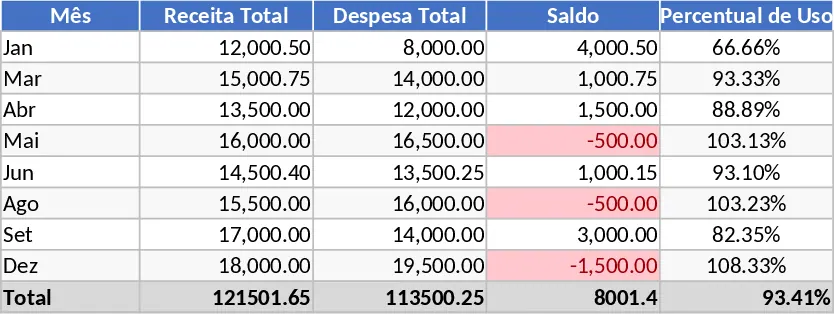
Take control of your personal finances by tracking monthly income sources and categorizing expenses like rent, groceries, and utilities.