Client Visit Activity Log and Effectiveness Tracker Template
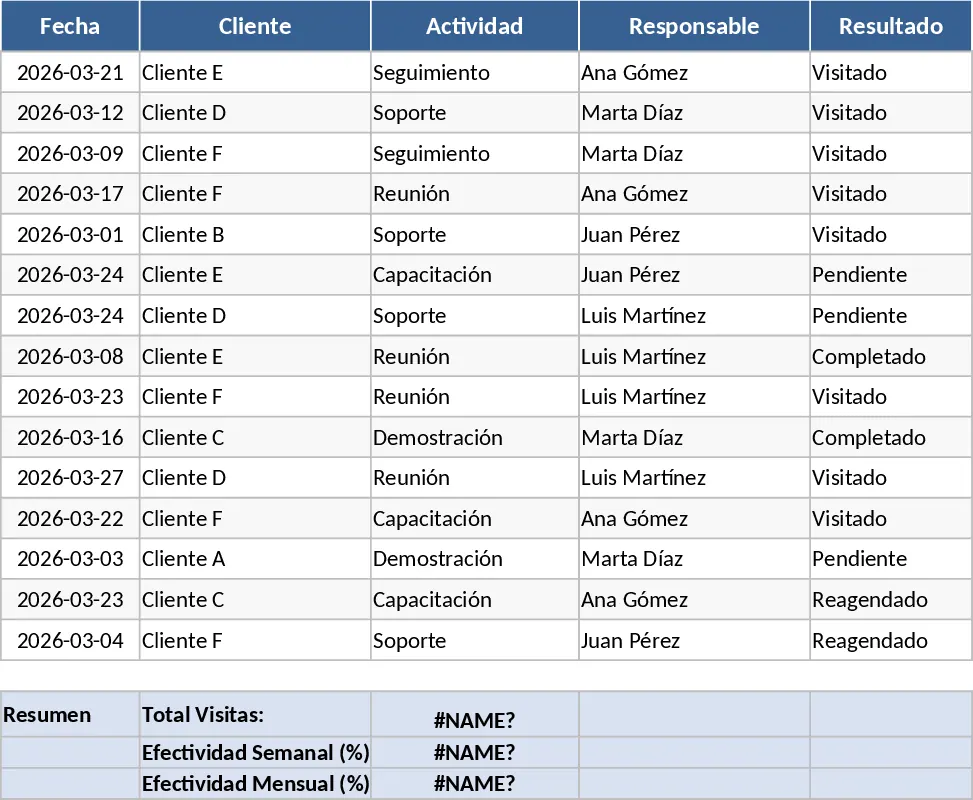
This comprehensive Customer Visit and Effectiveness Tracker is designed for sales professionals, field agents, and account managers who need a structured way to log their daily interactions and measure their performance against specific targets. The template features a centralized activity log where you can record client names, visit dates, meeting purposes, and outcomes. It is pre-configured with a logic that defines success based on your specific goals: 6 visits per week or 24 visits per month represent 100% effectiveness. By consolidating this data into a single source of truth, the template eliminates the guesswork in sales reporting and provides a clear, visual representation of your productivity levels and field coverage.
The core of the template is the automated dashboard, which transforms your raw activity list into insightful weekly and monthly charts. These visualizations allow you to see at a glance whether you are meeting your quotas or if you need to ramp up your outreach efforts. It is particularly useful for professionals who manage a high volume of clients and need to ensure that no account is neglected. Instead of manually calculating percentages or drawing charts in external software, the built-in formulas handle the math, ensuring that your effectiveness rating is always up to date as soon as you enter a new visit. This helps in identifying patterns, such as which weeks are typically slower and where there is room for optimization in your travel or meeting schedule.
The structure includes a data entry sheet with dropdown menus for visit status and categories, making it easy to maintain data consistency. The summary outputs provide a breakdown of total visits versus target visits, giving you a tangible metric for your hard work. This is an essential tool for anyone looking to professionalize their sales workflow, as it provides the data-driven insights necessary for performance reviews and strategic planning. Whether you are working solo or reporting to a manager, having a visual history of your client engagements is invaluable for long-term relationship management.
How to use this template:
- Open the Activity Log sheet and enter your client visit details, including the specific date and the name of the contact person.
- Update the status of each visit as completed to ensure the formulas count them toward your weekly and monthly totals.
- Navigate to the Dashboard tab to view your weekly and monthly effectiveness charts, which automatically compare your actual visits against the 6 and 24-visit benchmarks.
- Use the insights from the charts to adjust your schedule for the following week, ensuring you stay on track to hit your 100% effectiveness goal.
By implementing this tracking system, you can expect to save hours of manual calculation time each month while gaining a much clearer understanding of your sales rhythm. It provides the accountability needed to maintain a high level of activity, ultimately helping you reach your sales targets with greater precision and significantly less administrative effort.