

Half Marathon Season Calendar Template
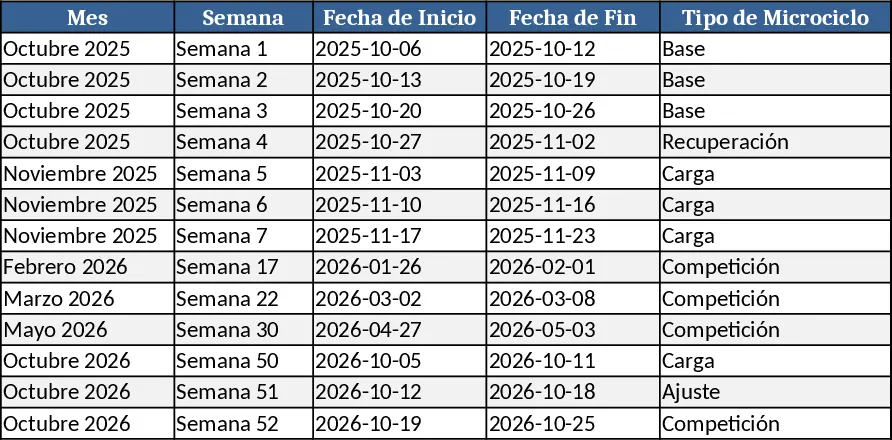
This template is built for runners and coaches who need a clear, visual roadmap of a half‑marathon season split into two six‑month macro‑cycles. The workbook contains four sheets: Macrocycle Overview, where you set the start and end dates for each six‑month block; Microcycle Planner, a table that breaks the season into weekly micro‑cycles with columns for date, day, training type (easy, interval, long), target pace, duration, and notes; Competition Tracker, a simple list of race dates, distances and locations; and Season Calendar, a automatically generated calendar view that colors each training day and highlights competition days.
By entering the macro‑cycle dates, the template creates week numbers and populates the micro‑cycle rows. Dropdown menus let you pick the training type, and conditional formatting shades easy runs in green, interval sessions in orange, and long runs in blue. The Competition Tracker feeds directly into the calendar, so every 5k, 10k or half‑marathon appears as a bold icon on the correct date. Summary cells at the top of the workbook calculate total weekly mileage, average pace, and the number of competition weeks, giving you a quick health check on training load.
This tool solves the common problem of juggling multiple training blocks and race dates without losing sight of the overall progression. It helps you avoid over‑training by visualizing hard sessions and rest days, ensures that key races are placed at optimal points in the plan, and provides a ready‑to‑share calendar for athletes, clubs or sponsors. Whether you are a solo runner planning your own season or a coach designing programs for several athletes, the template streamlines the scheduling process and keeps everyone aligned.
How to use
- Open the Macrocycle Overview sheet and type the start and end dates for Cycle 1 (Oct 2025 – May 1 2026) and Cycle 2 (Apr 2026 – Oct 25 2026). The sheet will auto‑fill week numbers.
- Switch to Microcycle Planner and, for each week, select the training type from the dropdown, enter the target pace (e.g., 6:00 min/km), and specify the duration or distance. The template will compute weekly mileage.
- Add each race to the Competition Tracker with date, distance and location. The calendar will automatically highlight these days.
- Go to the Season Calendar sheet to view the full visual schedule. Print or export as PDF to share with your athlete or team.
Expected benefits: you’ll spend far less time manually drawing calendars, reduce the risk of missed races, and gain a quick visual cue of training balance, freeing mental bandwidth for actual training and recovery.
Similar Templates Recommendation
Secondary School Results and Ranking Template
Track up to 200 secondary students' marks, auto‑calculate grades, averages, divisions and rankings in a clear, formatted sheet.

Couple Budget and Cash Flow Tracker Template
Track monthly income, expenses, and cash flow for a working couple, visualize budgets and savings goals in one spreadsheet.

Date Range and Internal Log Template
Create an Excel file with two columns for dates and internal notes, with colored rows for different date ranges.
