

Initial Fiscal Inflation Adjustment Balance Sheet Template
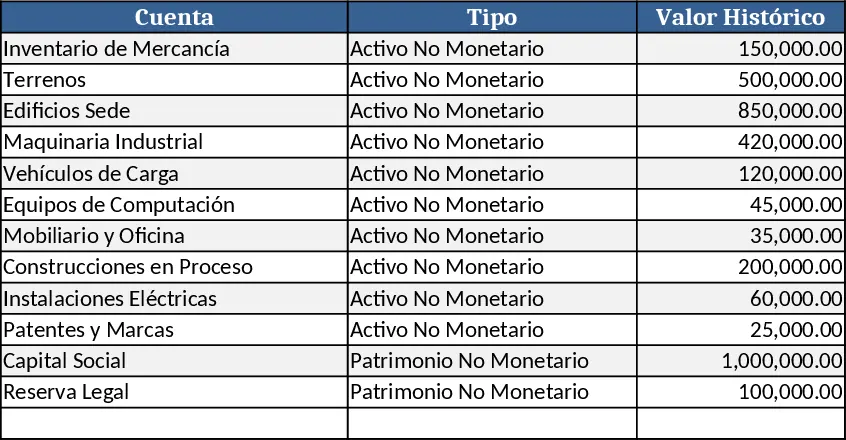
This Excel template is built for companies that must apply the initial inflation adjustment required by Venezuelan tax law. It contains four linked sheets: Input Data where you paste the original balance sheet, CPI table and detailed inventory and fixed‑asset listings; Inflation Index where you enter monthly or yearly consumer‑price‑index values; Revaluation Engine that automatically calculates the inflation factor, applies it to each non‑monetary asset and liability, updates accumulated depreciation and computes the new book values; and Summary that presents the adjusted fiscal balance sheet ready for filing. Dropdowns let you select the base year and the target year, while protected cells keep formulas intact.
The template eliminates the tedious manual calculations that accountants usually perform when re‑valuing assets and liabilities for inflation. By pulling the CPI data you provide, it derives the correct revaluation factor, applies it consistently across all line items, and produces a clean, audit‑ready balance sheet. This saves time, reduces the chance of transcription errors, and ensures compliance with the fiscal reporting standards that demand an inflation‑adjusted opening balance.
Designed for finance professionals, tax consultants, and CFOs working in high‑inflation environments—especially Venezuelan firms—it helps anyone who needs to prepare the initial fiscal balance sheet after a period of hyperinflation. The template tracks original book values, inflation rates, revaluation factors, updated depreciation schedules, and the resulting equity positions, giving a transparent view of how inflation reshapes the company’s financial position.
How to use
- Open the Input Data sheet and copy the pre‑inflation balance sheet figures (assets, liabilities, equity) into the designated cells.
- Enter the CPI values for the base year (e.g., 2019) and the target year (e.g., 2020) in the Inflation Index sheet; the template will calculate the inflation multiplier.
- Fill the inventory and fixed‑asset tables with quantities, unit costs, acquisition dates and useful lives; the engine will adjust these items automatically.
- Switch to the Summary sheet – the revalued asset and liability amounts, updated depreciation, and the new fiscal balance sheet appear instantly.
Expected benefits: you’ll cut hours of manual spreadsheet work and reduce the risk of calculation errors while producing a compliant, inflation‑adjusted balance sheet.
Similar Templates Recommendation
Secondary School Results and Ranking Template
Track up to 200 secondary students' marks, auto‑calculate grades, averages, divisions and rankings in a clear, formatted sheet.

Couple Budget and Cash Flow Tracker Template
Track monthly income, expenses, and cash flow for a working couple, visualize budgets and savings goals in one spreadsheet.

Date Range and Internal Log Template
Create an Excel file with two columns for dates and internal notes, with colored rows for different date ranges.
