Solar Energy Sales CRM and Prospect Tracking with Task Status Template
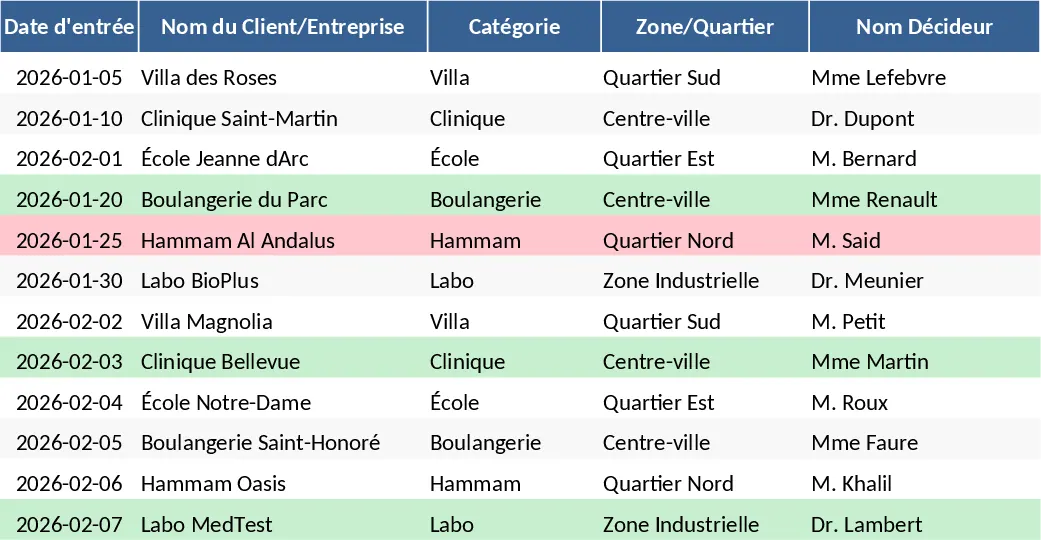
This specialized CRM template is tailored for professionals in the solar energy sector, providing a robust framework to manage the entire sales lifecycle from initial contact to final installation. The core of the system is the Prospect Database, which features pre-configured dropdown menus for client categories like Villas, Clinics, and Schools, alongside a dynamic status tracker. By centralizing lead information, decision-maker contacts, and specific energy pain points, sales representatives can move away from scattered notes and into a structured workflow that ensures no follow-up is missed.
The template includes dedicated sections for tracking quote amounts and lead sources, whether they come from field prospecting, digital marketing, or referrals. This structure allows you to visualize your sales funnel clearly, identifying which sectors are most profitable and which stages of the sale require more attention. With built-in conditional formatting, the sheet provides immediate visual feedback—highlighting won deals in green and lost opportunities in red—making it easy to assess your performance at a glance.
Beyond simple data entry, this tool helps you manage partner relationships and referral networks, which are crucial in the renewable energy industry. It solves the common problem of lead leakage and disorganized documentation, providing a professional way to report on sales targets and project pipelines. Whether you are an independent solar consultant or part of a larger installation team, this template streamlines your daily operations and helps you focus on closing more deals.
How to use:
- Start by populating the Prospect Database with your current leads, selecting the appropriate category and source for each entry.
- Update the Status column as you progress through the sales cycle; use the Quote Amount field to record the financial value of each proposal.
- Apply conditional formatting to the Status column by selecting the range, going to Conditional Formatting, and assigning specific colors to statuses like Won or Lost for better visibility.
- Use the comments section to log specific technical requirements or site visit notes to keep your pitch personalized and professional.
Expected benefits: Significant time saved on lead organization and a much clearer overview of your sales pipeline and projected revenue.
Similar Templates Recommendation
Solar Energy Sales CRM and Prospect Tracking with Dashboard Template
Manage solar energy prospects, track quotes, and monitor sales pipelines with this specialized CRM template for renewable energy professionals.
Professional Sales Pipeline Tracker with Funnel Dashboard Template
Track leads and deal stages with this professional sales tracker featuring a dynamic dashboard and visual funnel chart for pipeline analysis.
Auto Brokerage Prospect & Client Portfolio Template
Track and manage automotive brokerage prospects and sales, organize client portfolio, monitor pipeline and performance in one Excel sheet.