Marketing data used to feel like a tangled mess—until AI came along. Now, tools like RowSpeak (our AI-powered spreadsheet assistant) turn chaos into clear insights faster than you can say "ROI."
For campaign, channel, ROI, or customer reporting, RowSpeak's marketing data analysis with AI connects raw marketing files to a reviewable analysis workflow.
Here’s how to combine Excel’s number-crunching power with AI’s brainpower to level up your marketing game.
Step 1: Know Your Data’s DNA
Before diving into analysis, map out your data sources:
- Demographics: Age, location, gender (who’s buying?)
- Behavior: Clicks, shares, cart abandons (what are they doing?)
- Transactions: Sales, refunds (what’s driving revenue?)
- Engagement: Watch time, scroll depth (what content sticks?)
Pro tip: Use RowSpeak’s auto-categorization to tag messy data instantly—no manual sorting needed.
Step 2: Set Up Your Excel Battle Station
A clean spreadsheet = happy analysis. Structure columns like this:
| Date | Source (e.g., Instagram) | Metric (e.g., CTR) | Value |
|---|
Too busy to format? RowSpeak’s smart templates auto-build marketing dashboards in 2 clicks.
Step 3: Unleash Excel’s Secret Formulas
Stop calculating manually. These formulas do the heavy lifting:
- SUMIFS(): "Show me total sales from Q1 to Q2"
- AVERAGE(): "What is our monthly average sales volume?"
- XLOOKUP(): "Pull last month’s conversion data for this SKU"
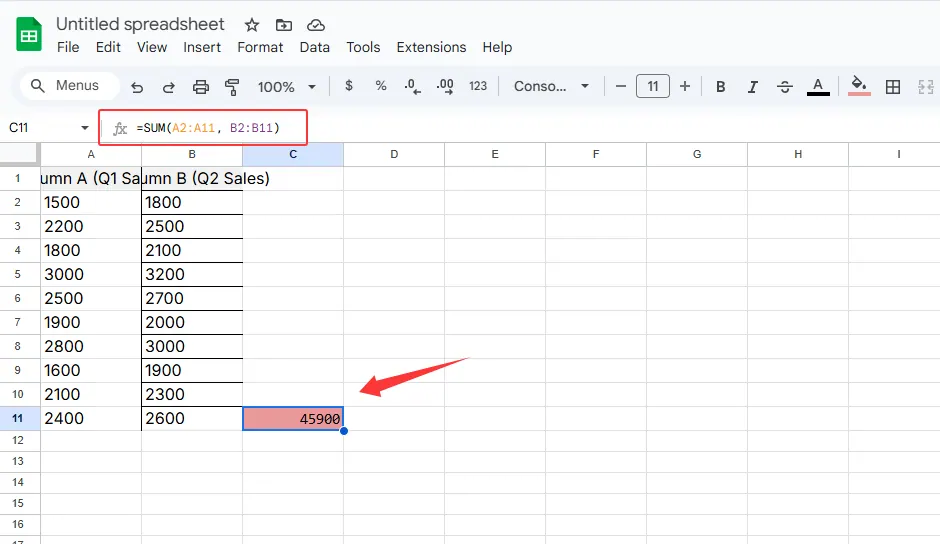
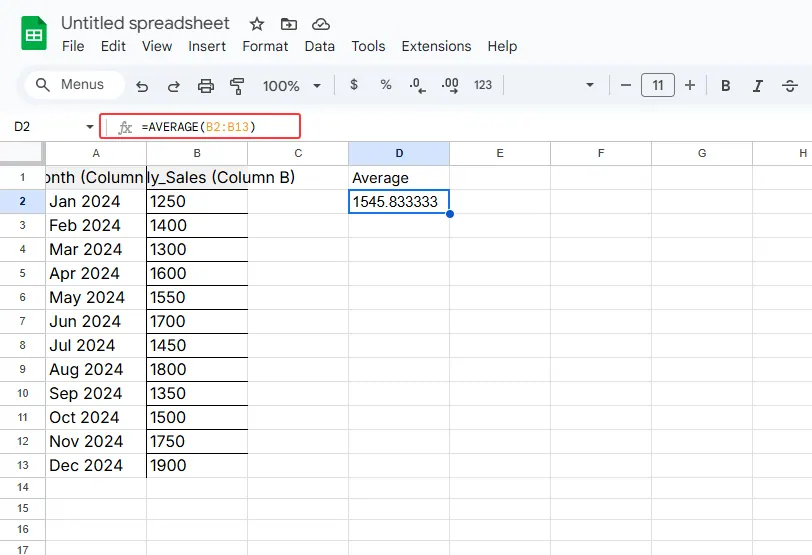
Don’t memorize them—RowSpeak suggests formulas as you type, like Grammarly for spreadsheets.
Step 4: Visualize Like a Data Artist
Numbers lie flat. Charts tell stories. Right-click your data and try:
📈 Line charts for trends (e.g., weekly signups)
📊 Stacked bars for comparisons (Facebook vs. Google Ads)
🍰 Donut charts for budget breakdowns
Step 5: Add AI Superpowers
Here’s where it gets wild. With RowSpeak’s AI Analyst, you can:
Ask questions naturally:
- "Why did Q2 conversions drop?"
- "Predict holiday sales based on last year’s data"
Get instant insights:
- "Your TikTok ads underperform for ages 35+. Try shifting 20% budget to Reels."
Automate reports:
- "Generate a weekly performance PDF for the CEO"
No more staring at pivot tables until 3 AM.
Real-World Example: The 10-Minute Campaign Audit
Imagine analyzing a holiday campaign across 5 channels. Here’s the AI-assisted workflow:
- Dump raw data into RowSpeak
- Ask: "Which channel had the highest ROI?"
- Visualize: Auto-generated bar chart shows Instagram winning
- Diagnose: AI flags "Email subject lines under 50 chars performed 2X better"
- Act: Reshuffle budgets before Black Friday
Traditional time: 4 hours. With AI: under 10 minutes.
Pitfalls to Avoid
🚫 Garbage in = garbage out: Clean data first (use RowSpeak’s Remove Duplicates and Fill Blanks tools)
🚫 Analysis paralysis: Set a 15-minute timer for decision-making
🚫 Siloed data: Connect RowSpeak to your CRM/ads platforms for live updates
Why Stop at Excel + ChatGPT?
While pairing Excel with generic AI helps, RowSpeak is built specifically for marketing data:
✔ No prompt engineering—ask in plain English
✔ One-click integrations with Google Analytics, Meta Ads, etc.
✔ Team collaboration with shared dashboards
Think of it as ChatGPT with a marketing degree and Excel on steroids.
Your Turn
Next time you’re drowning in spreadsheets:
- Upload data to RowSpeak
- Ask what you need (e.g., "Find top 3 leaky funnel stages")
- Implement the AI’s recommendations
Data-driven decisions shouldn’t require a data science team. With the right tools, they’re just a few clicks away.
P.S. Hit reply if you want our free "5-Minute Marketing Audit" RowSpeak template—pre-loaded with AI analysis shortcuts.