Travel Budget Planner and Dashboard Template
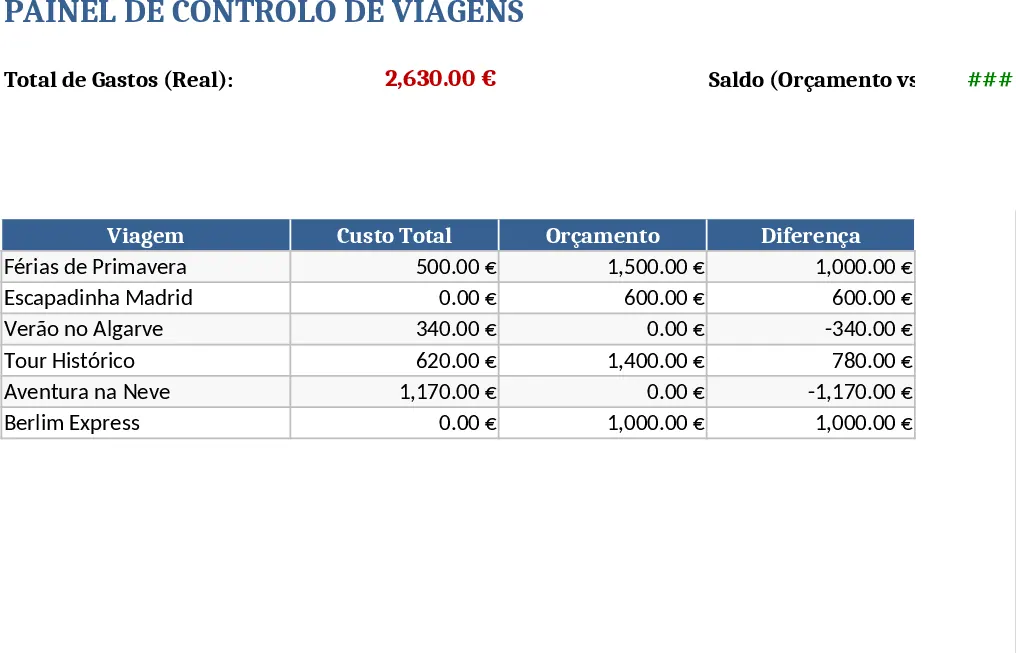
This Excel template is built for anyone who needs to organise multiple trips while keeping a clear eye on costs. It contains four worksheets: Travel List, where you record each journey’s destination, departure and arrival dates, price per person and any notes; Budget, where you enter the planned budget for each trip and the template automatically calculates total costs, remaining funds and variance; Dashboard, a visual summary that charts total spend, average cost per trip and budget utilisation; and an optional Extras sheet for additional data such as accommodation, transport modes or activity costs. All sheets are linked with formulas, so updating a single cell instantly refreshes totals and charts.
The template solves the common headache of scattered travel information and manual calculations. By consolidating itinerary details and financial data in one place, you eliminate duplicate entry, reduce errors and gain instant insight into how each trip impacts your overall budget. The dashboard gives you a quick visual snapshot, making it easy to spot overspending or identify cost‑saving opportunities without digging through rows of numbers. This streamlined approach saves time during planning and reporting, and helps you stay within budget limits.
It is ideal for travel coordinators in small companies, project managers organising field work, families planning vacations, or anyone who regularly books trips and needs to monitor expenses. Whether you are arranging business travel, conference attendance, or personal holidays, the template adapts to any scenario where you need to track dates, destinations, per‑person costs and overall spend.
With this tool you can track every aspect of a journey: destination, start and end dates, number of travellers, price per person, total cost, and the difference between planned and actual spend. The Budget sheet also lets you break down costs into categories (transport, lodging, meals, activities) and see how each contributes to the total. The Dashboard visualises these figures with bar and pie charts, so you can instantly compare trips, monitor trends over time, and present clear reports to stakeholders.
How to use
- Open the file and go to the Travel List sheet. Fill in each row with the trip name, destination, departure and return dates, number of travellers and price per person.
- Switch to the Budget sheet and enter the allocated budget for each trip. The sheet will automatically compute total cost, remaining budget and variance.
- Review the Dashboard sheet – charts will update automatically to reflect the data you entered, showing total spend, average cost per trip and budget utilisation.
- (Optional) Add any extra line items in the Extras sheet, such as accommodation or activity fees, and the totals will flow into the Budget and Dashboard automatically.
Expected benefits: you’ll spend far less time juggling separate spreadsheets, enjoy up‑to‑date cost insights at a glance, and make more informed decisions about future travel planning.