Swiss CFP Case Study B1 & B2 Financial Planning Calculator Template
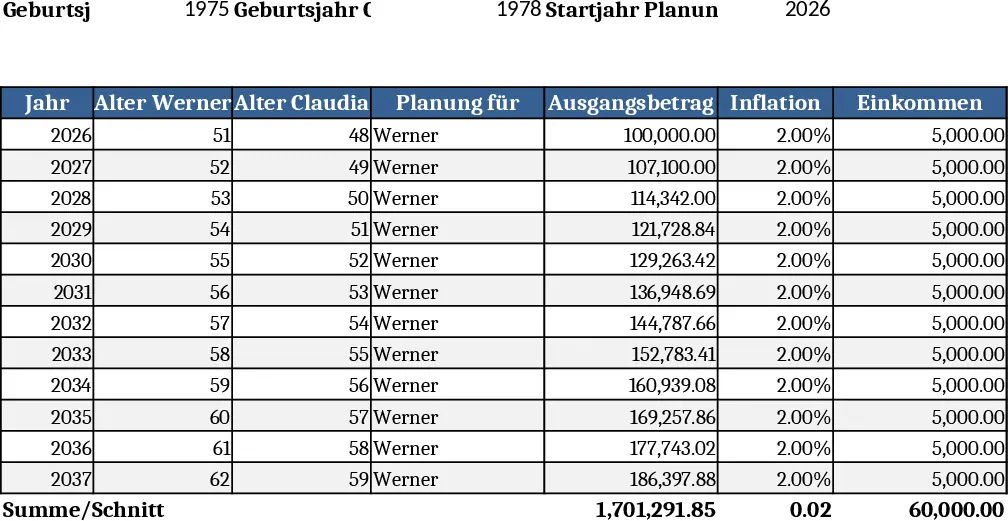
This Excel workbook is built for Swiss financial planners who need a repeatable, self‑calculating tool for case‑based financial planning. The file contains three main sheets: Input, B1 – Scenario 12, and B2 – Scenario 15. In the Input sheet you record the couple’s personal details (names, birth dates, start‑year of planning) and the core assumptions such as inflation, expected income growth, and investment return rates. Drop‑down lists let you assign each cash‑in or cash‑out entry to either Werner or Claudia, while blue‑shaded cells are free‑form inputs and red‑shaded cells automatically compute balances, tax impacts, and retirement needs based on the fixed formulas taken from the official solution guides.
The B1 sheet mirrors the original "Fall B1 – Aufgabe 12" example. It pulls the base values from the Input sheet, runs the pre‑programmed calculations, and displays a year‑by‑year cash‑flow table, net worth trajectory, and a summary chart that highlights the year the couple reaches their retirement target. The B2 sheet replicates "Fall B2 – Aufgabe 15" on a separate tab, allowing you to copy the structure for multiple client families. All formulas are locked, so only the blue cells need updating; the red cells recalculate instantly, giving you a clean, error‑free projection for each scenario.
This template solves the time‑consuming manual spreadsheet work that often accompanies exam preparation or client onboarding. By centralising assumptions and automating the heavy arithmetic, you avoid transcription errors, keep every scenario consistent with the official solution methodology, and can quickly test “what‑if” variations such as higher inflation or different contribution levels. The built‑in dropdowns and protected formula cells make the workbook safe for sharing with junior analysts or clients who only need to fill in their personal data.
Who benefits? Financial planners, wealth‑management interns, and certification candidates who need a reliable, editable model for Swiss retirement and cash‑flow planning. It is especially handy when you must produce multiple client scenarios from the same base assumptions, or when you are preparing study material that mirrors the official exam cases.
How to use
- Open the Input sheet and fill in the personal data, birth dates, start year, and adjust the assumption cells (inflation, income growth, interest rate). Use the drop‑down menus to tag each cash flow with the correct client name.
- Switch to the B1 – Scenario 12 tab; the sheet will instantly pull the inputs and display a detailed yearly cash‑flow table and a retirement‑target summary.
- Move to the B2 – Scenario 15 tab, enter any scenario‑specific blue‑cell values, and watch the red‑cell results update automatically for each family member.
- Export the summary tables or charts for client presentations, or copy the entire workbook to reuse the structure for new cases.
Expected benefits include a noticeable reduction in manual calculation effort, consistent alignment with official solution formats, and faster generation of client‑ready projection reports.