قالب إدارة محل دواجن شامل Template
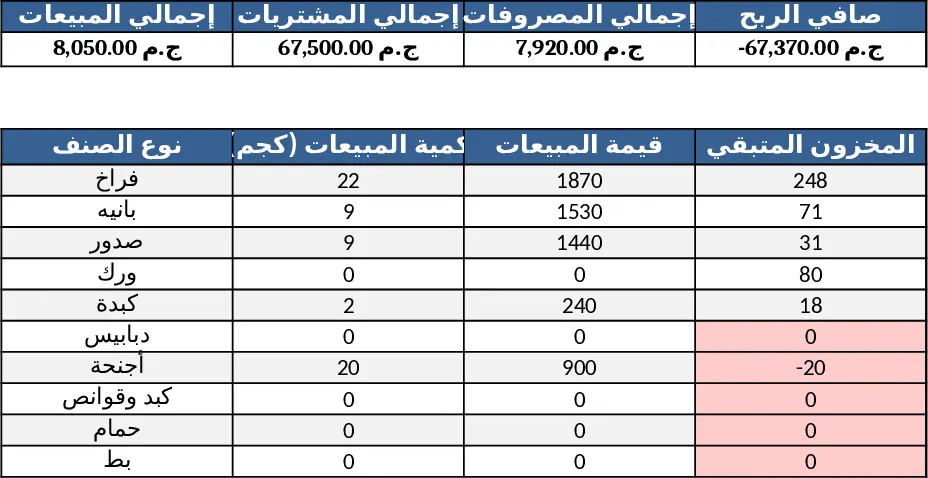
This ready‑to‑use Excel workbook is built for a poultry shop that needs a single place to record every transaction and see the health of the business at a glance. The file contains six inter‑linked sheets, each designed with frozen header rows, data‑validation drop‑downs for product types and payment methods, and conditional formatting that flags low stock or overdue payments.
Sheet 1 – Purchases (Traders) captures trader name, date, product type (e.g., فراخ, بانيه, صدور, …), weight in kilograms, price per kilo and an auto‑calculated total. A weekly summary table automatically aggregates each trader’s purchases, and a filter lets you view a single trader’s activity.
Sheet 2 – Sales records the date, product type, quantity sold, selling price and payment method (cash or credit). Daily sales totals are computed instantly, and a pivot‑style summary highlights the best‑selling product.
Sheet 3 – Inventory pulls the added weight from Purchases and the deducted weight from Sales, showing current stock per product. The remaining quantity column updates in real time, and a conditional format turns red when stock falls below a preset threshold, giving you an early warning before you run out.
Sheet 4 – Expenses logs every outflow with date, expense category (fixed, daily, emergency), line‑item (rent, labor, electricity, transport, etc.) and amount. The sheet automatically separates expenses by type and provides daily and monthly totals.
Sheet 5 – Cash & Credit is split into two sections. The credit ledger tracks each customer’s invoice, payments received and outstanding balance. The cash ledger aggregates daily cash sales, subtracts daily expenses, calculates net cash for the day and rolls the balance forward, so you always know how much cash is on hand.
Sheet 6 – Dashboard brings the key numbers together: total sales, total purchases, total expenses, net profit, profit margin per kilo, top and bottom selling items, and current inventory status. Clean bar and pie charts make trends easy to read, while a simple layout keeps the view uncluttered.
The template solves the daily headache of juggling separate notebooks or scattered spreadsheets. By automating calculations and linking every sheet, it eliminates manual re‑entries, reduces errors, and gives you instant insight into profitability and stock levels. It is ideal for small‑to‑medium poultry shop owners, managers, or accountants who need a low‑cost, Arabic‑language solution that works on any standard version of Excel.
How to use
- Open the workbook and start entering data on the Purchases sheet – select the product from the drop‑down, fill weight and price, and the total will appear automatically.
- Record each sale on the Sales sheet, choosing cash or credit; the daily sales total and best‑seller update instantly.
- Add any expense on the Expenses sheet; the daily and monthly totals recalculate without any extra steps.
- Review the Cash & Credit sheet each evening – cash sales are added to the cash balance, credit payments reduce outstanding balances, and the cumulative cash figure shows your available funds.
- Switch to the Dashboard whenever you need a quick snapshot; charts refresh automatically to reflect the latest entries.
Expected benefits: you’ll spend far less time reconciling numbers, enjoy up‑to‑date inventory alerts, and gain clearer visibility into profit margins, helping you make faster, data‑driven decisions for your poultry business.
Similar Templates Recommendation
Arabic Poultry Shop Management Excel Template
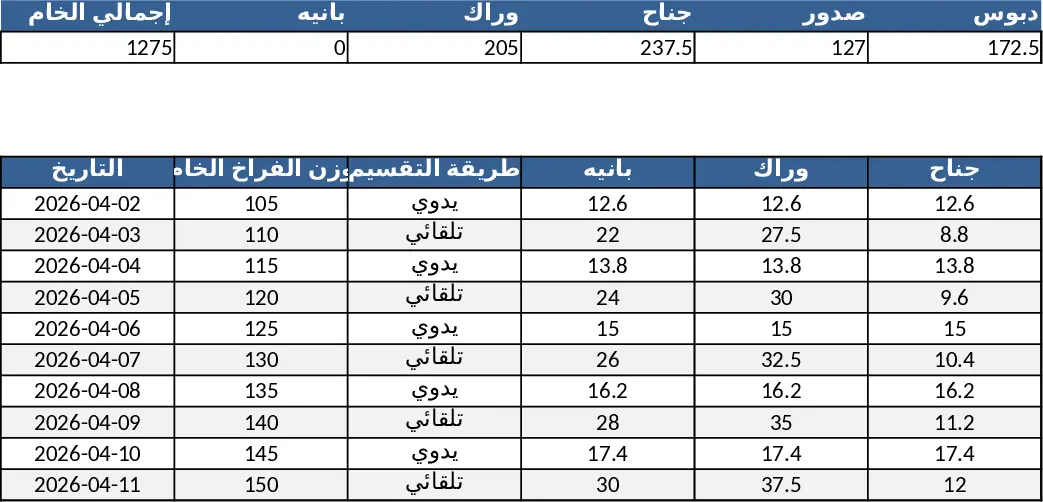
Track poultry purchases, processing, inventory, sales, expenses and cash flow in one Arabic Excel workbook with automated calculations and a visual dashboard.
Dairy Product Inventory Management Template
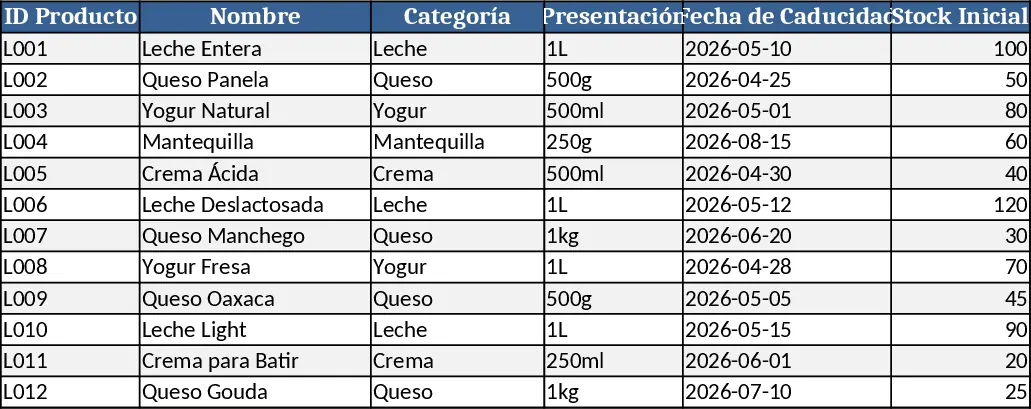
Track dairy product stock, monitor purchases, sales, and expiration dates in a single Excel workbook.
Restaurant Daily Sales & Profit Dashboard Template
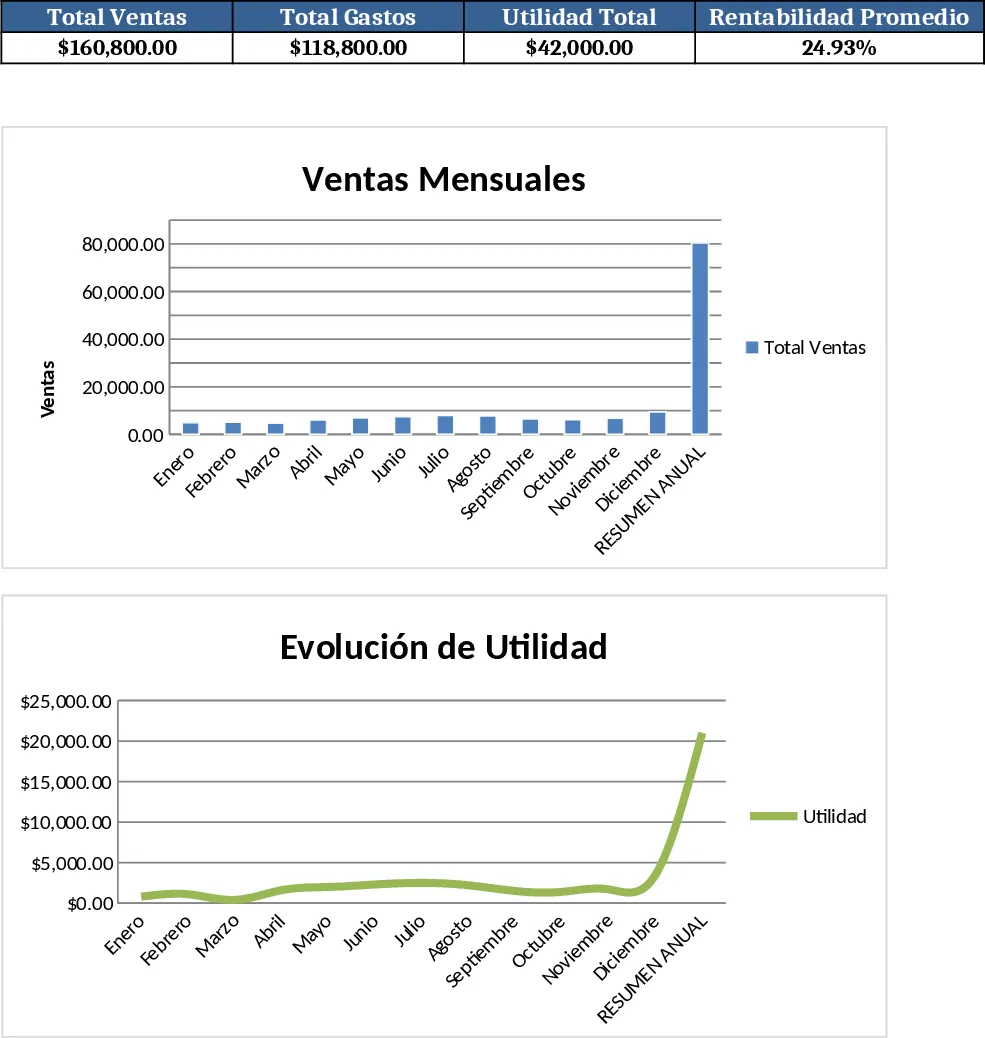
Track daily restaurant product sales, expenses, and monthly profitability with a ready‑to‑use Excel dashboard and optional macros.