Adecco Vacation & Rest‑Bonus Tracker Template
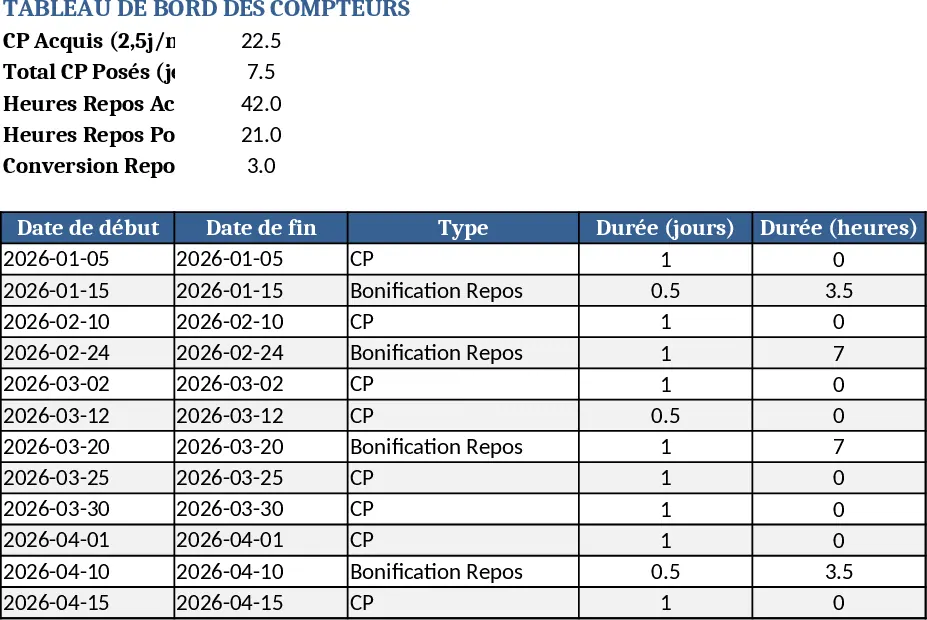
This Excel workbook lets you manage all your paid leave and overtime‑bonus hours on a single, easy‑to‑use sheet while a hidden calendar sheet takes care of French working days and public holidays. The main sheet contains a table where you record each request: date, type (CP for "congé payé" or "bonus repos"), duration (0.5 or 1 day), and a comment field. Dropdown menus prevent manual entry errors, and conditional formatting highlights approved, pending, or past requests. Behind the scenes, formulas calculate your monthly accrual of 2.5 CP days, add the weekly‑generated bonus hour (4 h per month), and automatically convert accumulated bonus hours into days. A summary block at the top shows total accrued leave, used leave, remaining days, total bonus hours, and their day equivalent. The secondary sheet holds a French business‑day calendar (Monday‑Friday) with all fixed and variable public holidays pre‑loaded; any date you pick for a leave request is cross‑checked against this calendar, so holidays are never counted as work days.
The template solves the common headache of manually tracking intermittent contracts, especially for interim workers who have no fixed reference period. By linking leave entries to a dynamic calendar, you instantly see the impact of a new request on your balance, avoid double‑booking, and stay compliant with French labor rules. It also consolidates overtime bonus tracking, turning weekly extra hours into a clear, visual count that can be spent like regular leave. This reduces spreadsheet clutter, eliminates guesswork, and gives you confidence that your entitlement is always up‑to‑date.
Ideal for interim employees, freelancers, or small HR teams that need a lightweight, self‑contained solution without investing in dedicated software. Use it whenever you need to plan a vacation, request a half‑day, or spend accumulated bonus hours. The workbook keeps a running total from a start date you set (e.g., 06/10/2025) up to today (TODAY()), so you can see historic usage and future entitlement at a glance.
How to use
- Open the workbook and set your start date on the "Settings" tab (default 06/10/2025). The sheet will auto‑populate the accrual schedule.
- In the "Leave Tracker" table, select the request date, choose CP or Bonus from the dropdown, and enter 0.5 for a half‑day or 1 for a full day.
- The formulas will instantly deduct the amount from your remaining balance, update the bonus‑hour counter, and reflect the change in the summary block.
- Review the visual calendar on the right side of the sheet to see your planned days highlighted alongside French holidays.
Expected benefits: you’ll spend far less time calculating entitlements, avoid errors caused by holiday overlaps, and have a clear, up‑to‑date picture of both vacation and bonus hours at any moment.