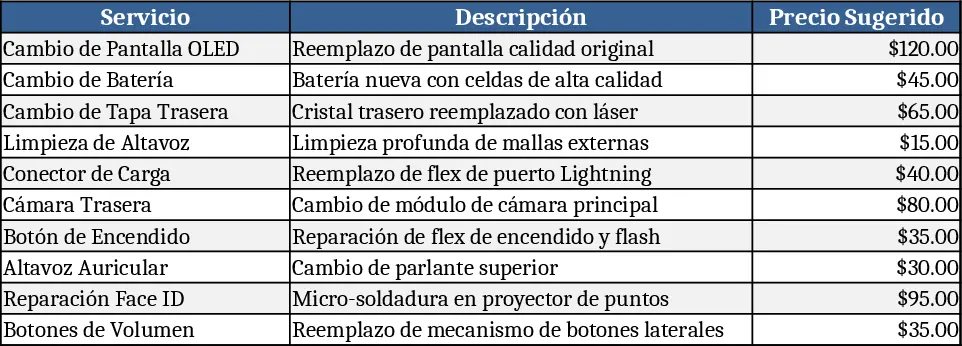
iPhone Series Service Price List Template
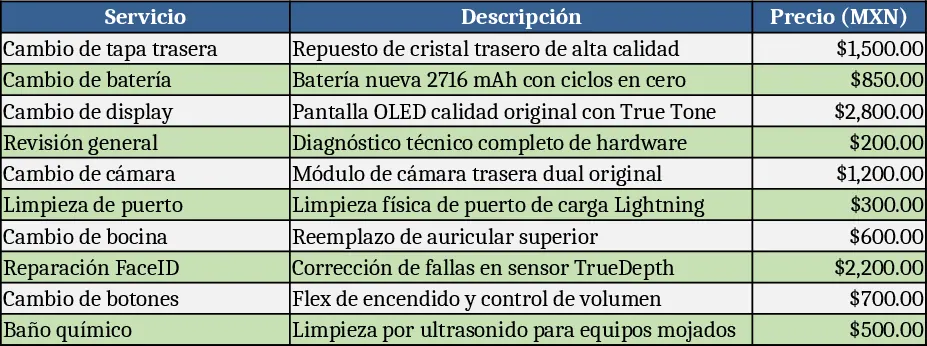
This Excel template gives you a clean, ready‑to‑use price list for every iPhone model from the iPhone X up to the latest series. Each model gets its own worksheet, automatically colored with a matching tab background so you can jump between devices at a glance. Within each sheet the rows alternate between two subtle shades, making the long list of SKUs easy to read. The core columns cover the model name, storage options, base retail price, and a set of service items such as back‑cover replacement, battery swap, screen repair, and other common fixes. Totals and subtotals are calculated on the fly, and a summary sheet pulls the highest‑level figures – total inventory value, average service cost, and a quick reference price matrix across all models.
The template solves the everyday headache of maintaining a consistent, visually organized price catalog for a fast‑changing product line. Instead of manually recreating tables for each new iPhone release, you simply duplicate the base sheet, rename the tab, and adjust the pricing cells. The built‑in color coding and alternating rows keep the data legible even when dozens of rows are displayed, reducing errors when quoting customers or preparing sales sheets. It’s especially handy for retail managers, phone repair shops, and e‑commerce teams that need to present both device prices and ancillary service fees in a single, professional document.
Anyone who sells iPhones or offers repair services will find this template useful – from small boutique repair shops to large carrier retail outlets. It works best when you need to keep track of multiple price points (different storage capacities, trade‑in values, or promotional discounts) and want a quick way to generate quotes or price sheets for customers. By centralising all model‑specific data, the file becomes a single source of truth, eliminating the need to juggle separate spreadsheets or handwritten lists.
How to use
- Open the workbook and locate the "Model Index" sheet – this lists all iPhone generations with a link to their dedicated tabs. Click a tab to view the pre‑formatted table for that model.
- Enter or update the retail price, storage variants, and service fees in the highlighted yellow cells. The template will automatically recalculate subtotals and the overall summary.
- If a new iPhone version is released, right‑click an existing sheet, choose Move or Copy, check Create a copy, rename the tab, and adjust the color via the tab‑color menu to match the series.
- Review the "Summary" sheet to see aggregated totals, average prices, and a quick‑look matrix you can copy into proposals or presentations.
Expected benefits: streamlined pricing updates, clearer visual organization, and reduced time spent assembling quotes, letting you focus more on sales and service delivery.