Client Deadline Tracker and Status Template
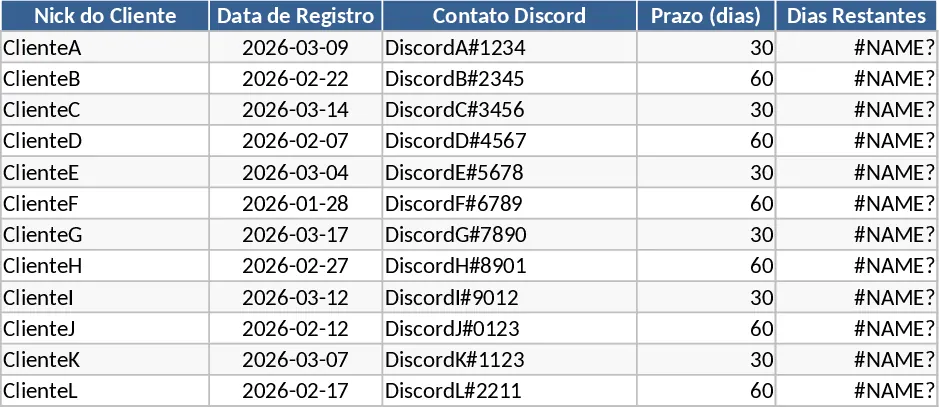
This Excel template provides a single, ready‑to‑use worksheet for managing client deadlines. The sheet is organized into six core columns: Nick do Cliente (client nickname), Data de Registro (registration date, entered manually or set to today), Contato Discord (Discord contact), Prazo (deadline period, selectable as 30 or 60 days), Dias Restantes (automatically calculated remaining days), and Status do Prazo (automatically generated status). The Prazo column uses a dropdown list to enforce only the allowed values, while Dias Restantes subtracts the elapsed days from the chosen prazo. The Status do Prazo column shows “Ativo” when more than five days remain, “Próximo do vencimento” when five days or fewer are left, and “Vencido” once the deadline has passed. Conditional formatting paints rows green, yellow, or red according to the status, giving an instant visual cue.
The template solves the common pain of manually tracking multiple client timelines and constantly updating spreadsheets. By automating date calculations and status flags, it eliminates human error, ensures you never overlook an approaching deadline, and makes it easy to prioritize outreach. The built‑in filters on each header let you quickly isolate clients that are overdue or nearing expiration, while the frozen top row keeps column titles visible as you scroll through long lists. Auto‑adjust column widths keep the view tidy, and the layout is designed for simple expansion—just add new rows and the formulas propagate automatically.
Ideal for account managers, client success specialists, freelancers, or any team that needs to keep a pulse on service agreements, support windows, or deliverable dates. Whether you’re handling a handful of high‑value accounts or a large portfolio of customers, this sheet gives you a clear, at‑a‑glance dashboard of who needs attention and when.
How to use
- Open the template and duplicate the sheet if you want to keep a master copy untouched.
- Enter the client nickname, registration date (or leave blank to auto‑fill with today’s date), and Discord contact.
- Choose the appropriate prazo (30 or 60 days) from the dropdown; the sheet instantly computes the remaining days and updates the status.
- Use the filter arrows on the header row to sort or filter by status, allowing you to focus on “Próximo do vencimento” or “Vencido” entries.
Expected benefits: reduces manual calculation time, minimizes missed deadlines, and provides a visual, up‑to‑date overview of client timelines, helping you stay organized and proactive.