Empty Cell Pink Highlight Tracker Template
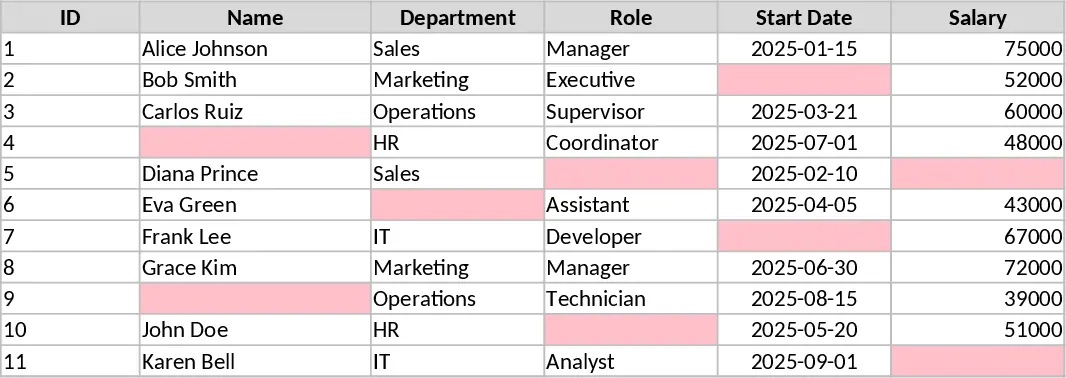
This versatile data entry template is designed to eliminate the frustration of missing information in your spreadsheets. By utilizing smart conditional formatting, the sheet automatically highlights empty cells in a soft pink hue, providing an immediate visual cue for required fields. The layout is clean and professional, featuring a structured table where you can define your own headers for any task—from inventory management and contact lists to project logs and survey responses. As you enter data into the highlighted boxes, the pink background disappears, giving you a clear sense of progress and completion.
This tool is particularly useful for teams or individuals who handle high volumes of manual data entry and want to reduce human error. It serves as a self-correcting form that ensures every row is fully populated before you finalize your report. Whether you are tracking daily operations, managing a small business inventory, or organizing event registrations, the visual feedback loop helps maintain data integrity without the need for complex macros or scripts. The template includes a main data sheet with pre-set formatting rules that can be easily expanded to fit your specific project size.
How to use:
- Open the template and rename the column headers to match the specific data points you need to collect.
- Begin typing your information into the pink-shaded cells; the color will automatically disappear once a value is entered.
- To add more rows, simply copy a formatted empty row and paste it below, or drag the fill handle down to extend the conditional formatting.
- Review the sheet once all pink highlights are gone to ensure your dataset is complete and ready for use.
Expected benefits: This template significantly reduces the time spent auditing data for missing values and minimizes the effort required to maintain clean, professional records.