Student Information Table Template
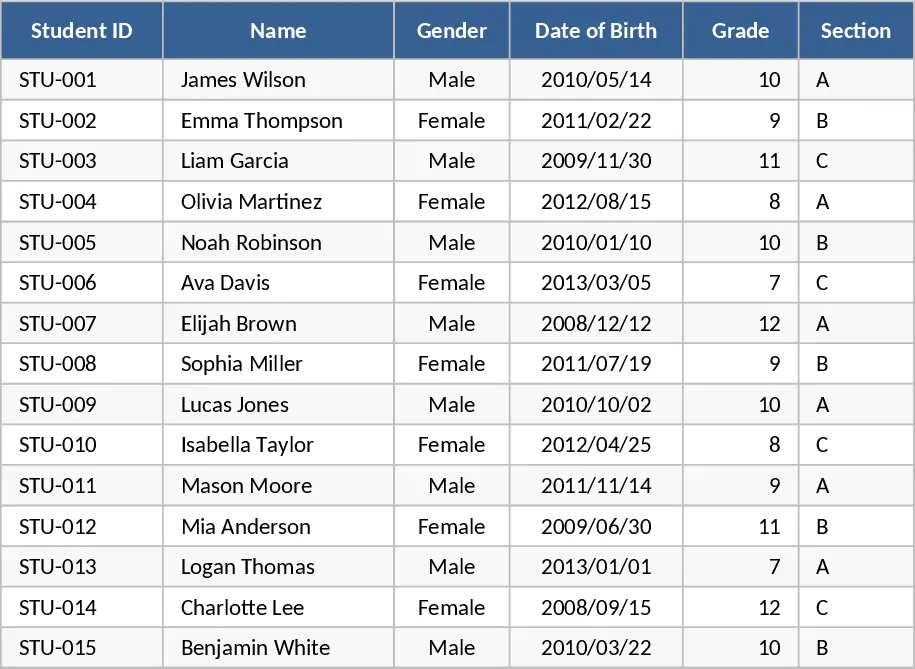
This Student Table template is built for teachers, administrators, and tutoring centers that need a simple yet powerful way to keep all student data in one place. The workbook contains a main sheet where each row represents a student and columns capture essential fields such as Student ID, Name, Date of Birth, Grade Level, Parent/Guardian contact, Email, Phone, and Address. Additional columns let you log current term grades for each subject, attendance counts, and any notes on behavior or special accommodations. Drop‑down lists are provided for Grade Level and Status (Active, Inactive, Graduated) to keep entries consistent. At the top of the sheet, a small summary area automatically calculates class averages, attendance rates, and the number of students per grade, giving you a quick snapshot of overall performance.
The template solves the common headache of juggling multiple spreadsheets or paper records. By consolidating personal details, academic results, and attendance into a single, filterable table, you can instantly generate reports for parent‑teacher meetings, identify students who need extra support, and ensure contact information is always up‑to‑date. It reduces the time spent copying data between systems and eliminates errors caused by manual entry, allowing you to focus on teaching and student development.
Anyone who manages a cohort of learners will find this useful – from K‑12 teachers handling a single classroom, to school administrators overseeing multiple grades, to private tutors tracking progress across several students. The template works well in scenarios such as end‑of‑term grading, weekly attendance monitoring, and preparing mailing lists for newsletters or emergency notifications.
How to use
- Open the workbook and go to the "Student Data" sheet. Fill in each column for every student, using the drop‑downs for Grade Level and Status to keep entries uniform.
- Enter grades for each subject in the designated columns; the sheet will automatically compute the average for each student and the class overall.
- Record daily attendance by marking "Present" or "Absent" in the Attendance column; the summary area will update the attendance percentage instantly.
- Use the filter arrows at the top of each column to view subsets of students (e.g., only those with low attendance) and export the filtered view if needed.
Expected benefits include a noticeable cut in the time spent compiling student reports, fewer data entry mistakes, and a clearer view of class performance that helps you intervene early and communicate effectively with parents.