Excel Workbook Design Guide Template
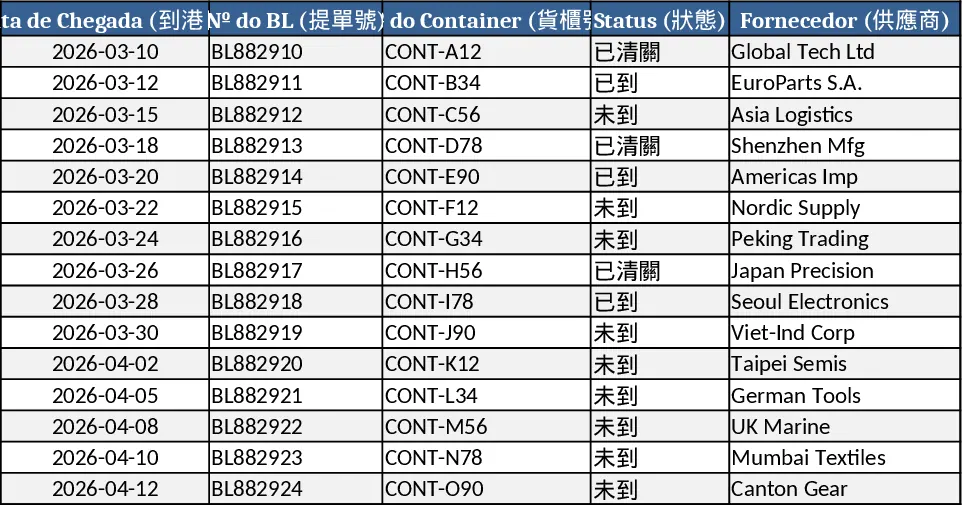
The Import Cost Management Excel system is built for import‑export companies that handle dozens of containers each month. It consists of four main sheets – Resumo de Importação (Import Summary), Detalhamento de Custos (Cost Details), Dashboard, and Instruções (Instructions). Every column is labeled in Brazilian Portuguese with a Chinese counterpart, so users can work in either language. The summary sheet lists each Bill of Lading (BL) on a single row, showing arrival date, container number, supplier, product, and a full set of cost items such as invoice value, freight, insurance, import tax, ICMS/IVA, port fees, customs broker fees, and other expenses. All monetary fields are formatted with thousand separators and support multiple currencies; a built‑in exchange‑rate column converts any amount to BRL automatically. Formulas calculate the Custo Total per row, and the sheet can be filtered or sorted by arrival date. The Cost Details sheet captures every individual expense line, linking it to the appropriate BL and container, with drop‑down lists for expense type and currency, and a formula that multiplies the original amount by the exchange rate to produce the BRL value. It can comfortably store at least 1,000 rows, making it suitable for large import volumes. The Dashboard pulls data from the Cost Details sheet, summarizing total cost per BL, container count, and status (Not Arrived / Arrived / Cleared) with dynamic SUMIF and COUNTIF functions, giving executives an instant visual snapshot. Finally, the Instructions sheet walks users through the four simple steps needed to keep the system up‑to‑date.
This template solves the common headache of juggling separate spreadsheets, manual currency conversions, and fragmented cost reporting. By centralizing all import‑related expenses, it eliminates duplicate data entry, reduces calculation errors, and provides a single source of truth for financial analysis. The built‑in visual dashboard lets senior management see the financial impact of each shipment at a glance, supporting faster decision‑making on pricing, inventory, and cash‑flow planning. Because the workbook is fully automated – with drop‑downs, auto‑filters, and live formulas – users spend far less time reconciling numbers and more time focusing on strategic tasks.
The system is ideal for import managers, finance analysts, and CEOs of trading companies that move 40 + containers per month. It works equally well for small teams that need a professional‑grade tool without investing in expensive ERP modules, and for larger operations that require a scalable solution that can expand to 100 + containers. Whether you are preparing monthly cost reports, evaluating supplier performance, or forecasting cash flow, this workbook provides the data integrity and clarity needed for accurate financial insight.
How to use
- Open the Detalhamento de Custos sheet and enter each expense line: select the BL, container number, expense type, amount, currency, and the current exchange rate. The BRL amount is calculated automatically.
- Switch to Resumo de Importação; the sheet will pull the summed costs for each BL, update the total cost column, and reflect the current status via the drop‑down list.
- Go to the Dashboard and type a BL number in the input cell – the sheet instantly shows the total cost, number of containers, and status for that shipment.
- Review the Instruções sheet anytime for a quick refresher on the workflow.
Expected benefits: streamlined data entry, automatic multi‑currency conversion, and instant executive‑level reporting save hours each month and improve the accuracy of your import cost analysis.
Similar Templates Recommendation
Plantilla Contable NIIF Nicaragua Template
Comprehensive Excel template for Nicaraguan businesses to manage accounting under IFRS, with dashboard, ledger, and automated financial statements.
Financial KPI Dashboard and Reporting Template
Build interactive financial dashboards, automate data consolidation, and generate KPI‑driven reports using Excel, Power Query, and Power Pivot.
Vehicle Service Estimate and Invoice Management Template
Track vehicle details, maintenance alerts, estimates and invoices in one workbook to streamline automotive cost management.