Green Coffee Sales CRM Tracker Template
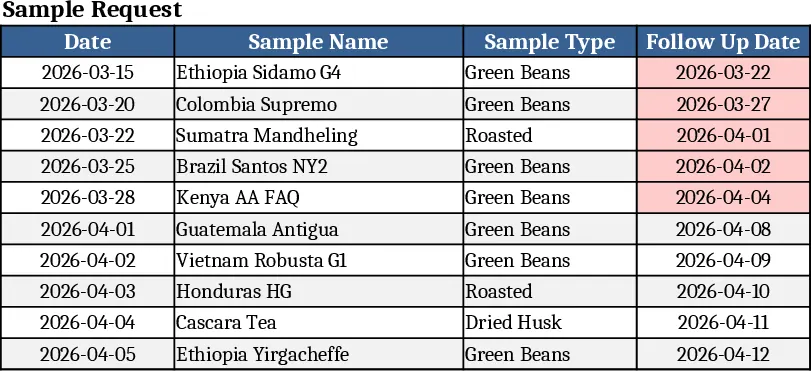
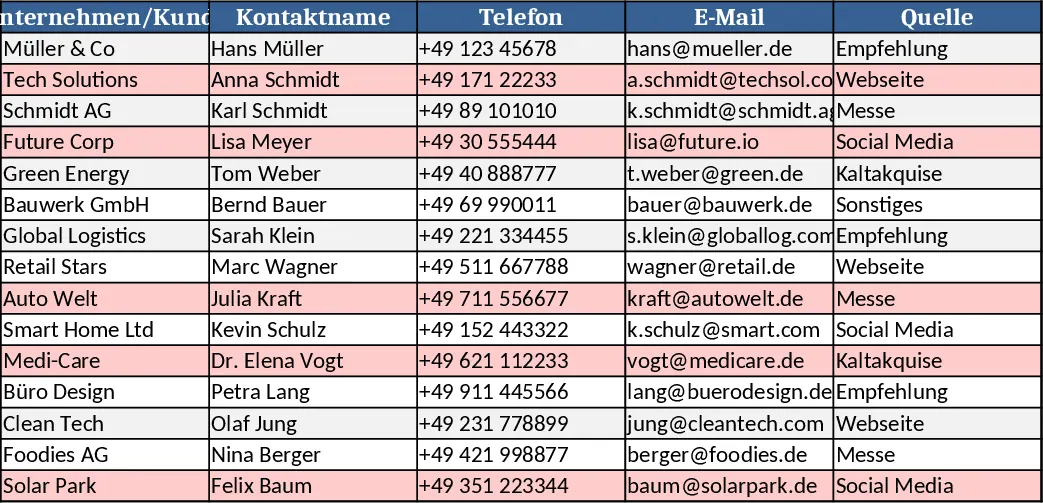
This template is built for green coffee sales teams who need a single place to capture every customer, contact person, sample sent, and interaction logged. It consists of five linked sheets: Customers (ID, name, company, region, status), Contacts (contact name, email, phone, linked to a Customer ID), Samples (sample date, product, quantity, linked to Customer ID, dropdown for sample type), Interactions (date, type – call, email, meeting – notes, linked to Customer ID), and a Dashboard that rolls up totals, recent activity, and a simple pipeline view. Dropdown menus keep data consistent, while formulas automatically calculate sample counts per client and highlight customers with no recent contact.
The workbook solves the common chaos of scattered spreadsheets and email threads by giving sales reps a clear, searchable record of every touchpoint. Instead of guessing which client received the latest cupping sample or whether a follow‑up call was already made, users can instantly see the full history and plan the next step. This reduces duplicate outreach, improves relationship management, and helps forecast future orders based on sample conversion rates.
It is ideal for coffee importers, roasters, and sales representatives who meet multiple buyers each week and need to keep track of sample logistics and conversation notes. Whether you are a solo trader managing a handful of accounts or a small team coordinating regional sales, the template scales by simply adding rows to the underlying sheets.
The template helps you track: customer details and segmentation, contact information for each decision‑maker, every sample dispatched with product and quantity, and a chronological log of calls, emails, and meetings. The dashboard surface‑level metrics let you spot high‑engagement accounts, identify dormant clients, and measure sample‑to‑sale conversion at a glance.
How to use
- Open the Customers sheet and enter a new client, filling in the required fields; the system generates a unique Customer ID.
- Switch to the Contacts sheet, add each contact and select the matching Customer ID from the dropdown.
- Record every sample you send in the Samples sheet, choosing the product from the predefined list and linking it to the Customer ID.
- Log each interaction in the Interactions sheet, picking the interaction type, adding notes, and linking to the same Customer ID; the Dashboard updates automatically.
Expected benefits include faster preparation of client reports, fewer missed follow‑ups, and a clearer view of sales pipeline health, all without needing a separate CRM platform.