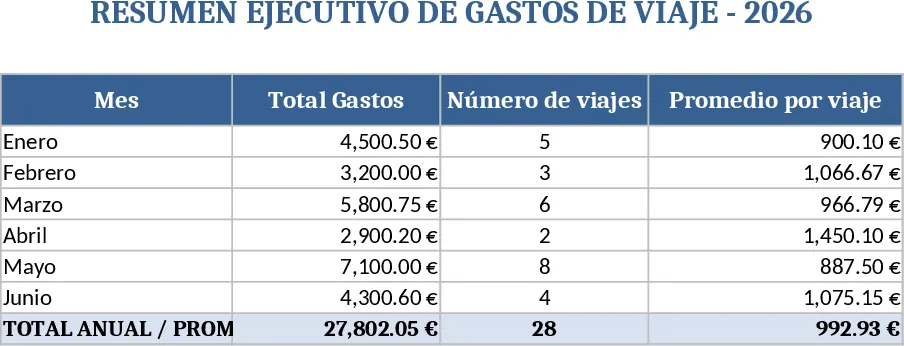
Travel Expense Tracker Feb20‑Mar31 Template
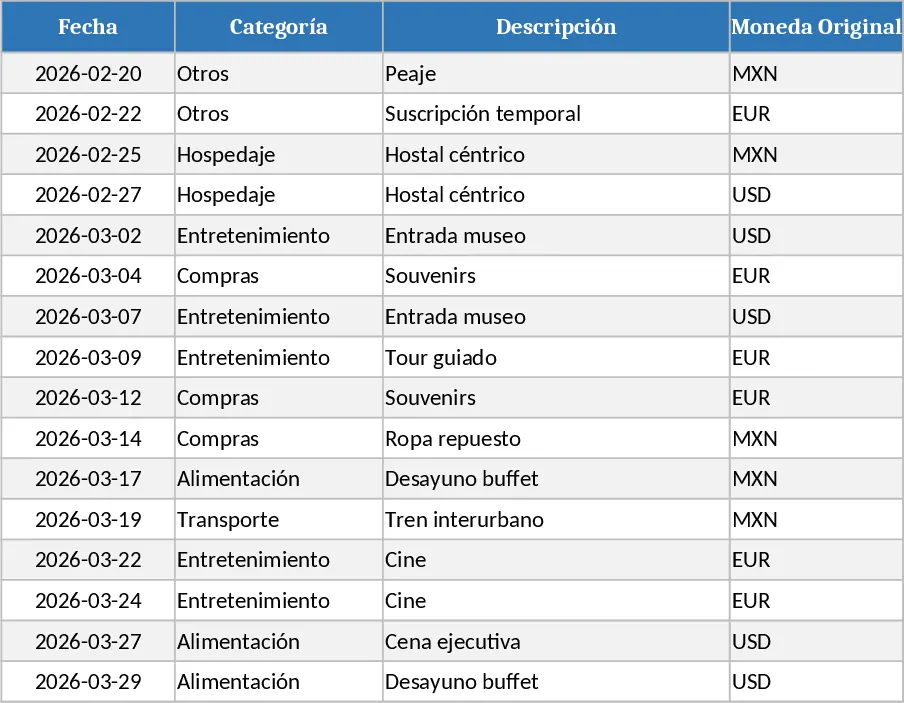
This travel‑expense template is built for a single trip that runs from February 20th through March 31st. The workbook contains three sheets: a Data Entry sheet where you record each cost, a Rates sheet where you store daily exchange rates for the currencies you’ll encounter, and a Summary sheet that automatically aggregates totals, converts amounts to your base currency, and breaks down spending by category and payment method.
In the Data Entry sheet you’ll find columns for the expense date, a dropdown list of categories (such as Transportation, Accommodation, Meals, Activities, Miscellaneous), a free‑text description, the original currency code, the amount in that currency, a lookup that pulls the applicable exchange rate from the Rates sheet, a calculated field that shows the amount in your base currency, and a dropdown for the payment method (Cash, Credit Card, Debit Card, Reimbursement). The Rates sheet lets you paste daily rates or manually enter them; the template will match the date you enter in the Data Entry sheet and apply the correct conversion automatically. The Summary sheet presents a clean dashboard with total spend, spend per category, a pie chart of payment‑method distribution, and a day‑by‑day timeline so you can see where your budget is being used.
This tool solves the common headache of juggling multiple currencies and receipts while on the road. Instead of juggling spreadsheets or manual calculations, you get a single place to capture every cost, see the real‑time converted total, and instantly spot overspending in any category. It’s especially useful for business travelers, consultants, or anyone on an extended trip who needs to keep a precise record for reimbursement or personal budgeting. By automating the conversion and summarising data, you spend less time on spreadsheets and more time on the trip itself.
The template helps you track each expense, manage exchange‑rate fluctuations, and produce a ready‑to‑share expense report at the end of the journey. You’ll have a clear audit trail with dates, descriptions, and payment methods, making it easy to justify expenses to finance teams or simply review your spending habits.
How to use
- Open the workbook and go to the Rates sheet. Enter the daily exchange rates for each currency you’ll use, matching the date column.
- Switch to the Data Entry sheet and start filling rows: select the date, choose a category, write a brief description, pick the original currency, type the amount, and select the payment method. The converted amount will appear automatically.
- After entering all expenses, go to the Summary sheet to view total spend, category breakdowns, and payment‑method charts. Export or print the summary for your records or reimbursement.
- If you need to adjust a rate or correct an entry, simply update the cell; all linked calculations refresh instantly.
Expected benefits: streamlined data entry, automatic currency conversion, instant visual summaries, and reduced time spent compiling expense reports.
Similar Templates Recommendation
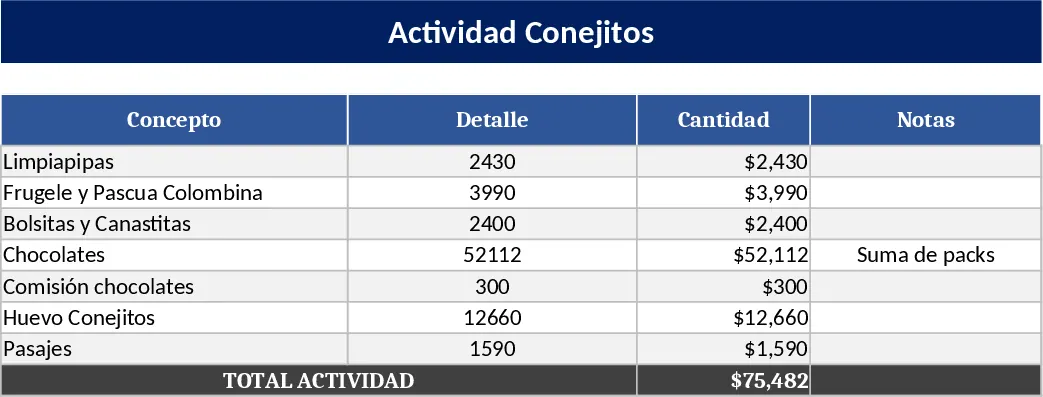
Actividad Conejitos Budget Template
Track and summarize all costs for the "Actividad Conejitos" event, from supplies and chocolates to commissions and travel expenses.
Travel Expense Report Template
Track and categorize all travel-related expenses, calculate totals, and generate reimbursement summaries in a single spreadsheet.