Employee Performance Evaluation Template
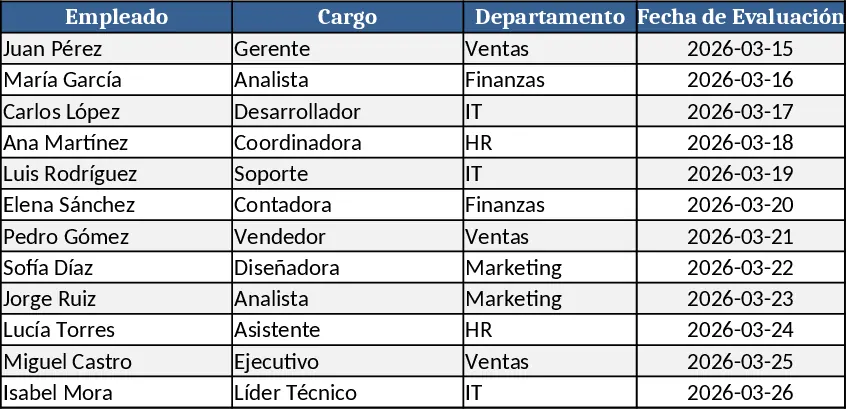
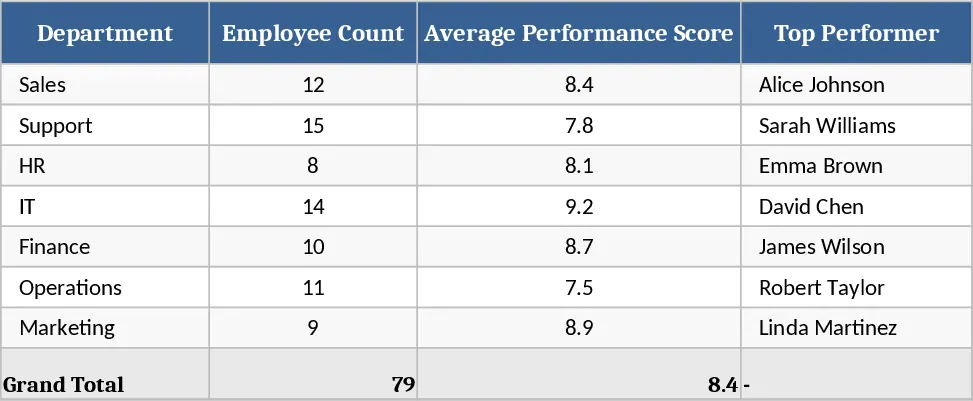
The Human Talent Performance Evaluation template is organized into four linked sheets: Employees, Criteria & Weights, Scores, and Dashboard. In the Employees sheet you list each staff member, their department, role, and hire date. The Criteria & Weights sheet lets you define the competencies you want to measure (e.g., teamwork, quality, initiative) and assign a numeric weight to each, using dropdown menus for rating scales (1‑5, 1‑10, etc.). The Scores sheet is a matrix where you enter period‑specific ratings for every employee against each criterion; formulas automatically calculate weighted totals and overall performance indices. Finally, the Dashboard pulls these calculations into a clean summary view with overall ratings, trend sparklines, and a radar chart that visualizes strengths and gaps for each employee.
This template solves the common headache of scattered performance data and inconsistent appraisal methods. By centralizing criteria, weights, and scores, HR teams eliminate duplicate work, reduce errors, and ensure every review follows the same objective framework. Managers get instant insight into who is exceeding expectations, who needs coaching, and how teams are progressing against strategic goals. The built‑in visualizations turn raw numbers into actionable stories, making it easier to discuss development plans during one‑on‑one meetings or annual reviews.
Designed for HR managers, team leaders, and small‑to‑medium businesses that conduct regular performance reviews, the template works for quarterly, semi‑annual, or annual cycles. It helps you track individual scores, departmental averages, and trend lines over time, providing a reliable basis for promotions, bonuses, and training needs analysis. Because all calculations are automated, you spend less time aggregating data and more time focusing on talent growth.
How to use
- Populate the Employees sheet with names, IDs, departments, and roles.
- Define the performance Criteria you care about and set their relative Weights; choose a rating scale from the dropdowns.
- Enter each employee’s scores for the current review period in the Scores sheet; the template will instantly compute weighted totals.
- Switch to the Dashboard to view overall ratings, compare individuals, and export charts for presentation.
Expected benefits: streamlined data entry, consistent scoring, faster review cycles, and clearer insight into talent development without the need for complex manual calculations.